
Almost every AI meeting tool now promises the same thing: fewer meetings, perfect notes and hours saved every week. Those claims don't help you choose. What decides whether a tool is worth paying for is narrower: which part of the meeting it handles, what runs out on the plan you can afford, and whether it works on calls you don't host.
So this list ranks five tools by the job each does best: taking notes on video calls, transcribing everything else, scheduling, showing your screen to a prospect, and running webinars. Every pick has a full TrakSource audit behind it, and every price below was read from the vendor's own page this month.
- Best overall: Tactiq. Live transcripts and AI summaries for Google Meet, Zoom and Teams calls, with no bot joining the meeting.
- Best for in-person meetings and recordings: Notta. Mobile and desktop apps, file uploads, and minute-based plans from $8.17 a month.
- Best for scheduling: Reclaim.ai. Booking links, recurring meetings that move themselves, and focus time protected around them.
- Best for sales calls: CrankWheel. Prospects see your screen from a link, with no download, even on their phone.
- Watch what runs out, not the headline price. Tactiq Pro has 10 AI credits a month, Notta's free plan caps each recording at 3 minutes, and Livestorm's unused attendee credits don't roll over.
Who made the list: only tools TrakSource has reviewed in full. Each pick links to that review. Well-known tools we haven't reviewed in depth aren't ranked. They're listed further down with the reason they're missing.
How they're ranked: by the job each does best, not by an overall score. The first pick is the best choice for the most common need behind this search, which is getting notes from video calls without doing it by hand. The others are the best choices for the other jobs.
Prices: read from each vendor's own pricing page or help centre in November 2026. Two exceptions: CrankWheel publishes a 48% discount for paying 12 months upfront but no annual price, so the annual figure here is our calculation, marked where it appears. Livestorm lists its yearly attendee packs as totals, so the per-attendee figures are those totals divided by the number of credits.
On accuracy figures: Accuracy depends on audio, accents and the meeting platform far more than on the tool, and no vendor publishes an independent benchmark, so no accuracy percentages are quoted here.
The Picks at a Glance





What Actually Separates Them
These tools cover different jobs, so the useful comparison isn't feature against feature. It's three questions you can verify. What does a meeting cost at your volume? What runs out first? And does the tool work when you're a guest on someone else's call? Here's the first one for the three tools that are priced around meetings, for one person with about 22 client meetings a month (five a week):
*Our calculation: CrankWheel's $29 monthly Solo price minus the 48% discount it publishes for paying 12 months upfront. CrankWheel doesn't list an annual price.
Reclaim.ai and Livestorm don't fit this comparison. Reclaim charges per seat for your calendar, however many meetings it books. Livestorm charges per attendee: its smallest Pro pack is 400 credits for $1,200 a year, about $3.00 for each person who joins a session, falling to about $2.40 at 4,000 credits. One credit is used when an attendee joins the event room, so registrants who never show up cost nothing.
- Note takers: AI actions per month (Tactiq) or minutes per month (Notta), not transcripts.
- Screen sharing: meetings per month. CrankWheel's free plan is 15.
- Webinars: attendee credits per year. Livestorm's unused credits don't roll over.
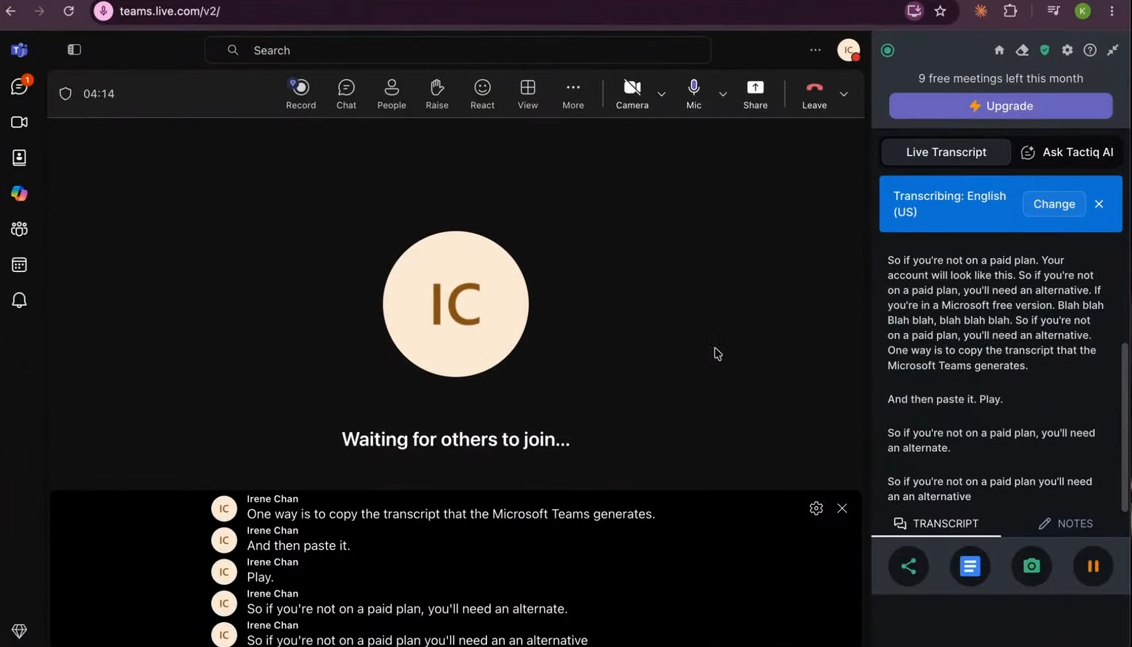
1 Tactiq
Best overall: notes from video calls, with no botTactiq is a Chrome and Edge extension that transcribes Google Meet, Zoom and Microsoft Teams calls live, from your own meeting tab. Nothing joins the call as a participant and no audio is recorded. That's why it's the first pick: it does the most common job in this category, notes from video calls, without the awkwardness of a visible bot on client meetings. Instead, it posts a chat message telling attendees you're transcribing, and that can't be switched off on the free plan.
The catch is the AI allowance. Pro gives unlimited transcripts but only 10 AI credits a month, and one credit is one summary, one list of action items or one question. If you summarise every call, you need Team, which has unlimited AI and can be bought by a single user. Bot-free capture also has conditions. On Zoom, Tactiq reads Zoom's own captions, so the host must turn them on and you must join in the browser. Desktop apps are covered only by a separate Mac app.
- No bot joins the call and no recording is required.
- Useful free plan with no card and no time limit.
- Team plan with unlimited AI is sold from one user.
- SOC 2 Type II, ISO 27001 and HIPAA listed.
- Pro includes only 10 AI credits a month.
- Zoom needs the host's captions turned on.
- No Windows desktop-app support.
2 Notta
Best for in-person meetings, recordings and desktop-app callsNotta covers the meetings Tactiq can't reach. It records online calls through a bot that joins Zoom, Teams, Meet or Webex, or without a bot through its desktop app on Mac and Windows. It also records in-person meetings on its iOS and Android apps and transcribes files you upload. If many of your meetings happen in a room, on a Windows desktop app, or as recordings someone sends you, Notta is the better note taker.
It's priced by seat and by minute. Pro is $8.17 a month billed yearly ($97.99) for 1,800 transcription minutes a month and recordings up to 5 hours. Business is $16.67 a month ($199.99 a year) with unlimited minutes. The catch is the free plan: 120 minutes a month sounds generous, but each recording stops at 3 minutes and exports are a Pro feature. That makes it a demo rather than a plan. Notta's pricing page shows a monthly toggle but no monthly price for Pro or Business, and it doesn't say which recording methods each plan includes.
- Bot-free desktop app on both Mac and Windows.
- Mobile apps for in-person meetings.
- Lowest cost per meeting on this list at 22 a month.
- File uploads for recordings you already have.
- Free plan caps each recording at 3 minutes.
- Monthly prices for Pro and Business aren't shown.
- Online calls use a visible bot unless you record on desktop.
3 Reclaim.ai
Best for scheduling meetings and protecting time around themReclaim.ai handles the part of meetings that happens before anyone joins: finding a time. It's an AI calendar assistant that gives you booking links, finds the best time for recurring "Smart Meetings", and blocks focus time and buffers around your calls so your day isn't wall-to-wall. It doesn't take notes, so it works alongside the first two picks rather than replacing them.
The limits are on scheduling features, not on meetings. The free Lite plan gives one user one booking link and a one-week scheduling range. Starter ($10 a seat billed yearly, $12 monthly) raises that to three links and eight weeks. Business ($15 yearly, $18 monthly) gives unlimited links and a twelve-week range. The catch for teams is that the useful team features, such as round-robin links and company-wide focus-time goals, sit on the higher tiers, and Enterprise ($22) is annual-only.
- Focus time on every plan, including free.
- Smart Meetings find a time for recurring calls.
- Monthly billing available on paid plans.
- Starter allows only three booking links.
- No note taking; it's a calendar tool.
- Enterprise is annual billing only.
4 CrankWheel
Best for showing your screen to prospects on sales callsCrankWheel solves one sales problem very well: you're on the phone with a prospect and want to show them something. You send a link, and they see your screen in their browser, on a laptop or a phone, with nothing to install. That's what separates it from a meeting platform, where the prospect has to download an app or join a call they weren't expecting. It also includes remote control, high-quality video playback and lead-capture "Instant Demos".
Pricing has two shapes. Solo is $29 a month for one user with unlimited meetings and up to 30 viewers. Paying 12 months upfront takes 48% off, which works out to about $15.08 a month by our calculation. Team plans are priced by meetings rather than seats: $99 a month buys 100 meetings shared across unlimited users. The catch is that it isn't a full meeting tool. The free plan allows only 3 viewers, keeps recordings for a week and drops custom branding, and removing CrankWheel branding on Team is an add-on.
- Viewers need no download, even on a phone.
- Unlimited meetings on Solo.
- Team plans aren't priced per seat.
- No annual price published, only a discount.
- Branding removal is an add-on on Team.
- Not a replacement for a full meeting platform.
5 Livestorm
Best for webinars and online eventsLivestorm is for meetings with an audience: product demos, webinars and online events where people register and join from a browser. Pro supports up to 3,000 live attendees per event and sessions up to 4 hours, with unlimited team members. If your "meetings" are really one-to-many presentations to leads, this is the pick.
Pricing is now based on attendees. You buy a yearly pack of credits, and one credit is used each time an attendee joins a session. Registrants who never show up don't use credits, and nor do your own team members. The smallest Pro pack is 400 credits for $1,200 a year (about $3.00 each), and larger packs cost less per credit. The catch is that unused credits don't roll over to the next billing period, so buy for the attendance you actually get, not the registrations. The free plan allows 30 credits a year and events up to 30 minutes.
- You pay only for people who actually join.
- Team members never use credits.
- Up to 3,000 live attendees per event on Pro.
- Unused credits don't roll over.
- $1,200 a year minimum for Pro.
- Free plan caps events at 30 minutes.
Side by Side
| Tool | Best for | Entry paid price | Free option | Pricing basis | What runs out | Others must install? |
|---|---|---|---|---|---|---|
| Tactiq | Video-call notes | $8/user/mo yearly | 10 transcripts/mo | Per user | AI credits (10 on Pro) | No — no bot |
| Notta | Recordings, in-person | $8.17/seat/mo yearly | 3 min per recording | Per seat + minutes | Minutes (1,800 on Pro) | No |
| Reclaim.ai | Scheduling | $10/seat/mo yearly | Lite, 1 user | Per seat | Booking links (3 on Starter) | No — booking link |
| CrankWheel | Sales screen sharing | $29/mo Solo | 15 meetings/mo | Per user or meeting pack | Meetings (Team plans) | No — viewer link |
| Livestorm | Webinars | $1,200/yr | 30 credits/yr | Per live attendee | Attendee credits | No — browser |
Whatever you choose, the notes are only useful if they end up where you follow up. If your meetings are mostly sales calls, log summaries against the deal in your CRM. Our Close CRM review covers a pipeline built around calling. And if you present a deck on most client calls, our Gamma review covers building one quickly with AI.
Tools We Left Out, and Why
A list is only as honest as what it leaves out. These come up in every search for AI meeting tools. Here's why they aren't ranked.
Before You Buy Any AI Meeting Tool
Step 1: Map where your meetings actually happen
Count last month's meetings by type: browser calls, desktop-app calls, in-person, phone. Browser calls point to Tactiq. Windows desktop apps and in-person meetings point to Notta. Phone calls need a different tool entirely.
Step 2: Count the unit that runs out
For note takers, that's AI actions or minutes. For screen sharing, it's meetings. For webinars, it's attendees who show up. Multiply by a normal month, then choose the plan, not the other way round.
Step 3: Test it as a guest, not just as the host
Most tools work on calls you host. The test that matters is a client's Zoom or Teams call, where you don't control the captions, the bot settings or the desktop app.
Step 4: Check what you already pay for
Your meeting platform or workspace subscription may already include AI notes. If you only use one platform and it's included, you might not need a separate note taker.
Step 5: Get consent before you transcribe
Several US states, including California, require every party's consent to record a confidential conversation, and many countries have similar rules. Treat a transcript like a recording: keep the tool's notice switched on and say at the start of the call that you're taking AI notes. This isn't legal advice.
The Quick Decision
Frequently Asked Questions
What is the best AI meeting tool in 2026?
It depends on the job. For notes from video calls, Tactiq is our top pick because it transcribes Meet, Zoom and Teams without a bot joining. For in-person meetings and recordings, Notta. For scheduling, Reclaim.ai. For screen sharing on sales calls, CrankWheel. For webinars, Livestorm.
Which AI note taker doesn't join the meeting as a bot?
Tactiq runs in your browser tab, so nothing joins the call. It posts a chat message telling attendees you're transcribing instead. Notta can also record without a bot through its desktop app on Mac and Windows, though its online meeting recorder uses a bot.
Should I choose Tactiq or Notta?
Choose Tactiq if your meetings are browser calls on Meet, Zoom or Teams. Choose Notta if many are in person, in Windows desktop apps, or recordings you upload. On price at about 22 meetings a month, Notta Pro ($8.17, 1,800 minutes) costs less than Tactiq Team ($16.67), which you'd need for a summary of every call.
Is there a free AI meeting note taker?
Tactiq's free plan is the most usable here: 10 transcripts and 5 AI credits a month, with no card and no time limit. Notta's free plan gives 120 minutes a month, but each recording stops at 3 minutes, so it works only as a trial.
Do I need a scheduling tool as well as a note taker?
Only if scheduling is costing you time. Reclaim.ai's free Lite plan gives one user a booking link and focus time. Starter ($10 a seat billed yearly) adds more links and a longer scheduling range, and pairs well with a note taker by adding buffer time after meetings.
How can I show my screen to a prospect without a download?
CrankWheel sends a link that opens your screen share in the prospect's browser, including on a phone, with nothing to install. The free plan covers 15 meetings a month with up to 3 viewers. Solo is $29 a month with unlimited meetings.
How much does Livestorm cost in 2026?
Livestorm now prices Pro by yearly packs of attendee credits, starting at 400 credits for $1,200 a year, about $3.00 per attendee. A credit is used when an attendee joins a session. Registrants who don't join and team members don't use credits, but unused credits don't roll over. The free plan includes 30 credits a year and 30-minute events.
Is it legal to transcribe meetings with AI?
Usually, if everyone knows and agrees. Several US states, including California, require every party's consent to record a confidential conversation, and a transcript is safest treated the same way. Keep the tool's notice turned on and tell attendees at the start of the call. This isn't legal advice.
The Verdict
For most people searching for an AI meeting tool, the real need is notes from video calls without doing it by hand, and Tactiq is the best answer. It transcribes Meet, Zoom and Teams from your browser with no bot on the call, its free plan is useful on its own, and Team gives unlimited AI summaries from a single user. Start free, and choose Team rather than Pro if you'll summarise more than ten calls a month.
Every other pick wins a different job. Notta handles in-person meetings, uploads and Windows desktop apps at the lowest cost per meeting. Reclaim.ai books meetings and protects the time around them. CrankWheel lets prospects see your screen from a link. Livestorm runs webinars where you pay only for the people who show up. Before paying for any of them, run one test: use it as a guest on a client's call, where you don't control the settings.
Start with Tactiq Free →