

The standard remote podcasting workflow is often plagued by poor audio quality and fragmented software. Creators frequently record interviews on Zoom, manually sync separate audio tracks in Premiere Pro, edit out filler words with an external text editor, and finally upload the finished file to a separate hosting provider like Libsyn. This multi-step process introduces high software costs and significant post-production friction.
Zencastr was developed to consolidate the podcasting supply chain. Operating as a browser-based recording studio, it utilizes "local recording" technology to capture studio-quality audio and 4K video, regardless of internet connection stability. It then offers built-in AI editing and native RSS hosting. But does relying on browser cache for massive video files introduce stability risks? In this Zencastr technical audit, we examine their local recording architecture, processing limits, and hosting infrastructure.
- Local Recording Architecture: Records uncompressed WAV audio and 4K video locally on each participant's hard drive before uploading, minimizing internet lag and compression artifacts.
- Post-Production Automation: Includes a native AI editor that automatically levels audio, reduces background noise, and removes filler words.
- Unified Hosting: Offers native podcast distribution directly to major platforms via RSS generation, removing the strict need for external hosting.
- Browser Reliance: Operates entirely in the browser, meaning guests with older laptops or full hard drives can occasionally experience local storage bottlenecks or crashes.
1. Quick Summary
2. The TL;DR Verdict
Upgrade Your Production Quality
Zencastr provides an effective operational shift for remote creators. By recording data locally rather than over the internet, it aims to deliver broadcast-quality assets even if a guest has a poor Wi-Fi connection. If you are launching a professional video podcast and want to avoid spending hours syncing audio tracks or paying for a separate hosting provider, migrating to Zencastr represents a practical infrastructure upgrade.
Start Recording For Free →3. Pros & Cons
- Local recording captures uncompressed, studio-grade audio and video.
- Consolidates recording, editing, and RSS hosting into a single subscription.
- Automated post-production efficiently reduces time spent editing out pauses.
- Requires no software downloads for guests; operates via a simple browser link.
- If a guest closes their laptop before the upload finishes, files can stall.
- Heavy browser memory usage can occasionally crash older, low-spec computers.
- Lacks the advanced live-streaming capabilities of dedicated streaming tools.
4. How We Evaluated Zencastr
To ensure an objective operational audit, we deployed Zencastr in a live, remote production environment over a series of four podcast episodes. Our evaluation process included:
- Local Storage Resilience: Monitoring the progressive upload telemetry while intentionally throttling internet speeds to test data integrity and packet loss.
- Automated Editing Efficacy: Running raw, unlevelled audio through the AI post-production engine to measure its ability to balance aggressive volume spikes.
- Guest Friction: Sending invite links to non-technical guests to evaluate the pre-flight checks (camera/mic selection) and browser permissions process.
- Cost Analysis: Modeling the Total Cost of Ownership (TCO) compared to maintaining a fragmented stack of recording software and external hosts.
5. What Zencastr Actually Does
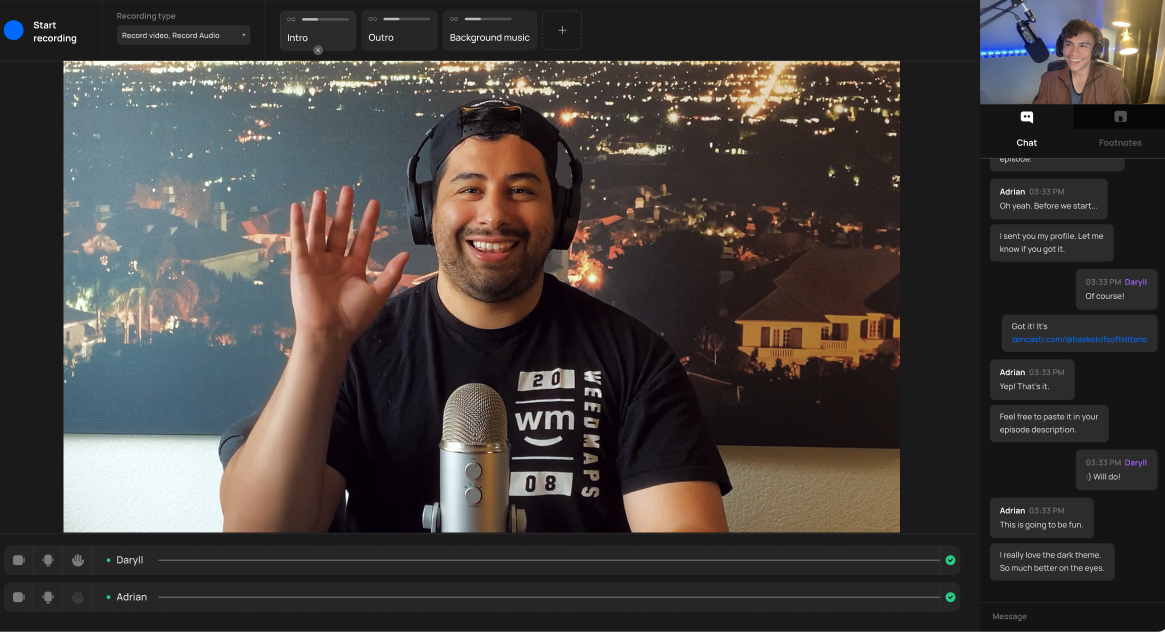
Zencastr acts as a virtual recording studio running directly in your web browser.
When you interview someone over basic conferencing software, the system compresses the audio and sends it over the internet in real-time. If there is a lag spike, the recording drops or sounds robotic. Zencastr addresses this by recording the raw data directly to your computer's local hard drive and the guest's local hard drive. It then pieces these pristine tracks together in the cloud, resulting in a final file that sounds like you were sitting in the same room.
6. Core Features Matrix
7. The Data: Consolidating the Podcasting Stack
Maintaining multiple software tools for a single production pipeline can quietly erode profit margins. Here is a baseline look at the cost of maintaining a fragmented podcast stack versus a consolidated platform.
8. Zencastr vs Riverside: Which is Better?
The most common comparison in this space is Zencastr vs Riverside. Both utilize the same underlying local-recording technology, but they prioritize different post-production workflows. As highlighted in standard industry feedback (referencing Screenshot 2026-06-12 201608.png), both platforms have distinct advantages depending on your use case.
- Includes native podcast hosting (RSS generation).
- Generous free tier that includes 720p video.
- Stronger built-in monetization/sponsorship network matching.
- Superior mobile app experience for guests joining via phone.
- Offers live-streaming integration (to YouTube/Twitch) while recording.
- Slightly more robust text-based video editor.
9. Zencastr vs Zoom: The Quality Gap
Many beginners start with Zoom. However, Zoom is engineered for real-time communication, not content creation. To ensure calls do not drop, Zoom heavily compresses audio and lowers video resolution dynamically. Zencastr is engineered for broadcast. Because it records locally, a guest’s audio remains at an uncompressed 16-bit 48k WAV format, resulting in a rich, radio-quality sound that conferencing software physically cannot replicate.
10. Workflow & Deployment Timeline
Here is what the execution pipeline looks like for managing a remote interview:
Step 1: The Green Room
Send the guest a browser link. They enter a "Green Room" where the software tests their microphone, camera, and local storage space.
Step 2: Local Recording
Hit record. As the conversation happens, high-resolution data is saved locally and progressively uploaded to Zencastr's cloud in the background. (If you use outbound platforms like Apollo.io to book high-profile guests, this seamless browser entry ensures they don't get frustrated with complex software downloads.)
Step 3: AI Post-Production
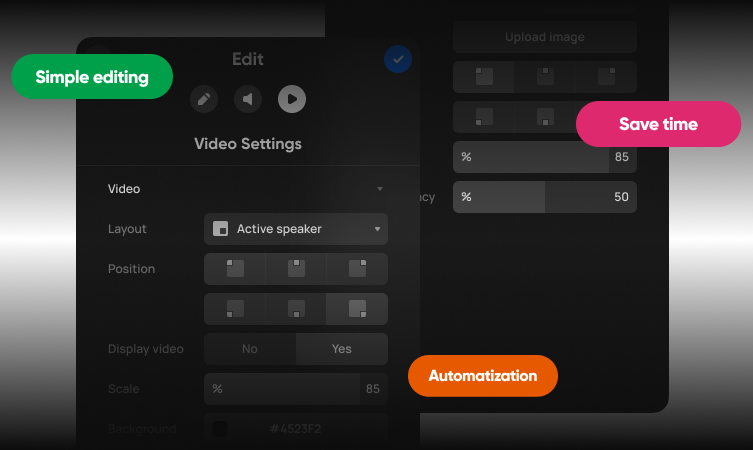
Once finished, click "Produce." The AI engine syncs the tracks, balances the audio levels, and removes awkward silences.
Step 4: Native Distribution
Push the finalized episode directly to your Zencastr-hosted RSS feed, automatically distributing it to major directories.
11. Feature Focus: Progressive Uploading
The biggest risk with local recording is data loss. If a guest records a massive 4K video file to their hard drive and their laptop crashes, the file is theoretically gone. Zencastr mitigates this with "Progressive Uploading." As the interview progresses, Zencastr is constantly pushing small packets of the local file to their cloud servers in the background. By the time you hit "Stop," the majority of the file is already safely stored in the cloud.
12. Feature Focus: Hosting & Monetization
What makes Zencastr highly unique in the recording space is its backend infrastructure. Platforms like Riverside require you to export your final file and upload it to an external host. Zencastr provides the hosting natively. Furthermore, they operate a "Creator Network" that actively matches growing podcasts with brand sponsors, allowing you to insert programmatic audio ads into your back catalog to generate revenue.
13. Example Use Cases
14. Operational Advantages
Automated audio leveling and smart silence removal drastically reduce the manual labor required in software like Audacity or Premiere.
Because the cloud engine handles the track alignment automatically, you rarely have to ask a guest to "clap on three" to sync timelines.
15. Who Zencastr Is Best For
- Audio-First Podcasters: The platform originated as an audio tool, and its uncompressed WAV routing remains some of the most stable in the industry.
- Creators Seeking Consolidation: Those who want a single dashboard for recording, editing, clipping, and hosting, rather than paying for three separate services.
- Independent Journalists: The secure, browser-based entry makes it incredibly easy to onboard non-technical guests who cannot download external software.
16. Who Should Avoid Zencastr
- Live Streamers: If your primary goal is broadcasting live to YouTube or Twitch while interacting with a chat, Zencastr is not optimized for live routing.
- Mobile-Only Guests: While Zencastr has improved its mobile web support, the core local-recording architecture tends to run more reliably on a stable desktop browser.
17. Integration Ecosystem & Synergy
18. Real User Sentiment
Across creator forums and review aggregates, Zencastr generally maintains positive feedback from audio engineers and podcast hosts:
- The Praise: The consensus highlights the flawless audio quality and the convenience of the all-in-one hosting ecosystem. Users appreciate not having to teach guests how to use complex software.
- The Complaints: The primary critique centers around computer crashes and "upload anxiety." If a guest's computer lacks processing power or if they shut their laptop immediately after an interview ends, local files can crash or stall, requiring troubleshooting.
19. Pricing Realities & Feature Tiers
Zencastr utilizes a freemium model. Analyzing their post-production limits is critical for determining when to upgrade to a paid tier.
Free Plan
- Unlimited Audio/Video Recording
- 1080p Video / 16-bit WAV Audio
- Basic Podcast Hosting
- Basic access to tools
Grow Plan
- Up to 4K Video Quality
- Advanced Analytics & Hosting
- ZenAI Clipping & Captions
- Removal of 20+ filler words
20. The Hidden Costs & Limitations
When modeling your financials, pay attention to the "Post-Production" and "Clipping" limits. While recording is generally unmetered, the AI editing engine utilizes a credit system. For example, the Grow plan comes with 50 credits per month, and generating high-resolution clips or running multiple edits depletes these credits based on the length and resolution of the output. If you run a daily, hour-long podcast, you will exceed this automated processing limit and require a Scale or Business tier, though you can always download the raw files and edit them externally for free.
21. Best Practices: "The Alpha Plan"
To effectively leverage local recording without risking data loss, you must manage guest expectations.
22. Security & Compliance
Zencastr utilizes standard communication protocols, ensuring the live stream of the conversation is reasonably secure. Furthermore, because files are stored locally during the recording phase, cloud access to the raw data is restricted via authenticated tokens. Redundant cloud backups also ensure files remain protected in the event a user's computer crashes.
23. Is Zencastr Worth It in 2026?
For the vast majority of digital creators and marketing teams, Zencastr is a highly practical asset. If you currently pay separately for a conferencing license, a separate recording account, and a hosting plan, consolidating into a Zencastr paid tier offers a clear financial advantage. The local recording technology is robust, and the addition of native hosting makes it an incredibly streamlined studio for remote interviews.
24. Frequently Asked Questions
Is Zencastr better than Zoom for podcasts?
Generally, yes. Zoom is optimized to prevent calls from dropping, which means it heavily compresses audio and video. Zencastr uses local recording to save uncompressed files directly to the hard drive, resulting in vastly superior broadcast quality.
How does Zencastr compare to Riverside?
Both use similar local-recording technology. Riverside offers slightly better mobile app support and live-streaming. Zencastr excels by offering an all-in-one ecosystem that includes native podcast hosting and distribution within the same platform.
Do my guests need to download an app?
No. Zencastr operates entirely within the web browser. You send the guest a link, and they join the session directly without installing external software.
What happens if my internet connection drops?
Because Zencastr records locally to the hard drive, a dropped internet connection will interrupt the live conversation, but the high-quality recording will continue to save locally and will upload as soon as the connection is restored.
Can Zencastr host my podcast?
Yes. Zencastr provides native RSS feed generation. You can upload your final episodes, and Zencastr will automatically distribute them to Apple Podcasts, Spotify, and other major directories.
What is the progressive upload feature?
Progressive upload means Zencastr is constantly sending small pieces of the recorded file to the cloud in the background while you are talking. This prevents massive upload delays at the end of a long recording session.
Does it edit the video for me?
Yes. Zencastr includes an AI post-production engine that can automatically mix tracks, level the audio, and even generate short-form vertical clips with captions for social media.
Is there a free plan?
Yes. The free tier allows for unlimited recording, 1080p video, and 16-bit 48k WAV audio, making it a highly capable starting point for new creators.
25. Final Conclusion
Relying on compressed conferencing software to produce long-form content fundamentally limits the perceived professionalism of a brand. Audiences in 2026 expect crisp, studio-grade audio, and achieving that through a fragmented stack of tools introduces unnecessary technical friction.
Zencastr serves as a highly capable infrastructure for modern podcasting. By bringing local recording, automated post-production, and native RSS hosting into a unified, browser-based environment, it offers significant operational efficiency. For creators looking to streamline their software stack while elevating their production value, Zencastr is a strong and sensible platform choice.
Launch Your Podcast Studio Today →