


In March 2026, Clockwise — the closest thing Reclaim had to a direct competitor — was switched off by Salesforce, and user data was deleted. If you depend on an AI calendar to hold your week together, that is exactly the kind of news that makes you check whether yours is next. It's the single most common question about this product now, so we'll answer it before anything else: Reclaim is not shutting down. It's owned by Dropbox, it's still shipping features, and it just absorbed a wave of Clockwise refugees.
That's the first of several things that have changed since our original review — and the second one matters more, because we got it wrong. This Reclaim.ai review is a full rebuild: current ownership, the Outlook support that arrived over a year ago, a price rise our old numbers missed entirely, and two new billing mechanics nobody is explaining clearly.
- Outlook is supported. Reclaim added Microsoft Outlook and 365 in May 2025. Our previous review called Google-only its "biggest dealbreaker" and sent Outlook users to Motion — that advice was wrong and we've corrected it.
- It's a Dropbox product now. Acquired August 2024, still independently branded, still shipping — Slack auto-reply and team out-of-office landed in June 2026.
- Prices went up. Starter is $10/seat/month annual, not $8. Business is $15 and Enterprise $22. The retired $8 tier is still quoted all over the internet.
- The free plan got tighter. Lite now caps at roughly 1 habit and 1 scheduling link with a 1-week scheduling range — meaningfully less generous than the 3-habit plan we praised.
- Two new billing layers exist. AI Agent quotas by tier, and Attendee Users charged for external attendees in 3+ person Smart Meetings.
Quick Summary
The Calendar That Argues Back
Reclaim's core idea is still the best one in this category: your calendar shouldn't be a static record of decisions you made last week, it should re-plan itself when the week changes. Tell it you need three gym sessions and four hours of deep work, and it finds the slots, defends them against incoming meetings, and moves them rather than dropping them when something wins. Now it works on Outlook as well as Google, it's backed by Dropbox rather than a startup runway, and it survived the shakeout that killed its nearest rival. The deductions are all financial: a 25% price rise, a thinner free tier, and two metered layers that make the real bill harder to predict than it used to be.
Three Corrections to What You've Read Elsewhere
Reclaim has changed substantially in eighteen months, and the internet hasn't kept up — including, until now, us. These are the three facts most reviews still get wrong:
Is Reclaim Shutting Down? No — Here's Why People Ask
The anxiety is rational, but it's aimed at the wrong company. Clockwise, Reclaim's closest competitor, was acquired by Salesforce and shut down on 27 March 2026, with user data deleted. That was an acquihire — Salesforce wanted the team for Agentforce, and the announcement talked about Agentforce rather than about Clockwise's roadmap.
Reclaim's acquisition was structured the opposite way. Dropbox bought the product, kept it running under its own brand, and the founders' announcement committed to continued investment with no planned pricing or support changes. Two years on, that's held: the user base has grown past 320,000 across more than 60,000 companies, Outlook support arrived, and Slack auto-reply and team out-of-office features shipped as recently as June 2026. Reclaim was confident enough to offer Clockwise migrants a price match through mid-2026.
The honest caveat applies to any acquired product: the long-term roadmap belongs to the parent company, and Dropbox has discontinued things before. But there is no announced shutdown, no signal of one, and a product actively shipping features is not a product being wound down. If you want a hedge, export your task integrations' source data periodically — your tasks live in Todoist, Asana, or Linear anyway, which limits how much you'd actually lose.
What Reclaim Actually Does
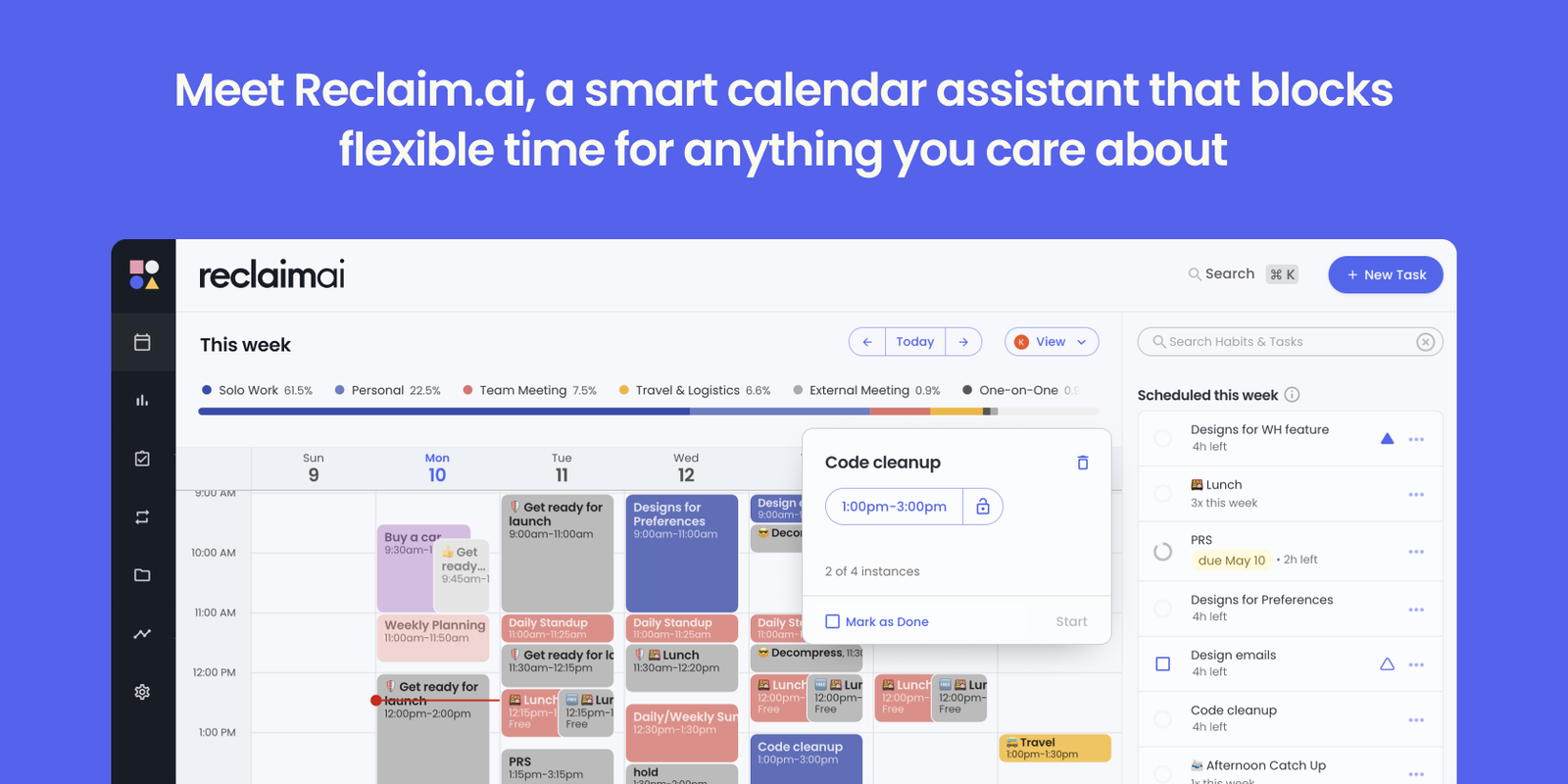
A normal calendar stores decisions. You put deep work at 2pm on Tuesday and it sits there until you move it — and when a meeting lands on top, the deep work simply doesn't happen. Reclaim replaces fixed appointments with constraints: "90 minutes of focus time, ideally mornings, at least four times a week" or "gym for an hour between 10am and 4pm." It then solves for those constraints continuously.
The consequence is that a disrupted week repairs itself. A client books over your Tuesday focus block; Reclaim finds the next slot that satisfies your rules and moves it, rather than silently dropping it. Priorities decide who wins: high-priority habits show as busy to outside bookers, lower-priority ones flex. Tasks pulled from Todoist, Asana, ClickUp, Jira, or Linear get scheduled against their deadlines and re-scheduled when you don't finish them. Smart Meetings find times that work across several people's real availability. Scheduling Links cover the Calendly job, and Buffer Time auto-inserts decompression and travel around meetings.
Under Dropbox the product has grown a distinctly team-shaped edge — team availability links, shared out-of-office, Slack status syncing, and analytics on how a group actually spends its week. That direction explains the pricing structure, and it's the key to understanding whether Reclaim is good value for you, which depends almost entirely on whether you're buying one seat or twenty.
Core Features
Reclaim.ai Pricing in 2026
Four tiers, priced per seat, with annual billing saving up to about 29% against monthly. The headline change since our last review is a roughly 25% increase on the entry paid tier — and a free plan that does noticeably less than it used to.
Lite
- Around 1 habit & 1 scheduling link
- 1-week scheduling range
- 1 calendar sync, 2 calendars
- 5 AI Agents
Starter
- Unlimited tasks & habits
- 3 Smart Meetings & 3 scheduling links
- 8-week scheduling range
- Full integrations · 10 AI Agents
Business
- Everything in Starter
- Team analytics & admin controls
- Priority support
- 50 AI Agents
Enterprise
- SSO & SCIM provisioning
- Enterprise security & compliance
- Dedicated support
- Unlimited AI Agents
Verified August 2026. Annual rates shown; monthly billing costs materially more, with Reclaim advertising up to 29% savings for paying yearly. Enterprise lists $22 but routes through Contact Sales. Free-tier limits vary slightly between published sources — confirm current caps on the live pricing page.
- AI Agents are metered by tier. Lite gets 5, Starter 10, Business 50, Enterprise unlimited. Your bill scales with automation quota as well as headcount, which is a newer model than the flat per-seat pricing most reviews describe.
- Attendee Users (AUs) are chargeable. An AU is someone attending a Smart Meeting of 3+ people without a paid Reclaim seat. Two-person meetings don't need them, and AUs accumulate across the team account. On Starter they're sold in 3-packs at $8/month (each pack including a free Starter seat); Enterprise buys them in 10-packs at $18/month. A launch promo made AUs free through 31 July — check whether that has now ended before you model costs.
- Per-seat pricing is designed for teams. As a solo user you're paying a rate built to scale across a group. That's the strongest argument competitors make against Reclaim, and it's a fair one.
- The Clockwise price-match window closed. Reclaim matched Clockwise pricing for migrants through 30 June 2026. If you're moving now, that deal has expired.
Setting It Up Properly
Most people who abandon Reclaim over-configure it in the first hour. This order works better.
Step 1: Connect calendars, change nothing
Link your work and personal calendars — Google or Outlook — and set your genuine working hours. Watch for a couple of days before adding anything. You need a baseline of how bad the week actually is.
Step 2: Add two habits, not ten
Pick the two things that reliably get sacrificed — usually deep work and lunch. Give them realistic windows and honest priorities. Over-blocking on day one is the single most common reason people bounce off this tool.
Step 3: Connect one task source
Wire in Todoist, Asana, ClickUp, Jira, or Linear — whichever already holds your real work. Reclaim schedules tasks against deadlines; it doesn't replace the task manager, so don't migrate anything.
Step 4: Let it defend, then review weekly
Give it a fortnight before judging. Then check the analytics: if focus time is still being eaten, the fix is usually priority settings rather than more habits. Leave genuine slack in the week for chaos.
How Reclaim Compares in 2026
| Feature | Reclaim.ai | Motion | Plain Google/Outlook |
|---|---|---|---|
| Auto-Rescheduling | Continuous re-planning | Aggressive auto-scheduling | None |
| Google & Outlook | Both, since May 2025 | Both | One or the other |
| Project Management | Integrates, doesn't replace | Built in | None |
| Booking Links | Included, incl. team links | Included | Needs Calendly |
| Free Tier | Yes, limited | Trial only | Free |
| Entry Price | $10/seat/mo | Notably higher per user | Bundled |
Who Reclaim Is Best For
- Anyone whose focus time keeps losing to meetings. This is the core use case and Reclaim is still the best answer to it. Habits that reschedule rather than vanish genuinely change how a week ends.
- Coordinating teams. The pricing is built for groups, and so is the value — team availability links, shared out-of-office, Slack status syncing, and analytics get better as more of the team is on it.
- Outlook and Microsoft 365 users. Newly true since May 2025, and worth restating because so much published advice still says otherwise.
- People who already run a task manager. Reclaim is a scheduling layer, not a replacement. If Todoist, Asana, Jira, or Linear holds your work, this puts it on the calendar without a migration.
- Consultants and freelancers juggling calendars. Multiple calendar sync plus booking links replaces a separate Calendly subscription, which offsets a chunk of the seat cost.
- ADHD and routine-building. Habits that reassert themselves are meaningfully different from recurring events you dismiss — one of the more genuine accessibility wins in productivity software.
Who Should Skip It
- Solo users on a tight budget. $120/year for one seat of a team product is a real question, and the free tier is now too thin to run on. Compare individual-priced planners before committing.
- People with light, predictable calendars. If nothing competes for your time, automatic rescheduling solves a problem you don't have.
- Anyone wanting projects and scheduling in one tool. Reclaim deliberately doesn't do project management. That's a scope choice, not a gap it's closing.
- Teams that need certainty about long-term ownership. No shutdown is announced and the signals are good — but if a Dropbox-owned roadmap is an unacceptable risk for your organisation, that's a legitimate reason to look elsewhere.
Limitations & Reality Check
- The free plan is no longer the selling point. Roughly one habit and a one-week scheduling range is a demo, not a workflow. Our previous praise for a generous Lite tier no longer holds.
- Costs are harder to predict than they were. Between per-seat pricing, AI Agent quotas, and Attendee Users, the flat "$8 and done" simplicity is gone.
- Setup takes real thought. Twenty to thirty minutes to configure properly, and a fortnight before you can judge whether it's working. It isn't plug-and-play.
- Automatic movement unsettles some people. If seeing your calendar rearrange itself creates anxiety rather than relief, no amount of configuration fixes that — it's a temperament mismatch.
- Mobile remains secondary. The apps are better as viewers than editors; real configuration happens on desktop.
- Acquisition risk is structural, not specific. Clockwise's shutdown was a different situation, but any acquired product's roadmap belongs to its parent. Keep your tasks in their source system and this stays a low-cost dependency.
Best Practice: Defend Two Things, Not Twenty
Frequently Asked Questions
Is Reclaim.ai shutting down?
No. Reclaim was acquired by Dropbox in August 2024 and continues to operate under its own brand, with no announced shutdown. The concern comes from Clockwise — its closest competitor — being shut down by Salesforce in March 2026 with user data deleted. That was an acquihire; Reclaim's acquisition kept the product and team, and it has since grown past 320,000 users and shipped new features as recently as June 2026.
Does Reclaim work with Outlook?
Yes. Microsoft Outlook and 365 support arrived in May 2025, and Reclaim now connects two-way to both Google and Outlook calendars. Many published reviews — including our own previous version — still describe it as Google Calendar only. That information is over a year out of date.
How much does Reclaim.ai cost in 2026?
There's a free Lite plan for a single user. Paid tiers are Starter at $10 per seat per month, Business at $15, and Enterprise at $22, all on annual billing, with monthly costing roughly 29% more. The widely quoted $8 Starter plan has been retired. Additional charges can apply for Attendee Users in larger Smart Meetings.
What are Attendee Users and will I be charged for them?
An Attendee User is someone who attends a Smart Meeting of three or more people without holding a paid Reclaim seat. Two-person meetings don't require them, and they accumulate across a team account. On Starter they're sold in packs of 3 for $8/month, each pack including a free Starter seat; Enterprise buys packs of 10 for $18/month. A launch promotion made them free through 31 July, so confirm the current position before budgeting.
Is the free Lite plan good enough?
Less so than it used to be. Lite now caps at roughly one habit, one scheduling link, a one-week scheduling range, and a single calendar sync covering two calendars. That's enough to understand whether automatic rescheduling suits you, but not enough to actually run your week on. Most people who like the concept end up on Starter.
Does Reclaim replace Todoist or Asana?
No. Reclaim is a scheduling layer, not a task manager. It syncs tasks from Todoist, Asana, ClickUp, Jira, Google Tasks, and Linear, then blocks calendar time against their deadlines. Your tasks continue to live in their source system, which also limits your exposure if you ever stop using Reclaim.
Reclaim vs Motion — which is better?
They solve overlapping problems differently. Motion fuses task management, projects, and scheduling into one app at a notably higher per-user price. Reclaim is a scheduling layer that sits on top of the task manager you already use, at $10 per seat. If your task system works and only your calendar is broken, Reclaim is the cheaper and less disruptive fix. If you want one tool for everything, Motion's integration is the argument for it.
Who owns Reclaim.ai?
Dropbox, since August 2024, in a deal reported at around $40.2 million. The product retained its name, team, and roadmap — the founders committed publicly to continued investment with no planned pricing or support changes, and two years on that has broadly held.
Final Verdict
Reclaim still does the thing almost nothing else does properly: it treats your calendar as a live system to be re-solved rather than a record to be manually repaired. Habits that reschedule instead of disappearing, tasks that find their own slots, and focus time that argues back against meeting requests remain genuinely valuable — and after the Clockwise shutdown, being owned by a stable parent is a feature rather than a footnote.
What's changed is the value equation, not the quality. The entry tier is 25% more expensive than our last review reported, the free plan does considerably less, and AI Agent quotas plus Attendee Users make the real bill something you should model rather than assume. It remains an easy recommendation for teams and for anyone whose deep work keeps losing to their calendar; it's a closer call for solo users paying team-shaped per-seat rates. Start on Lite to see whether automatic rescheduling suits your temperament, then price the seats honestly — and if you're an Outlook user who was told to look elsewhere, that advice is out of date and this is worth another look.
Start With Reclaim's Free Plan →