

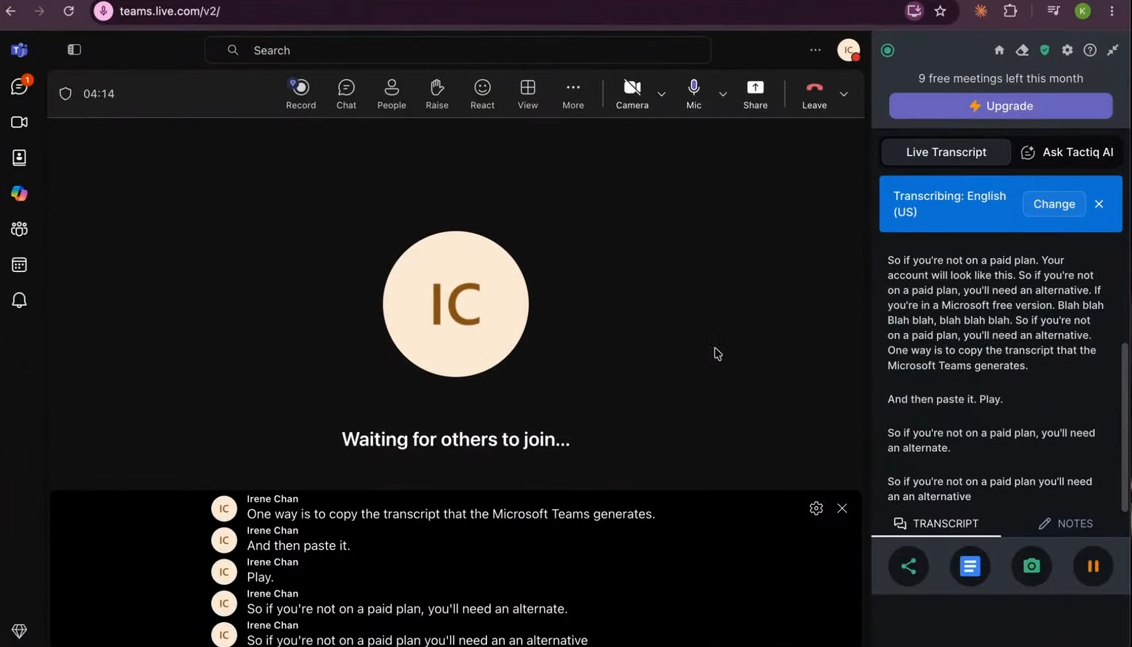
Tactiq is a browser extension that transcribes Google Meet, Zoom and Microsoft Teams calls live, without sending a bot into the meeting. Nobody sees an extra "Notetaker" tile join the call, and nothing records audio. You get a running transcript in a side panel and AI summaries afterwards.
That bot-free design is the reason to choose it, and it holds up. The thing most reviews skip is the AI allowance. Tactiq's Pro plan gives you unlimited transcripts but only 10 AI credits a month, and one credit is one AI action: a summary, a list of action items, or a single question. If you summarise every meeting, Pro runs out in about two working weeks. This audit covers how far each plan actually stretches, what bot-free transcription needs on each platform, and the consent question you take on when you transcribe other people.
- The bot-free approach really works. Tactiq runs in your browser tab. No participant joins the call and no recording is required, which avoids the awkwardness of a visible note-taker bot.
- The free plan is good for light use. 10 transcripts and 5 AI credits a month, with no card and no time limit. That covers a couple of meetings a week.
- Pro is mainly a transcription plan. You get unlimited transcripts but 10 AI credits. If you want a summary for every meeting, you'll need Team ($16.67 annual, $20 monthly), which is the first plan with unlimited AI.
- "No bot" has requirements. On Zoom, Tactiq transcribes from Zoom's own captions, so the host has to enable them and you have to join in Chrome or Edge. Desktop apps are only covered by a separate Mac app.
- You're still responsible for consent. Free users can't turn off the in-chat notice that Tactiq is transcribing. Paid users can, but turning off the notice doesn't remove your legal obligation to tell people.
The 30-Second Summary
Great Transcripts, Small AI Allowance
Tactiq does its main job well. Transcripts start automatically, nothing joins the call, and the free plan is useful on its own. Security is ahead of most extensions, with SOC 2 Type II, ISO 27001 and HIPAA listed. Three things hold the score down. Pro's 10-credit AI limit is easy to misread as "unlimited" next to its unlimited transcripts. Zoom and Teams both have setup requirements before the bot-free promise works. And the small number of public reviews outside the Chrome Web Store includes repeated billing complaints.
Verified directly: plan prices, transcript and AI credit limits, and feature placement were read from tactiq.io's pricing page and Tactiq's help centre in November 2026. Platform requirements for Zoom and Teams, and how the in-meeting notification works, come from Tactiq's own help articles. The Chrome Web Store rating, user count and "no bot joins your call" wording were read from the extension's store listing.
Source conflicts disclosed: Tactiq's help centre names Microsoft Azure OpenAI as its AI provider, while its privacy centre refers to OpenAI's enterprise API. Both say your data isn't used to train models. The help centre also says the option to switch off the transcription notice is on "Pro and above" in one place and "Pro and Team plans" in another. The pricing page lists SOC 2 Type II, ISO 27001, GDPR and HIPAA, but doesn't say which plans each applies to.
How Bot-Free Transcription Actually Works
Most AI note takers join your meeting as a participant: a bot dials in, records the audio and transcribes it on the vendor's servers. Tactiq doesn't. Its Chrome Web Store listing puts it plainly:
In practice, Tactiq reads the live transcription that's already happening in your meeting tab. Its Zoom help article confirms that on Zoom, it transcribes from Zoom's own live captions. That's why it doesn't need a bot. It's also why each platform comes with conditions:
| Platform | Works in the browser | Desktop app | What has to be set up |
|---|---|---|---|
| Google Meet | Chrome, Edge | Meet runs in the browser | Install the extension and sign in; transcription starts on join |
| Zoom | Chrome, Edge (web client) | Separate Tactiq Mac app only | Host must enable Zoom's automated captions; set the language manually |
| Microsoft Teams | Chrome, Edge, Teams web app | Separate Tactiq Mac app only | Spoken-language setting must match; speaker names depend on each participant's setting |
From Tactiq's help articles, November 2026. Tactiq's Teams article says the Teams desktop app "is not currently supported," while separate articles cover a Mac app for Zoom and Teams desktop meetings and Slack huddles. No Windows desktop option is documented.
The Zoom requirement catches people out most often. If you're a guest on someone else's Zoom call and the host hasn't turned on automated captions, Tactiq has nothing to read. You can use Zoom's "Request Captions" button, but whether that works depends on the host. If most of your calls are on clients' Zoom accounts, test Tactiq on a few of them before paying.
What It Costs
| Plan | Per user / month (annual) | Per user / month (monthly) | Transcripts | AI credits / month |
|---|---|---|---|---|
| Free | $0 | $0 | 10 / month | 5 |
| Pro | $8 | $12 | Unlimited | 10 |
| Team (1–20 users) | $16.67 | $20 | Unlimited | Unlimited |
| Business (20–200 users) | $29.17 | $40 | Unlimited | Unlimited |
| Enterprise | Custom quote — 200+ users, curated DPA, dedicated account manager | |||
The pricing page shows annual rates only; monthly rates are from Tactiq's help centre. Annual plans are billed upfront for the year, and checkout may show localised prices.
Two details in that table matter more than the headline prices.
An AI credit is one action, not one meeting. Tactiq's pricing page defines a credit as a single AI action, such as generating a meeting summary, drafting action items, or asking Tactiq AI a question. A summary plus action items for one call uses two credits. When you run out, transcription carries on, but AI features pause until next month or until you upgrade. So Pro's 10 credits cover ten summaries a month, or five meetings if you also want action items.
Team starts at one user. The pricing page lists Team for 1 to 20 users, so a solo user can buy it. That makes the real choice for anyone who summarises every meeting Pro at $12 versus Team at $20 on monthly billing. The extra $8 buys unlimited AI, priority support and team sharing.
What It Does Well
The AI side runs on enterprise model APIs rather than consumer chatbots. Tactiq's help centre says it uses Microsoft Azure OpenAI with content logging disabled, so your meeting data isn't kept even for abuse monitoring and isn't used to train models. That's a stronger commitment than many extensions make, and it matters when your transcripts include client calls. Meetings you delete go to an archive and are purged automatically after 30 days, or sooner if you clear them manually.
If you mostly need words on a page outside meetings, such as drafting emails or notes by voice, that's a different tool. Our Wispr Flow review covers dictation. Tactiq is only for capturing conversations.
Consent: The Part a Bot-Free Tool Makes Easy to Forget
A visible bot has one side benefit: everyone can see the meeting is being captured. Tactiq removes the bot, so it adds a notice of its own. By default it posts a message in the meeting chat:
On the Free plan, this message is always sent and can't be turned off. Paid plans can turn it off or decide per meeting. Being able to turn it off doesn't mean you should.
- Leave the chat notice on, and say at the start of the call that you're taking an AI transcript.
- Ask before transcribing calls about health, HR, legal or financial matters, or any client call covered by an NDA.
- If you run Tactiq for a team, decide the notification policy centrally. Team admins can manage in-meeting notifications for everyone.
The Plans Worth Considering
Free
- 10 transcripts a month
- 5 AI credits a month
- AI Workflows, uploads and exports
- Transcription notice always on
Pro
- Unlimited transcripts
- 10 AI credits a month
- Turn off the notice, pause auto-transcription
- Best if you rarely use AI summaries
Team
- Unlimited transcripts and AI credits
- Available from one user
- Auto-share transcripts with your team
- Priority support, central billing
Business, at $29.17 per user on annual billing ($40 monthly), is for 20 to 200 users. It's the plan to look at if IT requires SAML SSO, retention controls or the MCP server. Smaller teams don't need it.
How Tactiq Compares
The useful comparison isn't one brand against another. Meeting note takers fall into three groups, and each records your calls in a different way.
| Factor | Tactiq (browser extension) | Bot-Based Note Takers | Built-In Platform AI |
|---|---|---|---|
| Visible in the Meeting | No bot; chat notice instead | Joins as a participant | Platform's own indicator |
| Records Audio or Video | No — text only | Usually yes | Depends on the platform |
| Works Across Meet, Zoom & Teams | Yes, in the browser | Usually yes | One platform each |
| Works When You're a Guest | Depends on the host's caption settings on Zoom | Depends on the host admitting the bot | Usually only the host's licence |
| Needs Desktop App Support | Mac app only | No — bot joins remotely | Native |
We haven't quoted competitor prices. Many note-taker comparisons are written by a competing vendor, and prices in this category change often, so check current figures directly with any tool you shortlist.
If your calls are mostly sales calls, what happens to the notes afterwards matters more than how they were captured. Our Close CRM review covers a pipeline built around calling. If you host webinars rather than meetings, you need a different kind of tool. See our Livestorm review.
The Honest Ledger
- No bot joins the call and no recording is required.
- Free plan with 10 transcripts a month, no card, no time limit.
- Unlimited transcripts from $8 a month on annual billing.
- Team plan sold from a single user.
- Enterprise AI APIs with no model training on your data.
- SOC 2 Type II, ISO 27001 and HIPAA listed.
- Pro includes only 10 AI credits a month.
- Zoom needs the host's captions on and a browser join.
- Desktop apps covered only through a separate Mac app.
- Accuracy depends on the platform's own captions.
- Billing complaints after downgrades in recent Trustpilot reviews.
- Help centre contradicts itself on plan features.
Public feedback varies a lot by source. The Chrome Web Store listing shows 4.9 out of 5 from about 4,600 ratings and more than a million users. G2 shows 4.2 from 17 reviews. Trustpilot shows 3.2 from only 15 reviews, 53% of them one-star. The negative reviews there repeat a few themes: charges continuing after a downgrade to Free (two reviews in May 2026), poor accuracy in some languages, and support that couldn't resolve problems. Fifteen reviews is too few to show a trend, but the billing complaints are specific enough to check your invoice after any plan change.
Getting Set Up Without Surprises
Step 1: Run a week on the free plan
Install the extension and use it on real calls across every platform you use. Ten transcripts is enough to find out whether it works on your clients' Zoom setups before you pay anything.
Step 2: Fix the platform settings
On Zoom accounts you host, turn on automated captions in the Zoom web portal. On Teams, make sure the spoken language matches and ask regular attendees to allow speaker identification. Join calls in Chrome or Edge rather than the desktop app.
Step 3: Count your AI actions, not your meetings
During the free week, note how many summaries, action-item lists and questions you actually use per meeting. Multiply by your monthly meetings. Above 10, skip Pro and choose Team.
Step 4: Keep the notice on and say it out loud
Even on a paid plan, leave the chat notice on and mention the transcript at the start of the call. That's the simplest way to stay on the right side of consent rules.
Step 5: Protect time around your calls
A transcript is only useful if you act on it. Block a few minutes after each important call to review the summary. Our Reclaim.ai review covers automatic buffer time in your calendar.
Buy It or Skip It
Frequently Asked Questions
Does Tactiq join the meeting as a bot?
No. Tactiq runs as an extension in your browser tab, and its store listing says "nothing dials into the call, and no recording is required." Other attendees won't see an extra participant. Instead, Tactiq posts a chat message saying you're transcribing, which can't be turned off on the Free plan.
How much does Tactiq cost in 2026?
Free is $0 with 10 transcripts and 5 AI credits a month. Pro is $8 per user per month on annual billing or $12 monthly. Team is $16.67 annual or $20 monthly. Business is $29.17 annual or $40 monthly. Enterprise is quoted on request. Checkout may show localised prices.
What is a Tactiq AI credit?
One AI action: generating a meeting summary, drafting action items, or asking Tactiq AI a question. A summary plus action items for one meeting uses two credits. When you run out, transcription continues but AI features pause until the next month or until you upgrade.
Is Tactiq Pro enough if I summarise every meeting?
Usually not. Pro includes unlimited transcripts but only 10 AI credits a month, so it covers ten summaries. At one meeting a day that's about two working weeks. Team includes unlimited AI credits and can be bought for a single user, at $20 monthly or $16.67 on annual billing.
Does Tactiq work with the Zoom desktop app?
The browser extension works only when you join Zoom in Chrome or Edge. Tactiq offers a separate Mac app for Zoom desktop meetings, and no Windows desktop option is documented. On Zoom, Tactiq transcribes from Zoom's own captions, so the host must enable automated captions in the Zoom web portal.
Does Tactiq work with Microsoft Teams?
Yes, in Chrome, Edge and the Teams web app. Tactiq's Teams article says the Teams desktop app isn't currently supported, though a separate Mac app covers Teams desktop meetings. The Teams spoken-language setting must match the language being spoken, and speaker names depend on each participant's speaker-identification setting.
Is Tactiq private and secure?
Tactiq lists SOC 2 Type II, ISO 27001, GDPR and HIPAA on its pricing page, though it doesn't say which plans each covers. Its help centre says AI features run on Microsoft Azure OpenAI with content logging disabled, and that your data isn't used to train models. SAML SSO and retention controls are on Business and above.
Do I need consent to transcribe a meeting with Tactiq?
Often, yes. Several US states, including California, require every party's consent to record a confidential conversation, and a transcript is safest treated the same way. Tactiq posts a chat notice by default. Paid users can turn it off, but that doesn't remove your obligation. Leave it on and tell attendees at the start. This isn't legal advice.
The Verdict
Tactiq is the best option for anyone who wants AI meeting notes without a bot on the call. It runs in your browser tab, starts automatically, records no audio, and is backed by better security credentials than most browser extensions. The free plan is useful on its own, and unlimited transcripts from $8 a month are cheap.
The catch is the AI allowance. Pro's 10 credits a month are easy to miss next to "unlimited transcripts," and anyone who summarises every meeting will run out halfway through the month. Bot-free capture also has conditions, especially on Zoom, where the host's caption setting decides whether Tactiq works.
So start on Free, test it on every platform you actually use, count your AI actions for a week, and choose Pro only if you'll stay under ten. If you won't, go straight to Team. Whatever plan you choose, leave the transcription notice on.
Try Tactiq Free →