

Somewhere around page sixty, a long document in Word or Google Docs stops being a document and starts being a hostage situation. The scroll bar shrinks to a sliver. Finding "the bit where I explained the methodology" takes ninety seconds and three failed searches. You stop restructuring the argument — not because the structure is right, but because moving Chapter 7 above Chapter 4 now feels like surgery.
Scrivener has been the answer to that problem since 2007, and it is still the answer in 2026. It's not a word processor; it's a project environment for text, where a manuscript is hundreds of small pieces you can shuffle rather than one enormous file you scroll. This Scrivener review is a full rebuild of our original: current version numbers, verified pricing across all three platforms, the honest state of its ageing sync story — and one important buying change, because the discount route half the internet still recommends no longer exists.
- Still unmatched for long-form structure. The Binder, Corkboard, and Scrivenings combination has no real equivalent — nineteen years on, nothing has replaced it.
- The NaNoWriMo discount is gone. The organisation shut down in 2025, so the classic "win NaNoWriMo, get 50% off" route no longer exists. Its successor event, Novel November, still partners with Scrivener.
- Licences are per-platform. $59.99 buys macOS or Windows, not both. The bundle is $95.98 and iOS is a separate $23.99.
- Sync is the weak point and hasn't improved. There's no native cloud — mobile sync runs through Dropbox, and the iOS app is still on version 1.x.
- No AI, no collaboration, by design. If you want co-authoring or generated drafts, this isn't the tool and isn't trying to be.
Quick Summary
The Workshop, Not the Typewriter
Scrivener's insight is that a book is not a document — it's a pile of parts that eventually gets assembled. So it gives you a filing system, an index-card table, a research shelf, and a printing press, and lets you move between them without ever leaving the project. Nothing else does this as completely, and the one-time $59.99 price against $50–$120-a-year subscriptions makes the value obvious within months. The marks come off for things that were forgivable in 2017 and are harder to excuse now: sync still leans on Dropbox, the iOS app has been on version 1.x for years, and there's no collaboration of any kind. Buy it for solo long-form work and it's close to perfect. Buy it expecting a modern cloud app and you'll be annoyed by Tuesday.
Quick Pros & Cons
- One-time purchase — no subscription, ever.
- Handles 100,000+ word projects without slowing down.
- Corkboard restructuring genuinely changes how you revise.
- Compile exports to Word, PDF, ePub, Kindle, and Final Draft.
- Research PDFs and notes live beside the draft, up to four panes.
- Snapshots let you rewrite fearlessly and roll back with Compare.
- The 30-day trial counts usage days, not calendar days.
- No native cloud — mobile sync requires Dropbox.
- iOS app still on version 1.x and feels neglected.
- Licences are per-platform; Mac and Windows are separate purchases.
- No real-time collaboration or shared editing.
- Genuinely steep first few days of learning.
- No built-in AI assistance of any kind.
- Corkboard and split view are iPad-only on mobile.
What Scrivener Actually Does
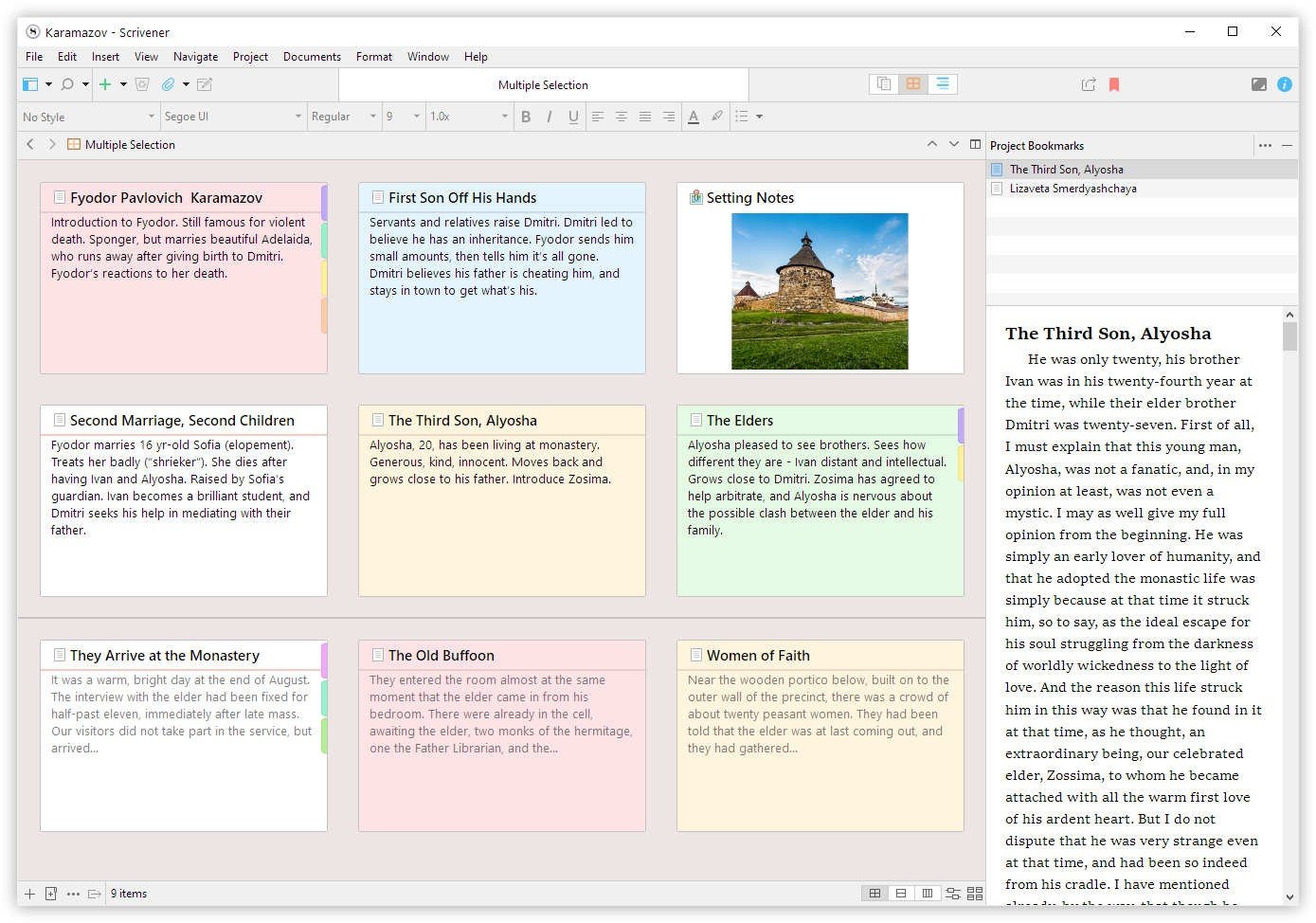
Open a Scrivener project and the left sidebar — the Binder — holds every piece of your work: chapters, scenes, character sheets, interview transcripts, imported PDFs, and a Research folder that never appears in the final export. Click one item to edit it alone; select a folder and Scrivenings mode stitches its contents into one continuous document you can edit as though it were a single file. That toggle between the trees and the forest is the whole product in one gesture.
The Corkboard turns every section into an index card carrying a synopsis. Rearranging the cards rearranges the manuscript — no cut-and-paste, no lost paragraphs. Freeform mode lets you scatter cards anywhere; coloured threads let you track subplots or argument strands. The Outliner is the same information as a spreadsheet: word counts, status, labels, custom metadata, all sortable, all editable in place.
Then Compile — the feature that quietly justifies the price for self-publishers. You write in whatever font you find comfortable, and Compile produces a correctly formatted Word document for your editor, a submission-standard PDF, a clean ePub for Amazon, or a Final Draft file for your agent, applying entirely different formatting rules to each. Writers who've paid a freelancer to format a manuscript know exactly what that's worth.
Supporting all of it: Snapshots with a Compare view, automatic backups on open and close, Collections for building cross-project lists, session and manuscript word targets with a Writing History log, full scriptwriting modes, footnote support, and MLA and APA templates out of the box.
Current Versions and the Platform Reality
Scrivener is three separate applications that share a file format, and they are not equally maintained. This matters more than any feature list when you're deciding what to buy.
Read that third chip carefully before you plan a mobile-first workflow. The iOS app is a competent companion for drafting on the move, and for many writers that's genuinely all it needs to be — but it is not a peer of the desktop apps, and it has not been meaningfully rebuilt in a long time.
Scrivener Pricing in 2026
One purchase, no renewals. The thing to get right is that a licence covers one platform — you can install it on the computers you personally own, but macOS and Windows are separate products. Minor updates within a major version are free; major version upgrades are paid, with discounts for existing owners.
Standard Licence
- Full desktop version, one platform
- Install on computers you own
- Free updates within the major version
- No subscription, ever
Educational
- Identical to the Standard licence
- Requires institutional affiliation
- Available for macOS and Windows
- Ideal for thesis and dissertation work
macOS + Windows Bundle
- Separate licence for each platform
- Cheaper than buying twice
- For writers who work across both
- Cross-grade later costs $37.95
iOS & iPadOS
- Sold separately from desktop
- Dropbox account required for sync
- Corkboard & split view are iPad-only
- Requires iOS 11 or later
Verified August 2026 against literatureandlatte.com. Already own one desktop platform? The cross-grade to the other is $37.95. By Literature & Latte's own arithmetic, covering all three platforms comes to $121.93 total — roughly one to two years of a comparable subscription app. Sales tax may be added depending on your location.
- The NaNoWriMo route is dead. For years the standard tip was "win National Novel Writing Month, claim 50% off Scrivener." NaNoWriMo announced its closure in 2025 and its site went offline — that coupon path no longer exists, however many blog posts still recommend it.
- Its successor still partners with Scrivener. Novel November, relaunched by ProWritingAid, carries the November-writing-challenge torch with sponsor discounts, so the seasonal saving hasn't vanished entirely — it just moved and changed name.
- The educational licence is the reliable discount. $50.99 with institutional affiliation, available year-round, no challenge required.
- Use the trial properly first. It runs 30 days of actual use, so it can stretch across several months of occasional evenings. There's no reason to buy before you've genuinely tested it.
The Workflow That Makes It Click
Most people who bounce off Scrivener do so because they treat it as Word with a sidebar. Here's the sequence that actually teaches the tool.
Step 1: Build the shell before the prose
Create Draft, Research, and Cuts folders. Add one empty document per intended section. You now have an outline you can rearrange — and crucially, a Cuts folder means deleting is never destructive.
Step 2: Load the research shelf
Drag PDFs, images, interview transcripts, and saved web pages into Research. Split the editor and keep a source open beside the draft — this is where Scrivener beats every browser-tab workflow you've used.
Step 3: Draft out of order, on purpose
Write whichever section has energy today. Set a session word target, mark each document's status as you go, and let the Outliner show you where the holes are.
Step 4: Restructure on the Corkboard
When the draft exists but doesn't flow, switch to Corkboard and move cards until the order is right. Take a Snapshot of anything before you rewrite it — that's the habit that makes bold revision painless.
Step 5: Compile once, export forever
Set up your Compile preset once — manuscript format for the editor, ePub for Amazon, PDF for print. From then on, publishing a new version is one dialogue box, not an afternoon of formatting.
The Sync Problem, Stated Plainly
Scrivener has no cloud service of its own. Projects are folders of many small files on your disk, which is why they're fast and resilient — and also why syncing them is fiddlier than a single cloud document. Desktop-to-mobile sync runs through Dropbox specifically; iTunes file transfer is the alternative.
In practice this works reliably if you follow one rule: close the project on one device before opening it on another. Skip that and you get conflicted copies, which are recoverable but genuinely unpleasant to untangle mid-manuscript. Writers who've used the same setup for years report no problems; writers who treat it like Google Docs and leave it open everywhere report exactly the problems you'd expect.
Is it acceptable in 2026? Honestly, it's the one area where the app's age shows. The trade-off is real, though: local-first files mean no outage takes your book away and no subscription lapse locks you out of it. Whether that's a fair exchange depends on whether you write on one machine or five. If you're constantly moving between devices and need frictionless handoff, look at cloud-native alternatives — Squibler covers that ground for fiction writers.
How Scrivener Compares
| Feature | Scrivener | Google Docs / Word | Cloud Writing Apps |
|---|---|---|---|
| Structure Tools | Binder, Corkboard, Outliner | Linear document only | Varies — usually simpler |
| Pricing Model | $59.99 once | Subscription or bundled | $50–$120 per year |
| 100k+ Word Performance | Fast — loads sections | Slows badly | Generally good |
| Publishing Export | ePub, Kindle, PDF, Final Draft | Basic export only | Often ePub |
| Real-Time Collaboration | None | Excellent | Usually included |
| Works Offline | Fully — files are local | Partial | Usually requires connection |
Who Scrivener Is Best For
- Novelists: the archetypal user. Character sheets, timelines, and subplot threads live beside the draft, and the Corkboard makes restructuring an act of thinking rather than an act of admin.
- Thesis and dissertation writers: footnotes, MLA and APA templates, and a research library you can read alongside your argument. The $50.99 educational licence makes it close to a default purchase — pair it with a reference workflow like Anara for the literature side.
- Non-fiction authors and journalists: long interview transcripts sit in the Research folder and open beside the draft. If you're transcribing recordings first, Notta handles that step and drops clean text straight in.
- Screenwriters: proper scriptwriting modes with automatic formatting and Final Draft export, without the four-figure price tag of dedicated screenwriting software.
- Self-publishers: Compile alone can replace a paid formatter, and it pays for the licence on your first book.
- Course creators: module-by-module scripts organised in one project, exported however each platform needs them — useful alongside a host like Teachable.
Who Should Skip It
- Bloggers and short-form writers. Under about 3,000 words, Scrivener's structure is overhead with no payoff. Draft in your CMS or a plain editor.
- Anyone who needs co-authoring. There is no shared editing, no comments-from-collaborators, no live cursors. Two people cannot work in a project at once.
- Writers who want AI assistance built in. Scrivener has none and isn't adding any. If generated drafts or inline rewriting is what you're shopping for, a tool like HyperWrite is a different category entirely.
- Phone-first writers. The iOS app is a companion, not a primary environment, and the best parts of it need an iPad.
Limitations & Reality Check
- The first week is genuinely hard. The interface presents a lot at once. Budget an hour for the built-in tutorial project — people who skip it are the people who give up.
- Compile is powerful and confusing in equal measure. The presets cover most needs, but deep customisation has its own learning curve. Get one preset right and stop touching it.
- Per-platform licensing feels dated. Buying macOS and Windows separately is out of step with how most software is sold now, even with the bundle and cross-grade discounts softening it.
- Windows trails macOS. Both are feature-complete, but Mac gets updates first and the version numbers show it.
- Major upgrades cost money. Minor updates are free; a future version 4 would be a paid upgrade, historically discounted for existing owners.
- Development is deliberate, not fast. Literature & Latte is a small independent studio. That's why the app still exists nineteen years on — and why it doesn't chase trends.
Best Practice: The Snapshot-First Method
Frequently Asked Questions
How much does Scrivener cost in 2026?
A Standard licence is $59.99 one-time for either macOS or Windows. The Educational licence is $50.99 for students and academics with institutional affiliation. Scrivener for iOS and iPadOS is $23.99 on the App Store, and a macOS + Windows bundle is $95.98. If you already own one desktop platform, cross-grading to the other costs $37.95. There is no subscription.
Is Scrivener a subscription?
No. Scrivener is a one-time purchase and you keep the version you bought indefinitely. Minor updates within a major version are free. Major version upgrades are paid, though Literature & Latte has historically offered substantial discounts to existing owners.
Does the NaNoWriMo Scrivener discount still exist?
No. NaNoWriMo announced its closure in 2025 and its website went offline, so the long-running "50% off for winners" coupon is no longer available — despite still being recommended in many older guides. Novel November, the successor event relaunched by ProWritingAid, partners with Scrivener and offers sponsor discounts. Year-round, the educational licence at $50.99 is the dependable saving.
Does one licence cover Mac and Windows?
No — licences are per-platform. A $59.99 Standard licence covers macOS or Windows, and you can install it on computers you personally own within that platform. To use both, buy the $95.98 bundle, or cross-grade later for $37.95. The iOS app is a separate $23.99 purchase.
How does Scrivener sync between devices?
There's no native cloud service. Desktop-to-mobile sync runs specifically through Dropbox, with iTunes file transfer as an alternative. It works reliably as long as you close a project on one device before opening it on another — skipping that step produces conflicted copies. Between two desktop machines, any file-syncing service works if you observe the same rule.
What is the current version of Scrivener?
As of August 2026: Scrivener 3.5.2 on macOS (requires macOS 11+), Scrivener 3.1.6 on Windows (64-bit Windows 10+), and Scrivener 1.2.4 on iOS and iPadOS (iOS 11+). The mobile app remains on version 1.x, and its Corkboard and side-by-side viewing features are iPad-only.
Does Scrivener have AI features?
No, and this appears to be deliberate. Scrivener focuses on structure, organisation, and formatting rather than generating or rewriting text. If you want AI assistance, writers typically run a separate tool alongside it rather than looking for it inside the app.
How long is the Scrivener free trial?
Thirty days — but counted in days you actually open and use the app, not consecutive calendar days. Writing on ten weekends stretches the trial across two and a half months. It's fully featured, so you can test a real project properly before deciding.
Final Verdict
Nineteen years is a long time for software to stay the best at anything. Scrivener has managed it because the problem it solves — imposing structure on a large body of text without freezing it — hasn't changed, and because nobody else has built the Binder, Corkboard, Scrivenings, and Compile combination as completely. If your project is a book, a thesis, or a script, the alternatives are not really alternatives.
The honest deductions are real and worth weighing: sync leans on Dropbox, the iOS app is showing its age, collaboration doesn't exist, and the first week will test you. But you pay $59.99 once, the files stay on your own disk, and no subscription lapse will ever lock you out of your own manuscript. Take the trial — it counts usage days, so spend it across real writing sessions — do the tutorial rather than skipping it, and if the Corkboard clicks the way it does for most long-form writers, buy it and stop shopping.
Try Scrivener Free for 30 Days of Use →