
Knowledge workers spend a significant portion of their week in virtual meetings. Taking manual notes during these sessions breaks active listening, while reviewing raw audio recordings afterward effectively doubles the required time investment. The modern solution is deploying AI meeting assistants—similar to how teams use HyperWrite AI to automate email drafting—but many standard transcription tools rely on intrusive "bots" that join calls as visible participants. For medical consultations, executive interviews, or strict corporate environments, announcing a third-party bot in the waiting room introduces severe privacy friction.
Notta AI approaches transcription with a focus on seamless background integration. Operating as a comprehensive meeting assistant, it offers a "botless" desktop application alongside standard web extensions, capturing and transcribing system audio across 58 languages with high accuracy. But does its multilingual engine and unlimited Business tier actually perform reliably under heavy enterprise use? In this Notta technical audit, we examine its recording architecture, translation latency, and monthly minute constraints.
- Botless Desktop Capture: Records system audio natively on macOS and Windows without sending a visible, awkward bot into your Zoom, Meet, or Teams call.
- Multilingual Framework: Supports 58 transcription languages and features real-time translation for global teams, seamlessly capturing bilingual code-switching.
- Post-Meeting Automation: Generates structured AI notes, tracks action items, and outputs presentation-ready visual deliverables immediately after a call ends.
- Cost Efficiency: The Pro plan offers 1,800 minutes (approximately 30 hours) of monthly transcription for roughly $8.17/month (billed annually), yielding a highly competitive cost-per-minute.
1. Quick Summary
2. The TL;DR Verdict
Stop Transcribing by Hand
Notta provides a practical operational shift for professionals overwhelmed by back-to-back scheduling. By capturing system audio directly in the background and applying structured AI summarization, it frees users to focus entirely on the conversation. If your team requires accurate, bilingual transcription and wants to avoid the friction of inviting visible bots into sensitive client calls, Notta represents a reliable and economically sound workflow upgrade.
Start Transcribing For Free →3. Pros & Cons
- Bot-free recording ensures client calls remain private and visually uninterrupted.
- Pro tier includes an expansive 1,800 transcription minutes per month for light users.
- Robust multilingual support (58 languages) handles regional meetings smoothly.
- SOC2 Type II and HIPAA compliance provide necessary data security for enterprise deployment.
- The free plan restricts recordings to a strict 3-minute maximum per file, limiting realistic testing.
- Live in-meeting sales prompts (like real-time battlecards) are not currently native.
- Deep CRM automation features are gated behind the more expensive Business plan.
4. How We Evaluated Notta AI
To ensure an objective operational audit, we deployed Notta in a simulated corporate environment over a series of video conferences and audio logs. Our evaluation process included:
- Botless Reliability: Testing the native desktop application across macOS and Windows to ensure it accurately captured multi-speaker system audio without joining as a visible participant.
- Transcription Efficacy: Running complex, technical dialogue and heavily accented audio through the engine to measure word error rates and speaker identification accuracy.
- Multilingual Processing: Testing the platform's 58-language framework by introducing bilingual conversations to verify translation latency.
- Cost Analysis: Modeling the Total Cost of Ownership (TCO) compared to maintaining competing subscriptions in the conversational intelligence market.
5. What Notta Actually Does
Notta acts as an automated, localized scribe for your audio communications.
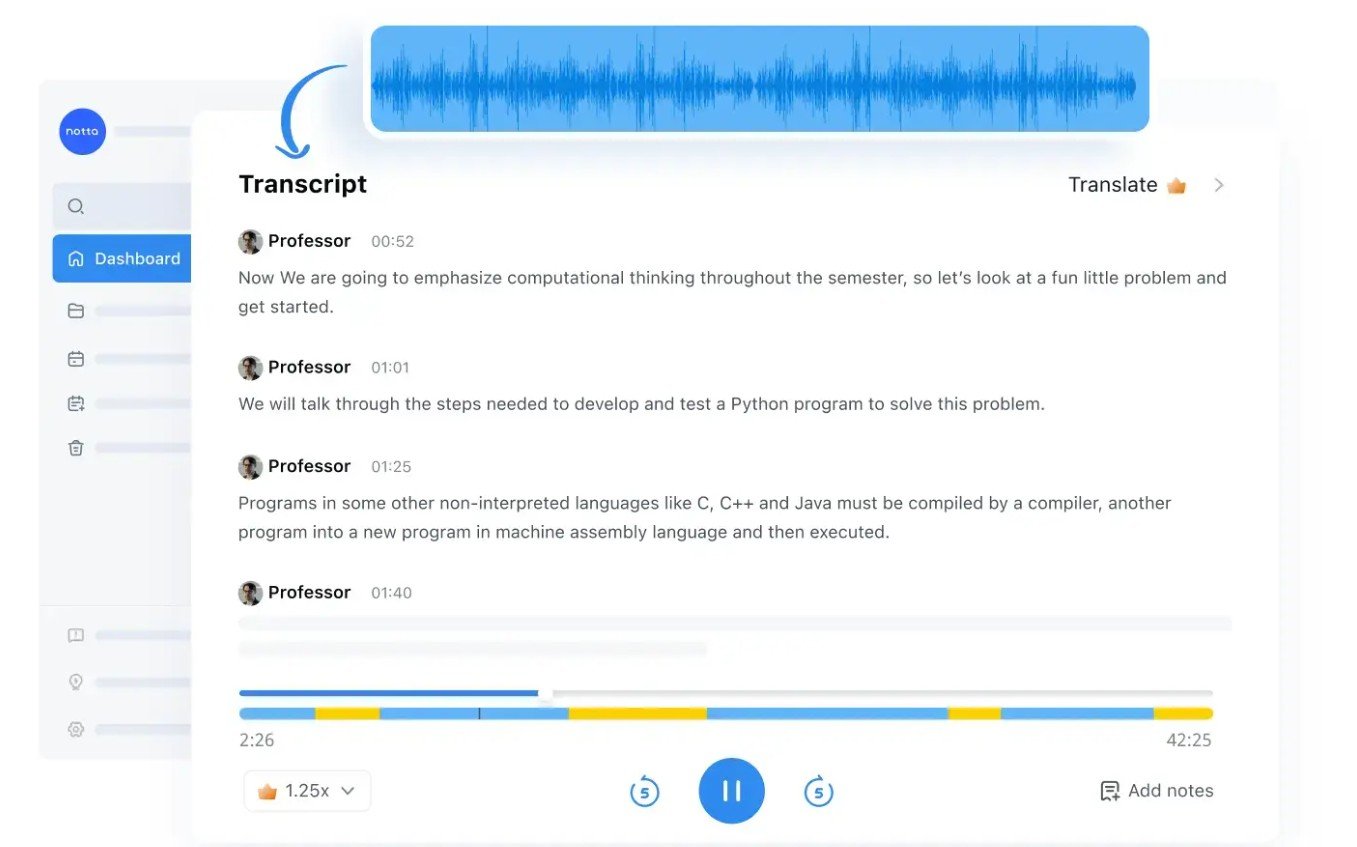
Instead of frantically typing while a client speaks, you run Notta in the background. It captures the audio from your system—whether you are on Google Meet, Microsoft Teams, Webex, or playing an offline video file—and converts it to text in real-time. Once the session concludes, the built-in AI parses the transcript to extract core decisions, identifies unique speakers, and formats the data into exportable notes or actionable bullet points.
6. Core Features Matrix
7. The Data: The Cost of Manual Review
Without an automated assistant, the administrative burden of meeting follow-ups scales poorly. Here is a baseline look at the operational advantage of deploying AI transcription.
8. How Notta Compares to the Market
To understand Notta's positioning, we must evaluate it against other leading conversational intelligence and transcription platforms based on functionality and pricing.
| Feature | Notta AI | Otter.ai | Fireflies.ai |
|---|---|---|---|
| Primary Focus | Multilingual & Botless | General Transcription | Sales & Integrations |
| Starting Price (Annual) | ~$8.17 / mo | ~$8.33 / mo | ~$10.00 / mo |
| Entry Paid Minutes | 1,800 mins/mo | 1,200 mins/mo | Unlimited (Fair use) |
| Botless Desktop App | Yes (Mac & PC) | Yes | Requires Pro+ tier |
9. Notta vs Otter.ai: The Language Gap
Otter.ai is widely recognized, but its core utility is somewhat restricted by language support, predominantly focusing on English, French, and Spanish. Notta processes 58 languages and effectively manages real-time translation, positioning it as a far more capable tool for organizations operating internationally. Additionally, Notta’s entry-level paid plan yields 1,800 minutes compared to Otter’s 1,200, offering better baseline volume for heavy users.
- Vastly superior language parsing (58 languages vs 3-4).
- Generous 1,800-minute monthly allowance on the base Pro tier.
- Consistent botless desktop performance out of the box.
- Highly familiar interface for legacy users.
- Stronger brand recognition in North American markets.
- Robust conversational analytics on Enterprise tiers.
10. Notta vs Fireflies.ai: Integrations vs Privacy
Fireflies.ai excels when integrated deeply into an agency's CRM. It provides features like "Live Assist," which prompts sales representatives during active calls. However, capturing audio on Fireflies typically requires a visible virtual bot to join the meeting unless you pay specifically to access their desktop recorder. Notta provides its botless desktop application immediately, allowing users to transcribe sensitive executive interviews or telehealth consultations without announcing a third-party recording presence.
11. Workflow & Deployment Timeline
Here is what the execution pipeline looks like for managing a virtual client meeting:
Step 1: Background Capture
Launch the Notta desktop app. It runs quietly in the background, intercepting the system audio from your Zoom or Webex call natively.
Step 2: Live Transcription
As participants speak, the platform transcribes the dialogue in real-time, automatically distinguishing between different speakers.
Step 3: AI Summarization
Once concluded, the AI generates a structured overview, isolating key decisions and assigning action items based on the context.
Step 4: Export & Sync
Export the final summary as a PDF, or (if using Business tiers) sync the data directly to Salesforce or HubSpot automatically.
12. Feature Focus: Botless Desktop Recording
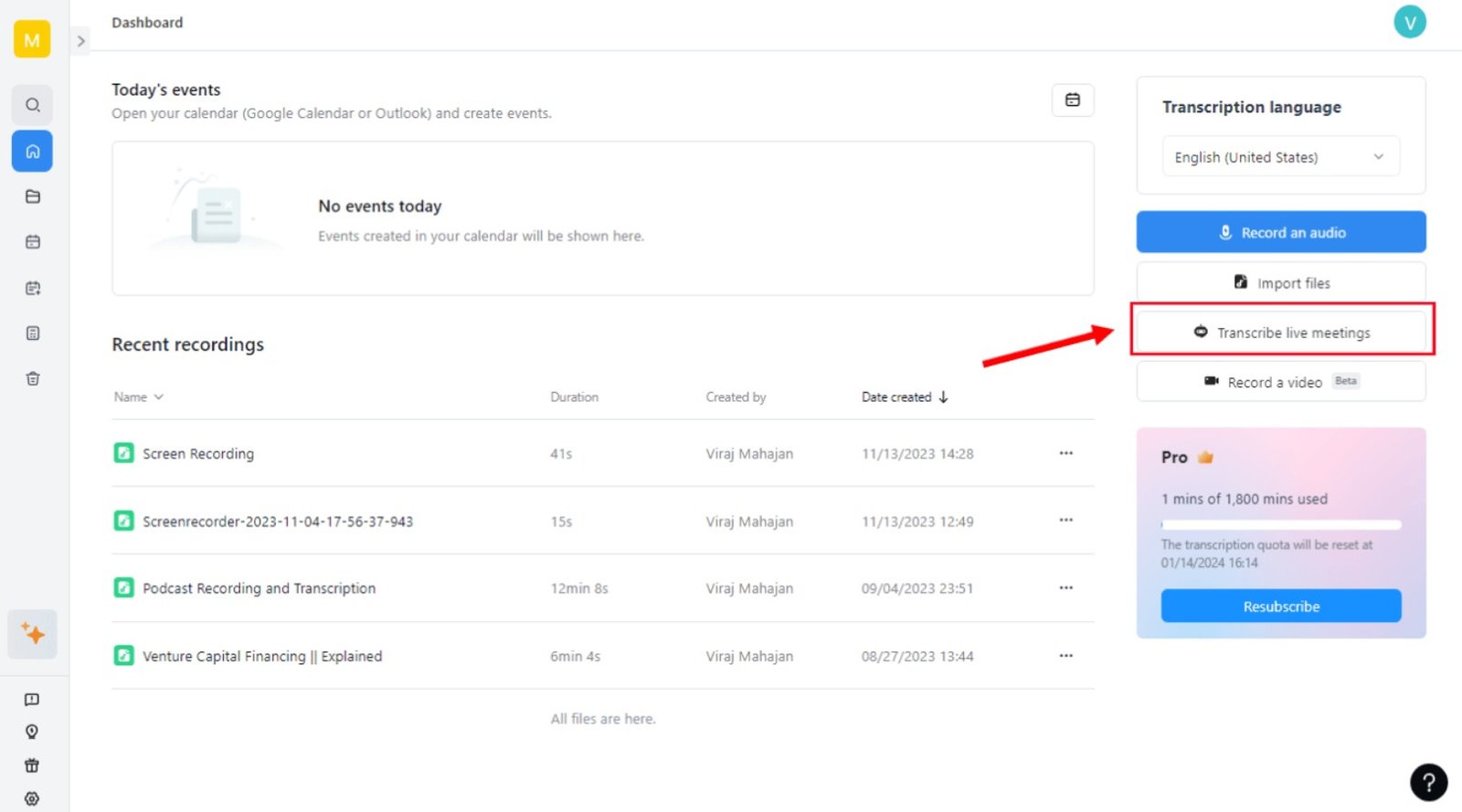
Standard transcription platforms rely on virtual participants that must be admitted into the meeting waiting room. This can cause friction with client compliance protocols. Notta’s desktop application for macOS and Windows captures audio at the system level. This means the software listens to your speakers and microphone without appearing in the participant gallery, ensuring a more natural and uninterrupted meeting dynamic, much like how local recording preserves audio quality in platforms like Zencastr.
13. Feature Focus: Multilingual & Translation
For agencies managing global portfolios, standard English-only transcribers are insufficient. Notta parses 58 different languages and features bilingual capabilities designed to capture code-switching seamlessly. This ensures that when stakeholders transition between native languages during a call, the transcript adapts without requiring manual intervention or returning fragmented text.
14. Example Use Cases
15. Operational Advantages
The entry Pro tier provides approximately 30 hours of monthly transcription, comfortably covering the meeting schedule of most individual professionals.
By utilizing native desktop audio capture, external clients are not subjected to managing or approving virtual bot participants during sensitive calls.
16. Who Notta Is Best For
- Global Teams: Organizations requiring highly accurate bilingual transcription across diverse language sets.
- Consultants & Clinicians: Professionals prioritizing privacy who need reliable, bot-free background recording.
- Budget-Conscious Individuals: Users looking to maximize their transcription allowance, as the $8.17/mo Pro plan provides more base minutes than many competitors.
17. Who Should Avoid Notta
- Free Tier Dependents: The free plan limits recordings to a maximum of 3 minutes per file, making it unsuitable for actual meetings and strictly purposed for brief testing.
- Call Center Operations: If you require deep, real-time telephony integrations for mass call center deployments, dedicated enterprise VoIP solutions may be more appropriate.
18. Real User Sentiment
Across software directories and aggregate review platforms, Notta maintains a solid reputation for its core utility:
- The Praise: The consensus points heavily toward its ease of use and superior language support compared to legacy transcribers. Medical and legal professionals specifically highlight the value of the unobtrusive botless recorder.
- The Complaints: The primary critique centers around the aggressively restricted free tier. Users attempting to transcribe a standard 30-minute meeting are abruptly cut off at the 3-minute mark, forcing an immediate upgrade to evaluate full performance.
19. Pricing Realities & Feature Tiers
Notta's pricing is structured to incentivize annual commitments, yielding approximately 40% savings over month-to-month billing. The tiers below reflect 2026 annual pricing data.
Pro Plan
- 1,800 transcription minutes/mo
- 5-hour max recording length
- 100 AI summaries per month
- Full export formats (TXT, PDF, SRT)
Business Plan
- Unlimited transcription minutes
- 200 AI summaries per month
- CRM Integration (Salesforce, HubSpot)
- Team workspaces & admin controls
20. The Hidden Costs & Limitations
While the base subscription covers extensive usage, organizations must be aware of translation add-ons. Specific features like Monolingual Translation incur an additional $6/month, and comprehensive Bilingual Transcription & Translation requires a $9/month add-on. Furthermore, relying entirely on the "Free" plan is functionally impossible for real-world business use due to the strict 3-minute recording cap and the inability to export transcripts.
21. Best Practices: "The Alpha Plan"
To effectively leverage the platform, organizations should establish a clear post-meeting protocol.
22. Security & Compliance
Notta addresses enterprise security requirements by maintaining strict data compliance protocols. The platform is SOC2 Type II certified and complies with HIPAA regulations, ensuring that sensitive conversational data—whether proprietary business strategies or protected health information—is managed securely.
23. Is Notta Worth It in 2026?
For individual professionals, consultants, and international teams, Notta is a highly practical investment. At approximately $8 a month for roughly 30 hours of transcription capacity, it undercuts several major competitors while offering superior language versatility. The inclusion of a botless desktop recorder provides an immediate solution for organizations prioritizing unobtrusive, secure client meetings.
24. Frequently Asked Questions
Is the Notta free plan actually useful?
Mostly for brief evaluation. The free plan limits recordings to a maximum of 3 minutes per session, which prevents it from being used for standard length meetings or interviews.
What is a botless meeting recorder?
Instead of a virtual participant visibly joining your Zoom or Teams call, a botless recorder runs as an application on your computer (Mac or Windows) and captures the system audio quietly in the background.
How many languages does Notta support?
Notta currently supports transcription in 58 languages and enables real-time translation features, making it ideal for international communication.
Does Notta work with Zoom and Google Meet?
Yes. It integrates seamlessly with major conferencing platforms including Zoom, Google Meet, Microsoft Teams, and Webex.
Can it sync with my CRM?
Yes. On the Business and Enterprise tiers, Notta offers integrations with major CRMs like Salesforce and HubSpot, automatically syncing meeting insights to client records.
Does it identify different speakers?
Yes. The platform utilizes speaker identification technology to automatically differentiate voices and attribute dialogue accurately in multi-participant conversations.
Can I chat with the AI about my meeting?
Yes. Notta includes an AI chat assistant that allows you to query the transcript directly (e.g., "What was the agreed budget?") to extract fast answers without reading the whole document.
Is my data secure?
Notta complies with stringent data privacy standards, including SOC2 Type II and HIPAA certifications, ensuring enterprise-grade protection for your recorded information.
25. Final Conclusion
The administrative overhead of manual note-taking actively diminishes professional productivity. As virtual meetings remain a permanent fixture of corporate workflows, adopting an AI assistant to parse conversational data is no longer a luxury—it is an operational necessity.
Notta AI delivers a robust, secure infrastructure for capturing and analyzing these conversations. By prioritizing extensive multilingual capabilities and deploying a privacy-centric botless recording engine, it addresses the common friction points of legacy transcription tools. For teams seeking to streamline their administrative tasks and ensure accurate documentation, Notta is a highly practical and cost-effective solution.
Deploy Your Meeting Assistant Today →