


Rent a VPS and you get a blank black screen. No Apache, no PHP, no database, no firewall — just a login prompt and the expectation that you know what to do next. That gap is why control panels exist, and why the companies selling them can raise prices every January without losing many customers.
Plesk is the most polished of them: it turns a raw server into a visual dashboard where adding a domain, issuing an SSL certificate, or spinning up WordPress is a button rather than a config file. This Plesk review covers what it genuinely does well, the January 2026 price rise that most published reviews haven't caught up with, and the edition trap that catches people who buy the cheapest tier expecting the feature Plesk is famous for.
- Prices rose about 26% in January 2026. Web Admin is now $16.99, Web Pro $29.99, Web Host $62.99 per server per month. Reviews still quoting $14 or $36 are pre-increase.
- Web Admin does not include the full WordPress Toolkit. It ships with a lite version. Git, Docker, Node/Ruby/Python UIs and reseller accounts also start at Web Pro. This catches a lot of buyers.
- Plesk and cPanel have the same owner. Both sit inside WebPros, backed by Oakley Capital — which is why both raise prices annually and why "switch to the competitor" is less of an escape than it sounds.
- Add-ons stack significantly. WordPress Toolkit Deluxe, email security and Imunify360 commonly push real deployments 20–50% above the base licence.
- The licence is rarely the biggest cost. Self-managing means you are the sysadmin — patching, backups, and 3am incidents included. That's the trade managed hosting actually sells.
Quick Summary
Great Software, Rising Rent
The WordPress Toolkit is genuinely the best thing of its kind — cloning, staging, mass updates and one-click hardening across dozens of sites from a single screen, with an interface that makes cPanel look like it was designed in 2009. Plesk also runs on Windows, which cPanel simply doesn't. What pulls the score down isn't the product, it's the commercial direction around it: an average 26% increase this January on top of steep rises the year before, feature gating that puts the headline toolkit two tiers up from the advertised entry price, and add-ons that quietly inflate real deployments. Good software. Worth watching your renewal notice.
Quick Pros & Cons
- WordPress Toolkit is the best multi-site management tool available.
- Cloning and staging with one-click sync back to live.
- Runs on both Linux and Windows — cPanel is Linux only.
- Automatic Let's Encrypt SSL issuing and renewal.
- Built-in ModSecurity WAF and Fail2Ban.
- Native Node.js, Ruby, Python and Docker support on Web Pro+.
- 14-day full-edition trial with no credit card.
- Average 26% price increase in January 2026, following earlier rises.
- Entry tier ships WordPress Toolkit Lite, not the full version.
- Add-ons commonly push real costs 20–50% above the licence.
- Needs 2GB+ RAM before you host anything.
- Dedicated server licences cost more than VPS licences.
- You remain responsible for server health, patching and incidents.
- Switching to cPanel doesn't escape the parent company.
What Plesk Actually Does
Rent a VPS from DigitalOcean, Vultr, Linode or AWS and you receive an empty Linux box. Getting a website onto it conventionally means installing and configuring a web server, PHP, a database, a mail stack and a firewall — then maintaining all of it.
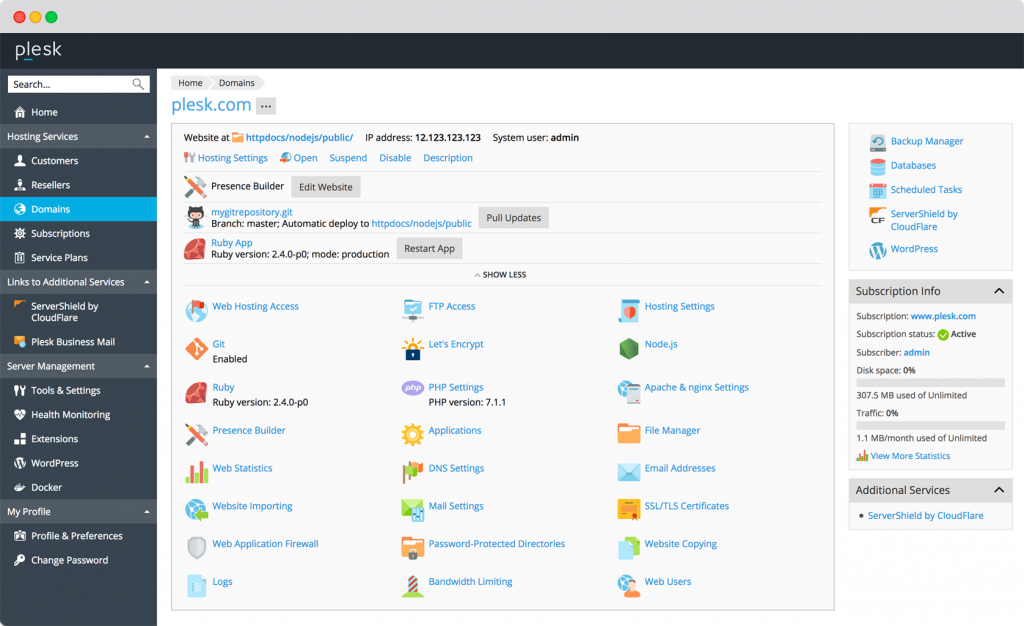
Plesk installs on top of that server and puts a browser dashboard in front of it. Click "Add Domain" and it writes the vhost config. Click to install WordPress and it provisions the database, generates credentials and issues an SSL certificate. PHP version switching, cron jobs, DNS records, mailboxes and backup schedules all become forms instead of files. Nothing Plesk does is impossible by hand; what you're buying is not having to.
The headline component is the WordPress Toolkit, and it deserves the attention. Mass-update plugins across every site on the server, clone a live site to staging, work on it, then sync changes back — all from one screen. For anyone maintaining more than a handful of WordPress installs, it's the feature that justifies the licence. Just note which edition it actually comes in, which is the next section.
The Edition Trap: Web Admin Doesn't Include the Full Toolkit
This is the most expensive misunderstanding in Plesk's lineup, and the pricing page doesn't make it obvious. Web Admin is the tier people quote when they say Plesk starts at seventeen dollars — but it ships with WordPress Toolkit Lite, not the full version that makes Plesk worth buying.
The practical consequence: if you're choosing Plesk because of the WordPress Toolkit — which is the usual reason — your real entry price is $29.99, not $16.99. Budget accordingly, and treat any comparison that pits Plesk's $16.99 against a competitor's full-featured tier as misleading.
There's a second, sharper way to read Web Admin: if you're comfortable in SSH, nginx config and certbot, almost everything it does can be done with free tools. Web Admin is the tier worth thinking hardest about, because it's the one where the honest answer might be that you don't need a control panel at all.
Plesk Pricing in 2026 (After the January Increase)
On 1 January 2026 Plesk applied an average increase of roughly 26% across all editions for both VPS and dedicated environments, alongside a restructure of how subscriptions are billed. This followed similarly steep rises the previous January. A great deal of published material — including, until this update, our own — still quotes pre-increase figures.
| Edition (VPS) | Price / server / month | Domain limit | WordPress Toolkit |
|---|---|---|---|
| Web Admin | $16.99 | Up to 10 | Lite version only |
| Web Pro | $29.99 | Up to 30 | Full toolkit |
| Web Host | $62.99 | Unlimited | Full toolkit |
Verified August 2026 against plesk.com and corroborating independent pricing trackers. Licences are billed per server, not per account. Dedicated server licences cost more than the VPS rates shown. Annual and other extended billing cycles carry roughly 8% off. VAT may apply depending on your country. Confirm at checkout before purchasing — this vendor adjusts pricing annually.
- Add-ons stack fast. WordPress Toolkit Deluxe, email security and Imunify360 each add meaningfully to the bill — real deployments commonly land 20–50% above the base licence.
- Licences are per server. Two modest VPS boxes running Web Pro often work out cheaper than one large box on Web Host, and give you failure isolation as a bonus. Model both.
- Third-party licences are much cheaper — with strings. NOC partners and resellers reportedly sell at 30–50% below retail, but with restrictions on transferability and support. Read the terms before saving the money.
- Your host may bundle it. Several VPS providers include a Plesk licence in the server price, often below buying direct. Check your provider's marketplace first.
- Expect another rise. Plesk has increased prices in consecutive Januaries. Whatever you pay now, budget for it going up at renewal.
Why "Just Switch to cPanel" Isn't an Escape
The standard reaction to a Plesk price rise is to look at cPanel. It's worth knowing that both products sit inside the same corporate structure: WebPros, backed by Oakley Capital, owns Plesk and cPanel alike.
That explains a pattern that otherwise looks like coincidence. cPanel has raised prices steadily since 2019, and its 2026 tiers moved up again — Solo to $29.99, Admin to $35.99, Pro to $53.99, Premier to $69.99. Plesk moved roughly 26% the same month. These aren't two competitors responding to each other; they're two products under one commercial strategy.
If licence-cost predictability is your actual concern, the genuine alternatives sit outside that group — DirectAdmin and Enhance have both reported increased migration interest from exactly this pressure, and free open-source panels cover basic needs at the cost of enterprise features. That's the honest framing of the choice, and it's not one most control-panel reviews will give you.
One thing the calculator can't price: risk. Managed hosts carry uptime responsibility, respond to incidents at 3am, and answer to you when something breaks. Self-managing transfers all of that to you. If a site going down for six hours would cost you a client, weight that heavily — it's the real product managed hosting sells, and the reason the margin exists.
Core Features
Getting Set Up
Step 1: Size the server before the licence
Plesk consumes real resources just to run. Below 2GB RAM your sites will crawl regardless of how good the panel is. Start at 4GB if you're hosting anything meaningful.
Step 2: Use the marketplace image
Most cloud providers offer a one-click Plesk image, which skips manual installation entirely — and some bundle the licence at below-retail rates. Check that before buying direct.
Step 3: Trial the full edition first
The 14-day trial gives you Web Host with everything unlocked. Use it to discover which features you actually touch — that's what tells you whether Web Admin's limits will bite.
Step 4: Set up off-site backups on day one
Plesk schedules backups easily but storing them elsewhere costs extra — S3, Google Drive or similar. A backup sitting on the same server that failed is not a backup.
Step 5: Run the security scan
Inside WordPress Toolkit, the Security tab's one-click hardening patches the common vulnerabilities — directory browsing, wp-config exposure — without breaking sites. Do it per install.
How Plesk Compares
| Feature | Plesk | cPanel | Independent Panels |
|---|---|---|---|
| Interface | Modern, clean | Dated, cluttered | Varies |
| WordPress Management | Best in class (Web Pro+) | Basic toolkit | Usually basic |
| OS Support | Linux & Windows | Linux only | Mostly Linux |
| Ownership | WebPros / Oakley | WebPros / Oakley | Independent |
| Pricing Trend | ~26% rise Jan 2026 | Rising since 2019 | More stable |
| Entry Price | $16.99 (limited edition) | $29.99 (Solo) | Free to low |
Who Plesk Is Best For
- Agencies managing client WordPress sites. The toolkit's staging, cloning and mass-update workflow is where the licence pays for itself, and it scales past the point where manual management collapses.
- Windows server users. If your stack includes ASP.NET, Plesk is effectively the only serious control panel available to you.
- Developers running mixed stacks. Node.js, Ruby, Python and Docker with management UIs, plus Git integration, from Web Pro upward.
- Anyone consolidating sites onto one box. Beyond roughly five WordPress installs, a panel starts saving more time than it costs — pair it with front-end caching like NitroPack for performance the panel alone won't deliver.
- Teams who want a visual layer without losing shell access. Plesk doesn't take SSH away; it just means you don't need it for routine work.
Who Should Skip It
- Single-site owners. Running your own server for one blog is a hobby, not an optimisation. Shared or managed hosting wins on cost once your time is counted.
- Anyone uncomfortable being the sysadmin. Plesk makes server administration visual, not optional. Security patches, failed backups and downtime are still yours.
- Command-line-confident developers on tight budgets. If you're fluent in nginx, certbot and systemd, Web Admin buys convenience you may not need.
- Operations needing stable multi-year licence costs. Two consecutive years of significant increases is a trend, not an anomaly. Budget for it or look outside WebPros.
Limitations & Reality Check
- The pricing trajectory is the main risk. Roughly 26% in January 2026 after steep rises the year before. Whatever you model today, model it again at renewal.
- Edition gating is aggressive. The advertised entry price doesn't include the feature Plesk is famous for. Read the comparison table rather than the headline.
- Resource overhead is real. Plesk consumes meaningful RAM before a single visitor arrives. Undersize the server and you'll blame WordPress for a panel problem.
- Off-site backup storage is your cost. Scheduling is easy; storage isn't included.
- Support quality draws mixed reports. Some users cite needing outside expertise to resolve issues, which is a hidden cost worth factoring if you're not confident on servers yourself.
- Cheaper third-party licences carry restrictions. The 30–50% discounts from resellers are real, but transferability and support terms differ from buying direct. Read before saving.
Best Practice: Buy the Edition Your Trial Proves You Need
Frequently Asked Questions
How much does Plesk cost in 2026?
For VPS licences: Web Admin $16.99/month for up to 10 domains, Web Pro $29.99/month for up to 30 domains, and Web Host $62.99/month for unlimited domains. Licences are per server rather than per account, dedicated server licences cost more, and extended billing cycles carry roughly 8% off. These reflect the average 26% increase Plesk applied on 1 January 2026 — figures published before then are out of date.
Does Web Admin include the WordPress Toolkit?
Only a lite version. The full WordPress Toolkit — along with Git integration, Docker support, Node/Ruby/Python management UIs and reseller accounts — starts at Web Pro ($29.99/month). If the toolkit is why you're buying Plesk, which it usually is, your real entry price is Web Pro rather than the advertised Web Admin rate.
Did Plesk raise its prices?
Yes. Plesk implemented an average increase of approximately 26% effective 1 January 2026, across all editions for both VPS and dedicated environments, alongside a restructure of subscription billing. This followed significant increases the previous January, so consecutive annual rises should be treated as the expected pattern rather than a one-off.
Is Plesk better than cPanel?
For WordPress-focused work, generally yes — the WordPress Toolkit is considerably stronger and the interface is far more modern. Plesk also supports Windows servers, which cPanel does not. But both are owned by WebPros, backed by Oakley Capital, and both raise prices annually, so switching between them doesn't escape the underlying cost trend.
Do I need to be a developer to use Plesk?
No coding is required for routine work, but you should understand DNS records, file structures and the basics of web hosting. More importantly, Plesk makes server administration visual rather than optional — security patching, backup verification and downtime remain your responsibility, which is the real difference between this and managed hosting.
Can I get Plesk cheaper than list price?
Often, yes. Many VPS providers bundle a Plesk licence into their server plans at below-retail rates, so check your host's marketplace before buying direct. Third-party resellers and NOC partners reportedly sell licences 30–50% below retail, though these can carry restrictions on transferability and support — read the terms before committing.
How much RAM does Plesk need?
2GB is the practical floor before you host anything, because Plesk consumes meaningful resources simply to run. For hosting multiple WordPress sites, 4GB or more is a more realistic starting point. Undersizing the server is a common cause of poor performance that gets wrongly blamed on WordPress.
Can I migrate from cPanel to Plesk?
Yes. Plesk includes a built-in migration manager that pulls websites, databases and email accounts from an existing cPanel server. It's one of the more reliable migration paths in this category, though you should test on a non-critical site first and keep the old server running until DNS has fully propagated.
Final Verdict
Plesk is genuinely excellent software. The WordPress Toolkit remains the best multi-site management system available, the interface is a generation ahead of cPanel's, and Windows support gives it a market nothing else serves. If you manage client sites on your own infrastructure, it will save you real hours every month.
The reason this lands at 7.9 is the commercial direction. An average 26% increase in January 2026 on top of steep rises the year before, an entry tier that withholds the feature people buy Plesk for, and add-ons that push real deployments well past the headline number. Take the 14-day trial of the full edition, work out which features you actually touch, and buy the narrowest tier that covers them — then run the calculator above with your own hourly rate in it. If self-managing still wins after your time is counted, Plesk is the right tool for the job. If it doesn't, that's a genuinely useful answer too, and worth more than another article telling you managed hosting is a scam.
Try Plesk Free for 14 Days →