

The standard migration path for growing websites is broken. When shared hosting (like Bluehost or GoDaddy) inevitably throttles your site speed, the industry default is to upgrade to a "Managed WordPress Host" like WP Engine or Kinsta. The problem? You are paying a massive premium—often upwards of $115/month—for basic cloud servers simply because they installed WordPress and added a custom dashboard.
Cloudways was built to bypass this managed hosting tax. It operates as a cloud orchestration layer, allowing you to rent high-performance servers directly from DigitalOcean, AWS, or Google Cloud, while providing a control panel to manage the technical server administration. But does it require a DevOps degree to operate? In this Cloudways infrastructure audit, we strip down their deployment workflows, caching stack, and total cost of ownership to find out.
- The Orchestration Layer: Cloudways isn't a physical host. It provides an intuitive dashboard that connects directly to bare-metal servers from DigitalOcean, AWS, and GCP.
- Dedicated Resources: Unlike shared hosting, your site gets its own dedicated RAM and CPU, preventing noisy neighbors from crashing your store during traffic spikes.
- Pay-As-You-Go Economics: You only pay for the exact hours your server is active. Pricing starts around $14/month for a premium DigitalOcean droplet, slashing costs by 50% compared to Kinsta.
- Technical Nuance: It lacks free email hosting (no cPanel) and requires a slight learning curve, making it better suited for agencies, developers, and serious e-commerce operators.
1. Quick Summary
2. The TL;DR Verdict
Enterprise Speed at Wholesale Pricing
Cloudways successfully democratizes cloud architecture. By stripping away the command-line complexity of AWS and DigitalOcean, it allows non-technical founders and agency owners to deploy blazing-fast, dedicated servers in minutes. If you are running a heavy WooCommerce store or managing multiple client sites, the ability to vertically scale server specs with a single click—without paying the exorbitant margins of traditional managed hosts—makes Cloudways an undeniable operational upgrade.
Deploy Your Cloud Server Today →
3. How We Evaluated Cloudways
To ensure an objective technical audit, we deployed Cloudways in a live testing environment to simulate a high-traffic production scenario. Our evaluation process included:
- Performance Benchmarking: We migrated a heavy, plugin-dense WooCommerce staging site from a standard shared host to a Cloudways DigitalOcean Premium droplet, measuring the delta in TTFB (Time to First Byte).
- Caching Stress Test: We evaluated the proprietary Breeze caching plugin in tandem with Redis Object Cache Pro under simulated traffic loads.
- Infrastructure Agility: Testing the 1-click staging environment deployment, server cloning process, and vertical scaling downtime.
- Cost Analysis: Modeling the total cost of ownership against equivalent hardware specs on WP Engine and Kinsta.
4. What Cloudways Actually Does
Cloudways does not own physical data centers. It is a Software-as-a-Service (SaaS) control panel.
If you try to rent a server directly from DigitalOcean or AWS, you are handed a blank Linux terminal. You must manually install Apache/Nginx, configure PHP, set up firewalls, and install WordPress via command line. Cloudways acts as the middleman. You select "DigitalOcean" from their beautiful dashboard, and Cloudways' software automatically provisions the server, installs an optimized software stack, issues a free Let's Encrypt SSL, and spins up WordPress for you in roughly three minutes.
5. Core Features Matrix
6. The Data: The Shared Hosting Speed Penalty
If you are running e-commerce on a $5/month shared host, your database queries are suffocating. Here is the operational shift when moving to a dedicated cloud environment.
7. Technical Setup: The Orchestration Layer
When setting up an account, Cloudways requires you to choose your underlying infrastructure provider. Following their acquisition by DigitalOcean, DO is the default and most heavily optimized choice for SMBs, offering incredibly fast NVMe storage processors. Alternatively, you can select AWS or Google Cloud if your enterprise specifically requires their exact data center routing, though this incurs higher baseline costs.
8. Workflow & Deployment Timeline
Here is what the execution pipeline looks like for deploying a new web asset:
Step 1: Server Provisioning
Select your cloud provider (e.g., DigitalOcean), choose your RAM/CPU size, and select the data center closest to your target audience.
Step 2: App Installation
Click "Add Application" and select WordPress. Cloudways instantly installs a fresh instance with their proprietary Breeze caching plugin enabled.
Step 3: Domain & Security
Map your domain name in the dashboard and click a single button to provision and install a free Let's Encrypt SSL certificate.
Step 4: Scale & Monitor
Monitor traffic via the analytics dashboard. If CPU usage spikes, use the Vertical Scaling slider to instantly allocate more RAM.
9. Feature Focus: Caching & Cloudflare Enterprise
Raw server power means nothing without efficient caching. Cloudways addresses this in three layers. First, they provide their own optimized WordPress caching plugin (Breeze). Second, servers with 2GB+ of RAM include a free license for Object Cache Pro, which drastically speeds up heavy database queries for WooCommerce. Third, they offer a native integration with Cloudflare Enterprise ($4.99/mo per domain), giving you access to enterprise-grade CDN routing, image optimization, and Web Application Firewalls (WAF) without needing to configure complex DNS rules.
10. Feature Focus: Staging & Cloning
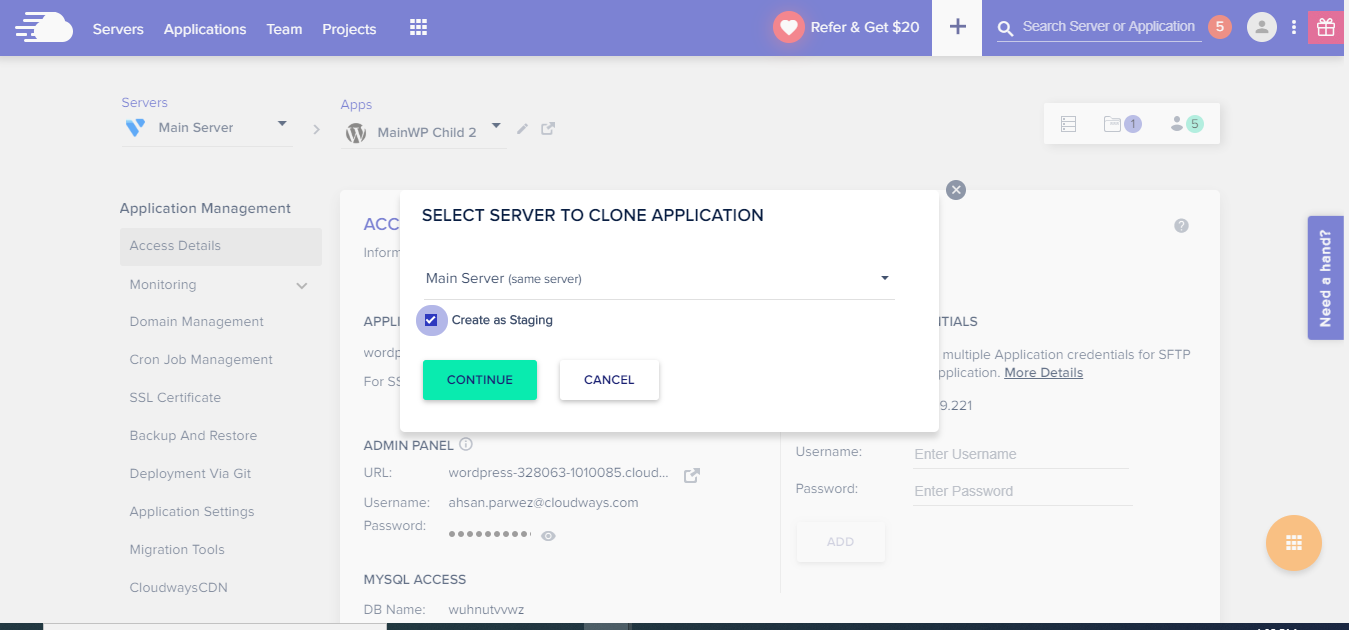
For agencies, the ability to duplicate environments is critical. Cloudways allows you to clone an entire server—or just a single WordPress application—with one click. You can instantly generate a secure staging URL to redesign a client's site, test major plugin updates safely, and then push the staging data back to the live production server seamlessly.
11. Feature Focus: 1-Click Vertical Scaling
If your site goes viral or you are running a Black Friday sale, shared hosting will suspend your account for using too much CPU. On Cloudways, you navigate to the "Vertical Scaling" tab and drag a slider to increase your server's RAM and processor limits. The upgrade occurs in minutes. Because pricing is pay-as-you-go, you only pay for the upgraded specs during the days you actually needed them.
12. Example Use Cases
13. The Real ROI (Arbitrage Avoidance)
Hover over the metrics below to see the baseline operational advantages of migrating to Cloudways.
Traditional managed hosts rent servers from Google or AWS, add their dashboard, and mark up the price by 300%. Cloudways drastically reduces this middleman markup.
By operating on bare-metal cloud infrastructure, you inherit the fault-tolerant, enterprise-grade uptime SLAs of DigitalOcean and AWS data centers.
14. Who Cloudways Is Best For
- Agencies & Freelancers: The ability to spin up unlimited applications (websites) on a single server makes it the most profitable hosting architecture for client retainers.
- Scaling E-commerce: WooCommerce requires heavy database processing. The dedicated RAM and Object Cache Pro integration are mandatory for fast checkouts.
- Technical Founders: If you understand the difference between DNS records, SFTP, and databases, the Cloudways interface will feel incredibly freeing.
15. Who Should Avoid Cloudways
- Absolute Beginners: Cloudways does not use cPanel. It does not include free email hosting (you must use Google Workspace or Zoho). If you expect a "one-click blog" experience with bundled email, stick to basic shared hosting.
- Users Expecting Hand-Holding: While they offer 24/7 chat support, it is highly technical. Unless you pay for their Premium Support SLA, they will ensure the server is online, but they won't fix your broken WordPress theme.
16. Integration Ecosystem & Synergy
17. Real User Sentiment (G2 & Forums)
Across software engineering forums and review aggregators, Cloudways holds a deeply respected technical reputation:
- The Praise: The overwhelming consensus highlights the raw speed-to-price ratio. Developers love that they can access root files via SSH and manage cron jobs directly from the UI without fighting through cPanel restrictions.
- The Complaints: Negative reviews almost universally target the support structure. Users migrating from highly coddled hosts (like WP Engine) often express frustration when Cloudways support identifies an issue as an "application-level problem" (i.e., a broken plugin) rather than a "server-level problem," leaving the user to fix it themselves.
18. Pricing Realities & Feature Tiers
Pricing is entirely Pay-As-You-Go, billed hourly, and invoiced at the end of the month based strictly on the hardware you utilize.
DigitalOcean Standard
- 1GB RAM / 1 Core Processor
- Unlimited Websites (Apps)
- Free SSL & Automated Backups
- Best for low-traffic staging/portfolios
DigitalOcean Premium
- 2GB+ RAM / Faster NVMe Storage
- Free Object Cache Pro included
- Capable of hosting heavy WooCommerce
- Best for Agencies & Live Traffic
19. The Hidden Costs & Add-Ons
While the base server pricing is incredibly cheap, scaling operations requires add-ons that you must factor into your monthly TCO (Total Cost of Ownership):
- Cloudflare Enterprise: Highly recommended for production sites, this costs an additional $4.99/mo per domain.
- Offsite Backups: Cloudways charges a few cents per gigabyte to store your server backups offsite (roughly $0.033/GB).
- Premium Support: If you require faster SLA ticket responses or phone support, the advanced support add-ons start at $100/mo, pushing the cost closer to legacy enterprise hosts.
20. Best Practices: "The Alpha Plan"
If you want to maximize agency margins without compromising client site performance, you must execute the Alpha Plan for server distribution.
21. Security & Compliance
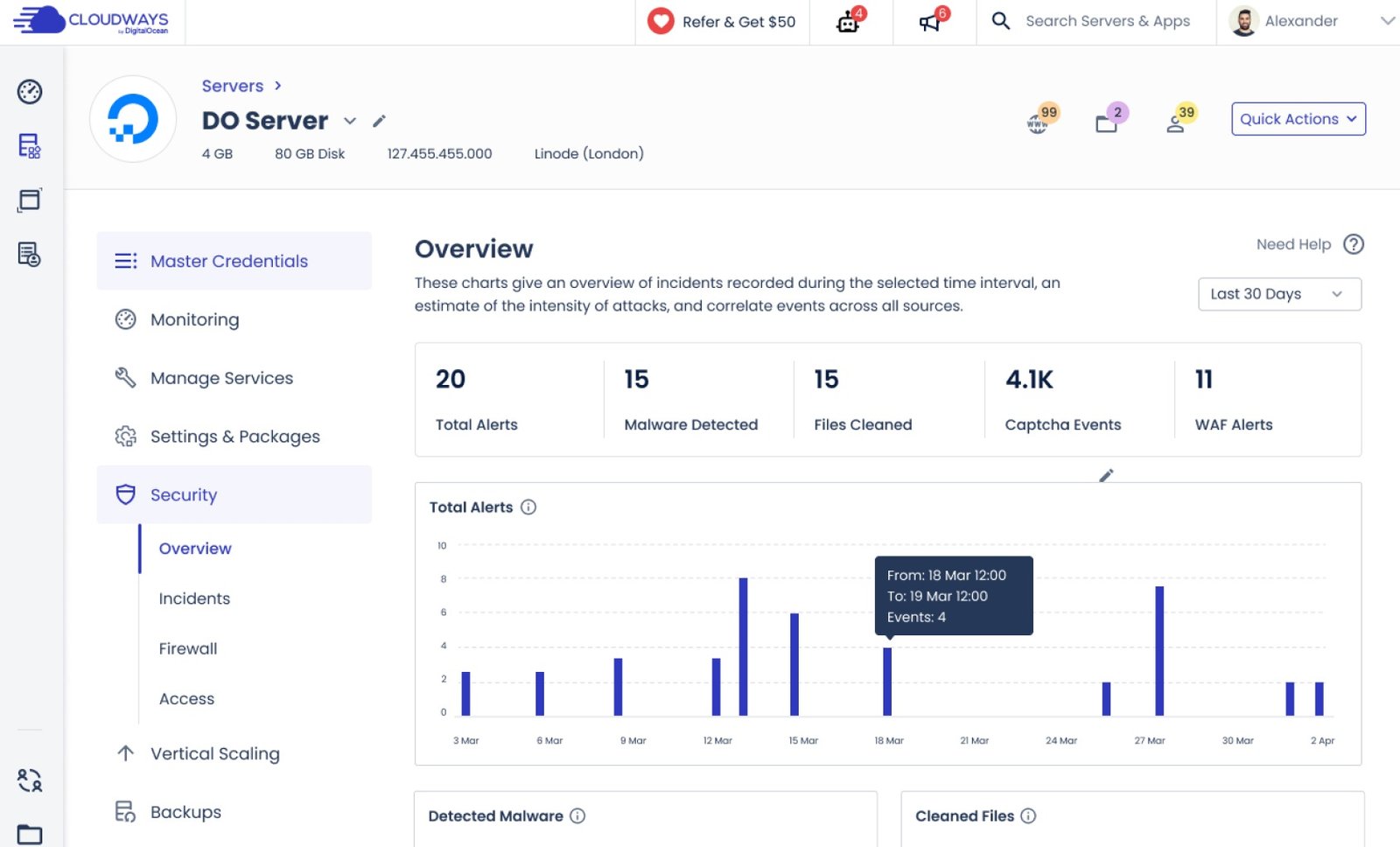
Cloudways employs OS-level firewalls, regular security patching, and automated safeguards against brute-force logins. The optional Cloudflare Enterprise integration provides an incredibly robust Web Application Firewall (WAF) to mitigate DDOS attacks. Additionally, their Team Management feature allows for strict Role-Based Access Control (RBAC), meaning you can grant a freelance developer SFTP access to a specific application without giving them the keys to your entire server.
22. How Cloudways Compares
| Feature | Cloudways (DO Premium) | WP Engine | SiteGround (Shared) |
|---|---|---|---|
| Architecture | Dedicated Cloud Resources | Managed Cloud | Shared Server |
| Pricing Limits | Pay for Server Size (Unlimited sites) | Strict Limits on Sites & Traffic | Cheap entry, expensive renewal |
| Email Hosting | No (Requires add-on) | No | Yes (Included) |
| Control Panel | Custom UI (Developer friendly) | Custom UI (Locked down) | cPanel / Custom UI |
23. PROS & CONS
- Drastically lowers hosting costs compared to legacy managed WordPress providers.
- Provides true dedicated CPU and RAM, eliminating noisy-neighbor site slowdowns.
- 1-click staging, cloning, and vertical scaling makes infrastructure agile.
- Pay-as-you-go hourly billing means you only pay for exactly what you use.
- Does not include native email hosting (no @yourdomain.com inbox included).
- Standard support expects you to handle your own application-level (WordPress) debugging.
- Requires a basic understanding of server logic; no traditional cPanel.
Watch our deep-dive visual teardown of the Cloudways deployment process.
24. Frequently Asked Questions
Does Cloudways use cPanel?
No. Cloudways uses its own proprietary, custom-built control panel designed specifically for cloud server orchestration. It is vastly cleaner and faster than legacy cPanel, but requires a brief adjustment period if you are migrating from shared hosting.
Do they provide free email hosting?
No. Because Cloudways provides dedicated cloud servers optimized purely for web applications, email hosting is not bundled. You will need to use a professional third-party email provider like Google Workspace or Zoho Mail.
Can I scale my server down?
Vertical scaling on Cloudways (increasing RAM/CPU) is a 1-click process. However, because cloud providers allocate physical disk space that cannot easily be shrunk, scaling down requires you to clone the application to a new, smaller server and update your DNS records.
Will they migrate my site for free?
Yes. Cloudways offers one free expert migration handled by their engineering team. Additionally, they provide a highly reliable free WordPress Migration Plugin that automates the transfer of your database and files effortlessly.
What happened to Vultr and Linode options?
Following DigitalOcean's acquisition of Cloudways, the platform heavily prioritized and optimized its stack for DO, AWS, and GCP infrastructure, phasing out new server deployments for competing providers like Vultr and Linode.
Is Cloudways only for WordPress?
No. While it is highly optimized for WordPress and WooCommerce, you can also deploy Magento, Laravel, PHP custom apps, and other frameworks directly from the dashboard.
How do the automated backups work?
Cloudways automatically takes server-level backups at the frequency you choose (daily, hourly) and stores them offsite. If an update breaks your site, you can restore the entire server or just specific application files with a single click.
Does it support WordPress Multisite?
Yes. You can deploy a WordPress Multisite network directly from the application installation menu, and manage domain mapping directly through the platform.
25. Final Verdict
The web hosting industry relies on keeping users ignorant. Shared hosts cram thousands of sites onto failing hardware, while "Managed" hosts charge exorbitant premiums simply for providing a clean dashboard on top of cheap cloud servers.
Cloudways completely shatters this model. By giving you direct access to bare-metal infrastructure (like DigitalOcean and AWS) through an intuitive orchestration layer, it provides enterprise-grade speed and dedicated resources at wholesale pricing. If you are an agency managing multiple client sites, or an e-commerce brand losing sales to a slow checkout cart, migrating to Cloudways is the most mathematically and operationally sound decision you can make for your infrastructure.
Deploy Your High-Performance Server Today →