

Managing hourly employees is historically a logistical nightmare. If you are still relying on paper timesheets or a basic punch-card machine by the door, you are bleeding capital. Employees clock in for their friends ("buddy punching"), dispatchers spend hours deciphering messy handwriting, and manual data entry leads to thousands of dollars in payroll miscalculations.
Buddy Punch was engineered to automate accountability. Operating as a cloud-based time clock, scheduling, and payroll engine, it turns any smartphone or tablet into a secure terminal. But does its geofencing and facial recognition technology actually work in the field, or is it easily bypassed? In this Buddy Punch operational audit, we strip down their mobile tracking and payroll integrations to find out.
- Stop Time Theft: Native facial recognition (Photos on Punch) and IP locking guarantee that the correct employee is clocking in at the correct location.
- Field Accountability: Advanced GPS and geofencing restrict clock-ins to specific job sites, making it essential for construction and remote service teams.
- Automated Payroll: Syncs timesheets instantly to Gusto, QuickBooks, and ADP, or handles taxes directly via Buddy Punch Payroll.
- Predictable Pricing: Subscriptions start at $4.49/user plus a $19 monthly base fee, providing enterprise-grade HR tools for small business budgets.
1. Quick Summary
2. The TL;DR Verdict
Eliminate The Buddy Punch
Buddy Punch solves the oldest problem in shift work: paying for hours not actually worked. By combining drag-and-drop scheduling with strict clock-in parameters—like requiring a selfie and locking the punch to a specific GPS radius—it forces absolute transparency. If you run a mobile workforce or a chaotic retail environment, the automated payroll syncing alone will return your software investment in the first month.
Start Your 14-Day Free Trial →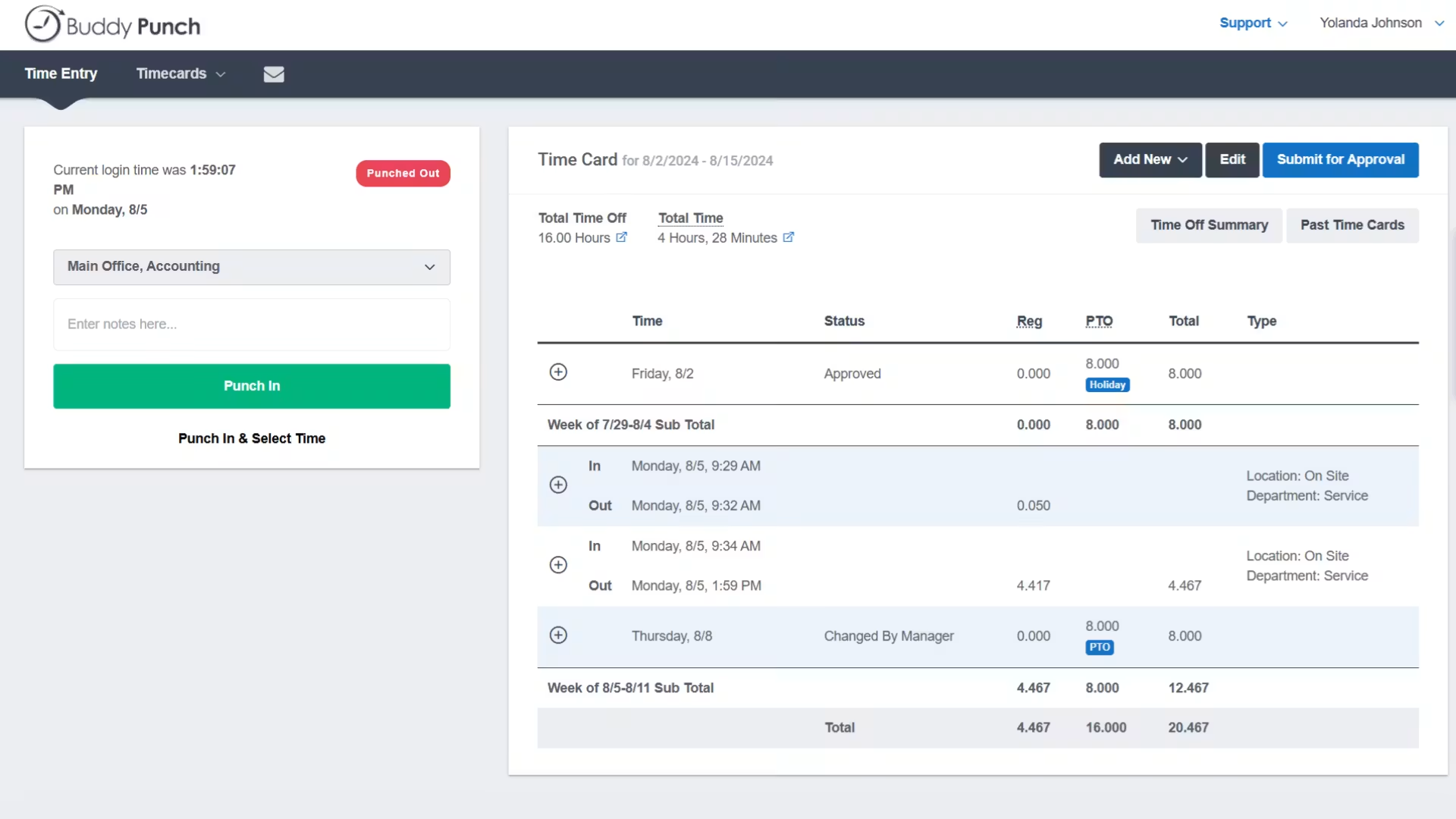
3. How We Evaluated Buddy Punch
To ensure an objective technical audit, we deployed Buddy Punch in a simulated multi-site retail environment over a 14-day period. Our evaluation process included:
- Accountability Stress Test: Attempting to spoof the system by clocking in outside of a designated geofence and bypassing the facial recognition prompt.
- Scheduling Logic: Building a 20-employee weekly schedule to test drag-and-drop velocity, shift swapping, and automated alerts.
- Payroll Integration: Exporting a finalized pay period and syncing the data directly into QuickBooks to measure data alignment and overtime rule compliance.
- Mobile Friction: Testing the iOS and Android applications under poor cellular connections (common on construction sites) for offline punch reliability.
4. What Buddy Punch Actually Does
Buddy Punch replaces physical time clocks and Excel schedules with a unified cloud terminal.
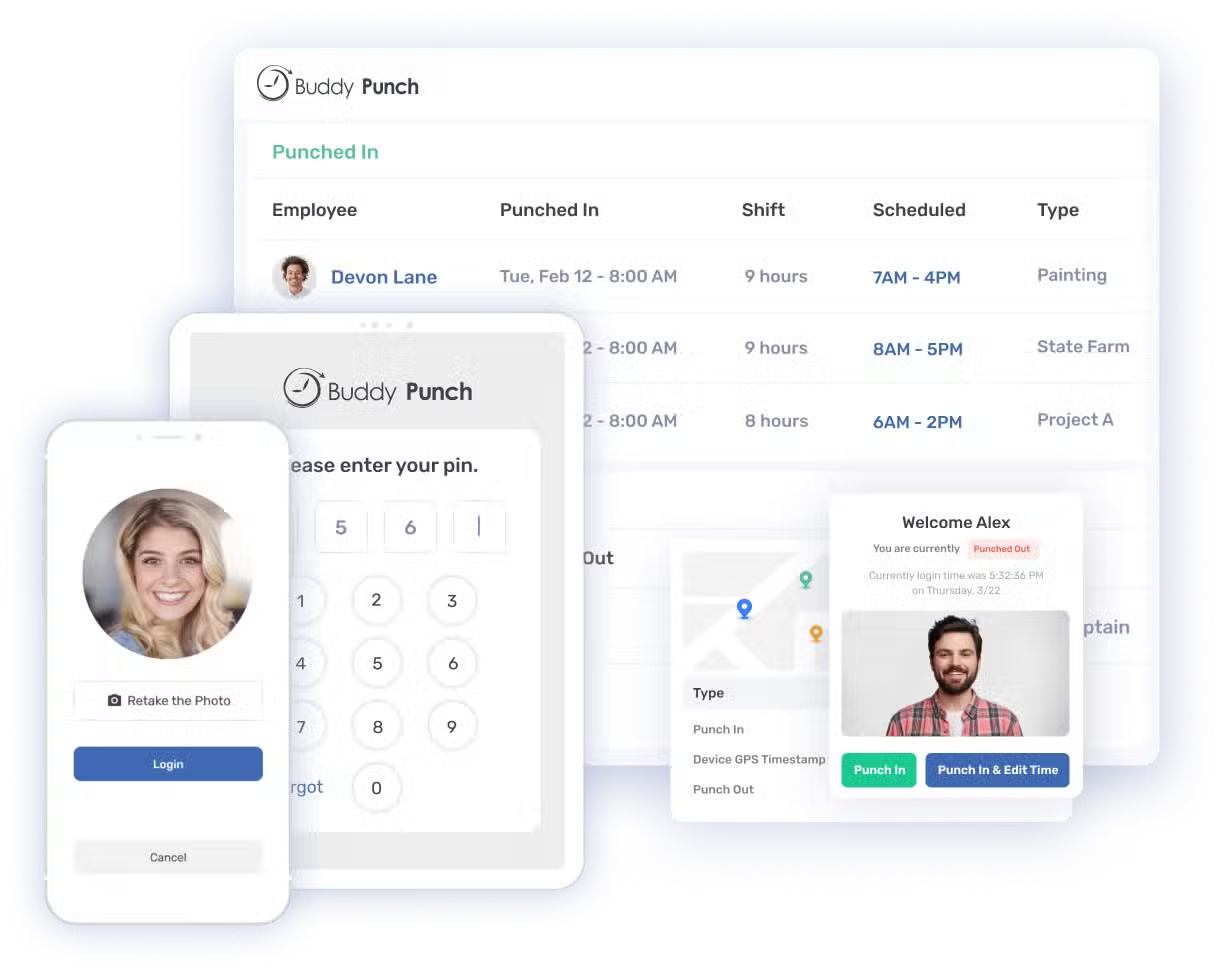
Employees download the app on their phone or use a shared iPad "Kiosk" at the front door. When they arrive, they hit a button, the camera takes a photo to verify their identity, and the GPS verifies they are actually in the building. The software tracks their hours, automatically deducts unpaid lunch breaks, calculates any overtime based on local state laws, and drops a perfectly formatted timesheet onto the manager's desk for 1-click payroll approval.
Watch our deep-dive visual teardown of the Buddy Punch geofencing setup.
5. Core Features Matrix
6. The Data: The Cost of Time Theft
The American Payroll Association estimates that 75% of businesses lose money to "buddy punching" (coworkers clocking in for a late friend). Here is the financial reality of unverified timesheets.
7. Technical Setup: Geofencing & IP Locks
Setting up accountability parameters is incredibly straightforward. For remote or field teams, you type the address of the job site into the dashboard and define a radius (e.g., 500 feet). For office or retail environments, you can implement an IP Address Lock. This physically prevents employees from using the app to clock in unless their phone is connected to the company's specific Wi-Fi network.
8. Workflow & Deployment Timeline
Here is what the execution pipeline looks like for an operations manager setting up a new crew:
Step 1: Roster Integration
Upload your employee list via CSV. Employees receive an email or text to download the mobile app and create their secure PIN.
Step 2: Rule Enforcement
Turn on "Photos on Punch" and set up an automatic clock-out rule (e.g., auto clock out at 5:00 PM if the shift ends) to prevent accidental overtime.
Step 3: Shift Scheduling
Use the drag-and-drop calendar to assign the week's shifts. Hit publish, and all employees receive a push notification with their exact hours.
Step 4: Payroll Sync
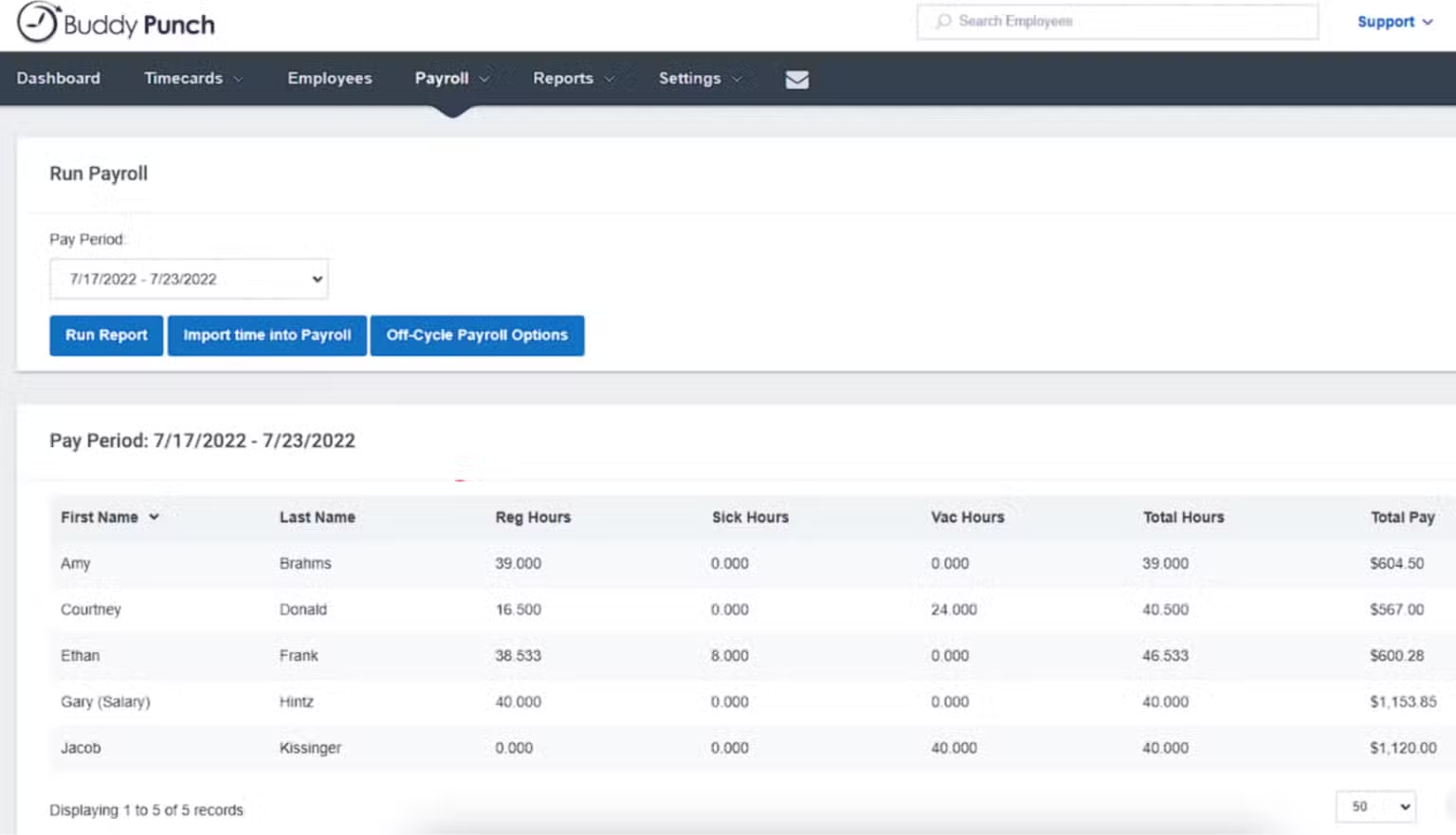
At the end of the week, review the digital timesheets for any missed punches. Click one button to push the verified hours directly into Gusto or QuickBooks.
9. Feature Focus: Facial Recognition (Photos on Punch)
On the Pro and Enterprise plans, you unlock the ultimate accountability tool. If an employee uses a shared tablet (Kiosk mode) or their own phone, the app requires a selfie at the exact moment of the punch. Managers can review the timesheet dashboard and see a visual grid of faces next to the timestamp, instantly identifying if someone handed their phone to a friend in the parking lot.
10. Feature Focus: Native Scheduling
Instead of paying for a separate tool like When I Work, scheduling is integrated directly (included in Pro/Enterprise, or a $1 add-on for Starter). You can save weekly templates, and employees can submit their availability or request shift swaps directly through the app. Most importantly, you can restrict punches so an employee cannot clock in 30 minutes before their scheduled shift starts, preventing unauthorized labor bleed.
11. Feature Focus: Payroll Automation
Buddy Punch acts as the collection engine, but it also handles the payout. You can either use its deep API connections to push hours natively into ADP, Paychex, or Gusto, OR you can pay an extra $6/user/month to use Buddy Punch Payroll. This add-on handles W-2s, 1099s, automated tax filings, and direct deposits, consolidating your entire HR stack under one roof.
12. Example Use Cases
13. The Real ROI (Efficiency vs. Expense)
Hover over the metrics below to see the baseline operational advantages of adopting digital time tracking.
The system automatically calculates daily and weekly overtime based on state laws, ensuring you never face labor board fines for miscalculated paychecks.
Eliminate the Friday afternoon nightmare of collecting text messages, deciphering paper cards, and manually typing hours into QuickBooks.
14. Who Buddy Punch Is Best For
- Blue-Collar & Service Crews: The mobile app, GPS coordinates, and offline punch capabilities make it perfect for landscaping, plumbing, and construction teams.
- Managers Tired of Excuses: If you are constantly dealing with "I forgot to clock out" or "I was stuck in traffic," the automated punch-outs and geofencing remove the gray area.
- Scaling Small Businesses: The aggressive pricing model allows a 10-person shop to access enterprise-grade facial recognition for under $80 a month.
15. Who Should Avoid Buddy Punch
- Solo Freelancers: If you are just tracking your own time to bill a client, a heavyweight app like this is overkill. Use a free tool like Toggl or Clockify.
- Organizations Needing Deep ATS: Buddy Punch is brilliant for time and payroll, but it does not include an Applicant Tracking System (ATS) for hiring and recruiting like massive suites (e.g., Rippling) might.
16. Integration Ecosystem & Synergy
17. Real User Sentiment (G2 & Capterra)
Across software review boards, Buddy Punch holds an exceptionally high 4.8/5 consensus rating among operations managers:
- The Praise: The overwhelming majority of reviews highlight the sheer simplicity of the interface. Unlike clunky legacy HR software, employees over 50 with limited tech skills report zero issues using the mobile app. The ease of the QuickBooks integration is heavily praised.
- The Complaints: Negative feedback is rare but occasionally targets the GPS load times. If an employee is in an area with poor cellular service, the geofence map can take a few seconds to pinpoint their location before allowing the punch.
18. Pricing Realities & Feature Tiers
Buddy Punch utilizes a transparent "Base Fee + Per User" model. The prices below reflect annual billing (which saves up to 18%).
Starter Plan
- +$19 Monthly Base Fee
- Standard GPS Tracking
- PTO & Time Off Management
- Basic Payroll Integrations
Pro Plan
- Includes Scheduling Add-on
- Geofencing & IP Locks
- Facial Recognition (Webcam)
- QR Code & Kiosk Mode
19. The Hidden Costs & Add-Ons
While the base pricing is highly competitive, scaling your feature set requires specific add-ons that inflate the per-user cost:
- Scheduling: If you are on the Starter plan, the drag-and-drop schedule builder costs an extra $1/user/mo (it is included for free on Pro and Enterprise).
- Live GPS Tracking: If you want to see a live map of your team moving in real-time (rather than just capturing GPS upon clocking in), the Real-Time GPS add-on is $2/user/mo.
- Full Payroll: Processing W2s and direct deposits via Buddy Punch Payroll adds $6/user/mo plus a $39 base fee.
20. Best Practices: "The Alpha Plan"
To eliminate time theft completely, you must execute the Alpha Plan for terminal restrictions.
21. Security & Compliance
Time tracking is subject to heavy state and federal labor laws. Buddy Punch ensures compliance by allowing managers to configure strict rest and meal break rules (auto-deducting them to comply with state mandates). The system maintains an unalterable audit log of every time a manager edits a timesheet, protecting the company in the event of an employee labor dispute.
22. How Buddy Punch Compares
| Feature | Buddy Punch | Homebase | QuickBooks Time |
|---|---|---|---|
| Facial Recognition | Yes (Pro Plan) | Basic Photo Capture | No |
| Geofencing | Excellent | Good | Excellent (TSheets legacy) |
| Pricing Structure | Base Fee + Per User | Per Location (Flat) | Base Fee + Per User (Pricier) |
| Scheduling | Native (Pro Tier) | Native (Core feature) | Add-on required |
23. PROS & CONS
- Facial recognition and IP locks physically eliminate "buddy punching" time theft.
- The interface is incredibly intuitive, requiring zero training for non-technical staff.
- Automated syncing with major payroll providers (Gusto, ADP) saves hours of data entry.
- Unlimited administrators are free; you only pay for active employees.
- The $19/mo base fee makes it slightly more expensive for micro-teams of 1-3 people.
- Advanced features like scheduling and geofencing require upgrading to the Pro plan.
24. Frequently Asked Questions
Are administrators counted as paid users?
No. Buddy Punch allows you to add an unlimited number of Administrators for free. You only pay for active Employees and Managers who need to track time or manage schedules.
Do employees need a unique email address?
No. Employees can clock in and out using a secure PIN on a shared Kiosk device, or by scanning a unique QR code, eliminating the need for corporate email addresses.
How does Geofencing work?
You enter a job site address into the dashboard and define a radius. When an employee tries to clock in via the mobile app, the GPS verifies their location. If they are outside the radius, the punch is denied or flagged for a manager.
Does it integrate with QuickBooks?
Yes. Buddy Punch has a deep integration with both QuickBooks Online and QuickBooks Desktop, allowing you to push finalized timesheet data directly into your accounting software with one click.
Can it automatically deduct lunch breaks?
Yes. You can configure "Automatic Breaks" to automatically deduct 30 or 60 minutes from a timesheet if an employee works past a certain threshold, ensuring compliance with state break laws without manual tracking.
What happens if a worker forgets to clock out?
You can set up "Automatic Punch Outs" that clock an employee out after a maximum shift length, or you can require them to submit a punch correction note the next day, which a manager must approve.
Can employees request time off in the app?
Yes. The PTO tracking feature allows employees to view their vacation/sick accrual balances and submit requests. Once a manager approves it, the hours automatically populate on the schedule and timesheet.
Is there a free plan?
Buddy Punch does not offer a forever-free plan, but they do provide a 14-day full-feature free trial with no credit card required to test the infrastructure.
25. Final Verdict
Relying on the honor system for hourly payroll is an operational failure. Unverified paper timesheets lead to padding, and generic mobile apps are easily manipulated by employees clocking in from their cars.
Buddy Punch is the ultimate infrastructure for workforce accountability. By layering facial recognition, IP address locking, and strict geofencing over an incredibly simple mobile app, it forces absolute transparency. Whether you are managing a remote construction crew or a high-turnover retail floor, the hours saved on payroll data entry and the elimination of time theft will cover the cost of the software in its first week of deployment.
Deploy Your Time Tracking Infrastructure Today →