Running a private health practice or coaching business requires managing a massive amount of moving parts. If you are duct-taping together Calendly for scheduling, Stripe for payments, Zoom for telehealth, and Google Drive for client notes, you are bleeding profit. Worse, assembling this fragmented tech stack is a massive HIPAA compliance violation waiting to happen.
Practice Better was built to solve this exact bottleneck. It is a comprehensive Electronic Health Record (EHR) and practice management platform designed specifically for health and wellness professionals. It consolidates your entire tech stack into a single, compliant dashboard. But is it too complex for a solo practitioner? In this Practice Better review, we examine the platform's actual workflow to find out.
1. Quick Summary
The Ultimate Compliance Hack
Practice Better eliminates the anxiety of managing client health data. By centralizing automated scheduling, secure invoicing, telehealth video calls, and charting into one encrypted platform, you can finally stop paying for 5 different software subscriptions. It is the fastest way to turn a messy coaching side-hustle into a professional, scalable clinical practice.
Start Your 14-Day Free Trial →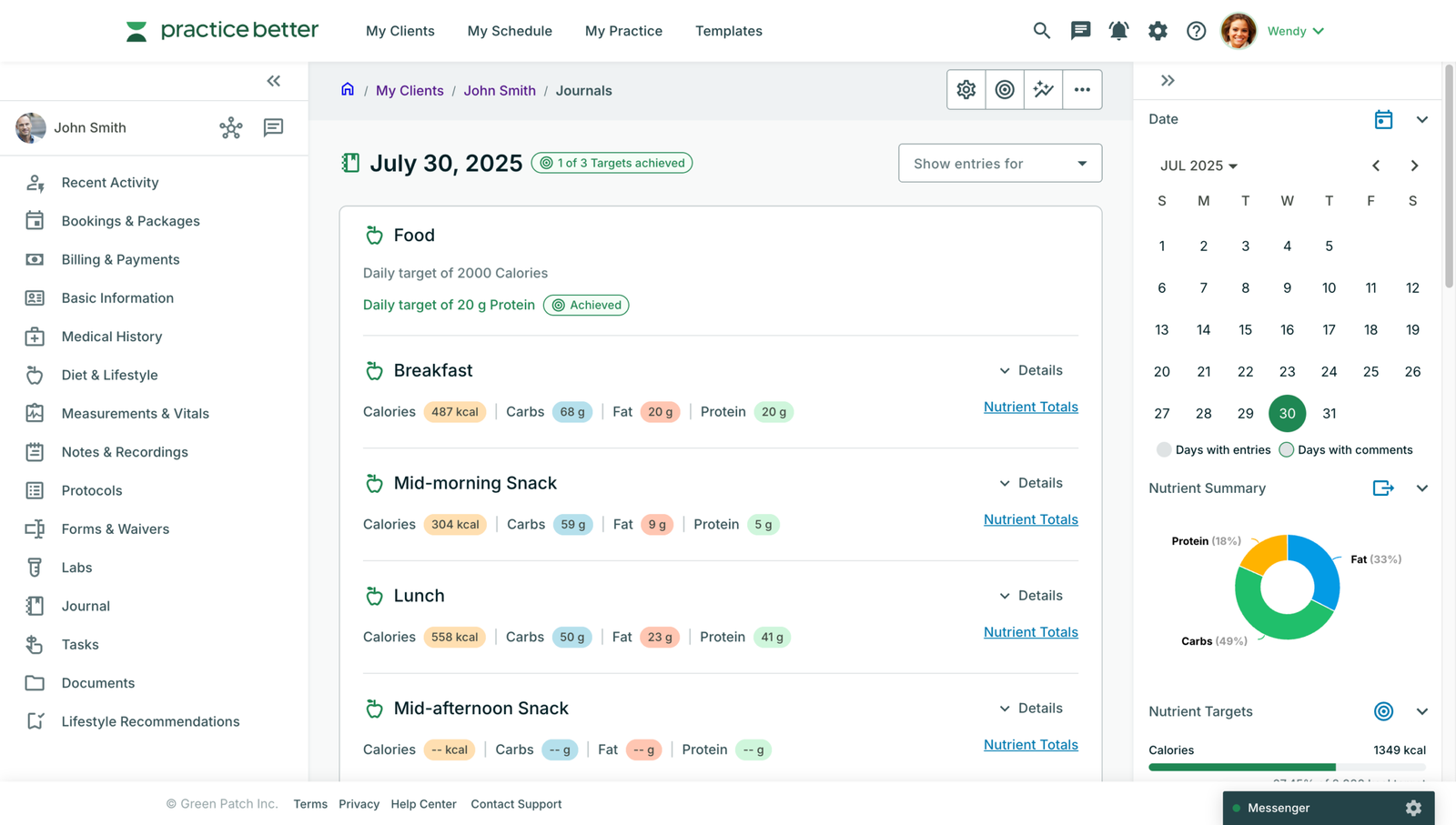
2. What Practice Better Actually Does
Practice Better acts as the operational brain of your health business.
It replaces your scheduling software by allowing clients to book sessions based on your exact availability. It replaces your billing software by taking secure credit card payments upfront. It replaces your course platform by letting you build and sell scalable group programs. Finally, it replaces your clinical filing cabinet by providing a secure, HIPAA-compliant client portal where patients can log their food, track their mood, and securely message you between sessions.
3. Core Features
4. The Data: Consolidating Your Software
Trying to run a modern coaching practice by subscribing to multiple specialized tools is mathematically inefficient. Here is how consolidating into an EHR changes your overhead.
5. The Technical Setup (HIPAA & BAA)
If you are handling Protected Health Information (PHI), using standard Gmail or unencrypted web forms is illegal. Practice Better handles this technical burden for you.
The platform is natively HIPAA, PIPEDA, and GDPR compliant. More importantly, upon signing up, Practice Better provides you with a signed Business Associate Agreement (BAA). This legally binds them to protect your data, ensuring that your entire workflow—from the client intake form to the video call—is completely secure and audit-ready.
6. Practical Workflow & Timeline
Here is what the onboarding and client workflow looks like for a new practitioner:
Step 1: Service Setup
Create your service offerings (e.g., "Initial 60-Min Consultation"). Attach a required intake form and set your pricing.
Step 2: Client Booking
The client clicks your booking link, chooses a time, pays via Stripe/Square, and automatically receives a secure login to their client portal.
Step 3: The Session
Host the session via the built-in telehealth feature while typing your clinical notes directly into their chart on the same screen.
Step 4: Protocols & Follow-up
Send the client a secure "Protocol" document containing their meal plans, supplement recommendations, and automated check-in reminders.
7. Example Use Cases
8. The Real ROI (Admin Time vs. Revenue)
Hover over the metrics below to see the baseline financial advantages of utilizing a unified practice management tool.
Eliminates the back-and-forth emails of scheduling, chasing payments, and manually sending intake forms.
Rest easy knowing every chat message, video call, and patient file is securely encrypted.
9. Who Practice Better Is Best For
- Nutrition-Focused Professionals: Because the platform has a massive built-in database for food logging and macro tracking, it is the undisputed leader for dietitians and nutritionists.
- Scaling Coaches: If you want to build and sell an evergreen "6-Week Gut Health Reset" course alongside your 1-on-1 practice, the "Programs" feature handles this flawlessly.
- Solo Practitioners: If you don't have the budget to hire a receptionist, the automated booking and billing features effectively replace an administrative assistant.
10. Who Should Avoid Practice Better
- Pure Psychotherapists: While it is secure, the heavy emphasis on food journals and supplement protocols can feel clunky for mental health professionals who just need simple video calls and clinical notes (SimplePractice is often better here).
- Insurance-Heavy Practices: While Practice Better does support creating Superbills and CMS-1500 forms, it does not currently have direct, built-in insurance claim scrubbing and clearinghouse routing.
11. Pricing & Feature Tiers
Practice Better prices its software based on the feature set you require, making it highly accessible for brand new coaches just starting out.
Starter Plan
- Unlimited clients
- Automated scheduling & billing
- Secure Client Portal
- Telehealth costs extra
Pro Plan
- Included Telehealth (Zoom)
- Run Group Programs / Courses
- Custom branding & colors
- Advanced Zapier integrations
12. Best Practices: "The Alpha Plan"
If you want to absolutely dominate the B2B SaaS affiliate space and capture practitioners looking for an upgrade, you must execute the Alpha Plan for your campaigns.
13. How Practice Better Compares
| Feature | Practice Better | SimplePractice | Healthie |
|---|---|---|---|
| Best Target User | Nutrition & Coaching | Therapists & Mental Health | Enterprise Clinics |
| Food/Lifestyle Logs | Excellent (Native) | No | Good |
| Online Programs | Built-In Course Builder | No | Yes |
| Insurance Billing | Superbills Only | Full Clearinghouse | Full Clearinghouse |
14. Limitations & Reality Check
- Learning Curve: Because it is an all-in-one system, the backend can feel slightly overwhelming on day one. Setting up your forms, protocols, and automation flows correctly takes a solid weekend of focused work before you invite your first client.
- Client Compliance: The software is incredible, but it requires your clients to actually download the app and use it. If you deal with an older, non-tech-savvy demographic, getting them to use the secure portal instead of regular text messaging can be a challenge.
15. PROS & CONS
- Consolidates 5 different software subscriptions into one clean dashboard.
- 100% HIPAA compliant with a provided BAA.
- The client mobile app is beautiful and encourages engagement.
- Allows you to sell passive income "Programs" alongside 1-on-1 coaching.
- Does not support direct insurance claim scrubbing.
- Telehealth video is restricted on the entry-level Starter plan.
16. Frequently Asked Questions
1. Is Practice Better HIPAA Compliant? +
Yes. Practice Better meets the strict security standards of HIPAA (US), PIPEDA (Canada), and GDPR (Europe). They will provide you with a signed Business Associate Agreement (BAA) to keep your practice legally compliant.
2. Do clients have to pay to use the app? +
No. The Client Portal—both the web version and the iOS/Android mobile apps—is completely free for your clients to download and use to communicate with you.
3. Can I use Practice Better to sell online courses? +
Yes! Their "Programs" feature (available on Pro and Plus plans) functions like a mini-Teachable. You can build structured, drip-fed video courses and sell them as standalone products or bundle them with coaching.
4. Does it connect to my Google Calendar? +
Yes. Practice Better features deep, two-way sync with Google Calendar, Apple Calendar, and Outlook. If you block off time in your personal Google Calendar, clients will not be able to book you during that slot.
5. Can I have multiple practitioners on one account? +
Yes. The platform scales from solo practitioners to large group practices. You can add additional practitioners to your team account and manage their permissions, scheduling, and billing centrally.
6. Is there a free trial? +
Yes, Practice Better offers a 14-day free trial on their paid plans, allowing you to test the telehealth tools, build forms, and explore the backend before committing.
17. Final Verdict
As a health professional, you should be spending your time getting your clients results, not chasing down broken Zoom links or worrying about whether your Google Drive folder violates HIPAA laws.
Practice Better solves the operational chaos of running a modern health business. By pulling scheduling, billing, telehealth, and charting into one beautiful, secure dashboard, it allows you to run a highly professional, scalable clinic from your laptop. If you are serious about growing your practice, it is the best investment you can make.
Consolidate Your Practice Today →