

The biggest mistake new YouTubers make is filming a video, editing it for 10 hours, and then trying to figure out the title and thumbnail.
Tools like TubeBuddy and VidIQ sell "SEO optimization" for videos that are already destined to fail. TubeLab takes the opposite approach. It is a pre-production research engine designed to find exactly what audiences want to watch before you hit record. It scans YouTube to find "Outliers"—videos getting 50x more views than their channel's subscriber count. In this TubeLab review, we put its data engine to the test to see if it can predict viral hits.
Quick Summary
The End of Guesswork
TubeLab eliminates the risk of creating dead content. By showing you highly specific patterns—like a channel with only 2,000 subscribers getting 300,000 views on a video—you can reverse-engineer the exact hook, title formula, and thumbnail style that broke the algorithm. It is arguably the highest ROI research tool in the creator economy right now.
Start Finding Viral Outliers →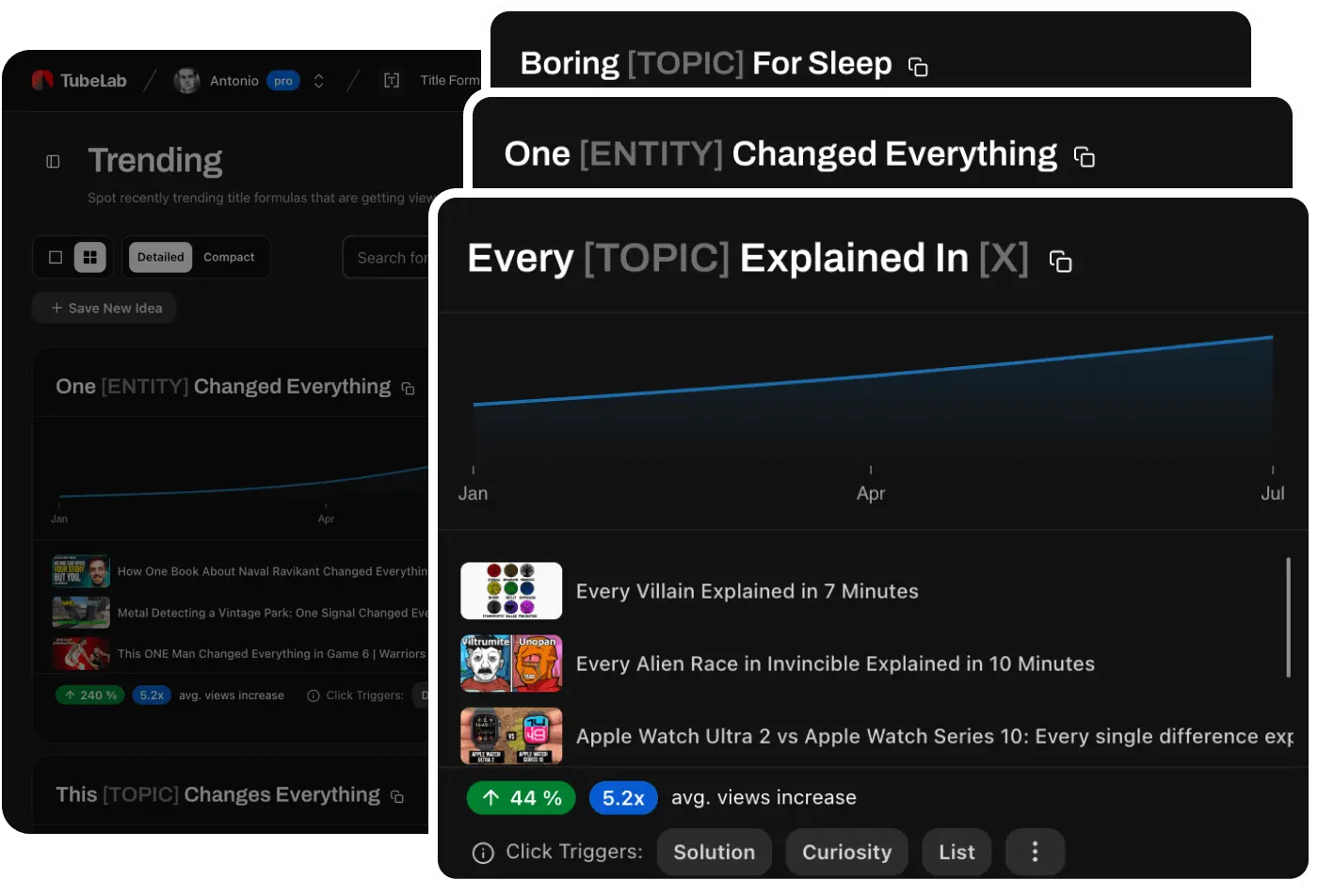
What TubeLab Actually Does
TubeLab crawls the depths of YouTube daily to find data anomalies.
Instead of showing you what MrBeast is doing (which you can't replicate without his budget), TubeLab finds small, unknown channels that recently had a massive spike in viewership. It aggregates these "Outliers" into a searchable dashboard. It also features a "Title Formulas" library that breaks down the psychological structure of 4 million successful titles so you can adapt them to your own niche.
Core Features
How to Use TubeLab — Workflow
We used TubeLab to plan a video for a tech/SaaS channel.
- The Search: We opened the Outlier Finder and searched for "CRM Software."
- The Filter: We set the parameters: Uploaded in the last 30 days, Channel Size < 50k subs, Performance Multiplier > 10x.
- The Discovery: It surfaced a video from a 3k-sub channel that got 85k views. The title structure was: "I Tried [X] So You Don't Have To."
- The Execution: We took that exact title formula, passed it through TubeLab's AI Ideation, and generated a highly clickable concept tailored to our specific software audience.
Example Use Cases
Who TubeLab Is Best For
- Data-Driven Creators: If you treat YouTube like a business rather than a personal diary, this is your command center.
- Faceless Channels ("Cash Cows"): Essential for finding low-competition, high-search-volume topics.
- Agencies: Who need to justify content strategy to brands using hard performance data, not just "gut feeling."
Who Should Avoid TubeLab
- Vloggers/Personality Channels: If your channel relies entirely on your daily life or personality, data analysis won't help you much. Your face is the niche.
- Post-Production Editors: If you just want a tool to automatically generate video tags or descriptions inside YouTube Studio, stick to VidIQ.
Pricing & Value Comparison
TubeLab is significantly cheaper than enterprise-level outlier tools like ViewStats Pro or 1of10.
| Plan | Price (Approx) | Key Value |
|---|---|---|
| Monthly | ~$29 /mo | Full access to Outlier Finder, Niche Analyzer, and Title Formulas. |
| Annual | ~$178 /yr | Brings the cost down to ~$14/mo. Incredible value for serious creators. |
| Free Tools | $0 | Free Chrome Extension for checking Monetization status & RPM estimates. |
How TubeLab Compares
| Feature | TubeLab | TubeBuddy | ViewStats Pro |
|---|---|---|---|
| Core Focus | Ideation / Outliers | SEO / Workflow | Analytics / Outliers |
| Performance Filters | 5x to 50x Multipliers | Basic Search | Advanced |
| Niche Saturation Data | Yes | No | No |
| Annual Cost | ~$178/yr | ~$316/yr | ~$479/yr |
Limitations & Reality Check
- Execution is Still on You: Finding an outlier concept is only step one. If the original video went viral because of incredible storytelling and your version is a boring AI voiceover, it will still flop. The data doesn't replace the need for good pacing and editing.
- Shorts Data: Currently, the Niche Analyzer heavily favors long-form content. Shorts-only channels present unique tracking challenges across all platforms, though it is rapidly improving.
Best Practices: "The Adjacent Pivot"
Don't just copy your direct competitors.
Pros & Cons
- Reveals exactly what the algorithm is pushing today.
- Significantly cheaper than direct outlier competitors (1of10, ViewStats).
- Title formulas are a massive time-saver for packaging concepts.
- Free Chrome extension provides instant RPM insights on any video.
- No native A/B testing for thumbnails (unlike TubeBuddy).
- Requires you to actively research rather than passively optimizing.
- Does not plug directly into the YouTube Studio dashboard.
Frequently Asked Questions
What exactly is an "Outlier"?
An outlier is a video that performs exponentially better than its channel's baseline. For example, if a channel normally gets 1,000 views, a video that gets 25,000 views is a 25x Outlier. This indicates a highly viral topic or format.
Is this better than VidIQ or TubeBuddy?
It serves a completely different purpose. VidIQ/TubeBuddy are for optimizing videos you've already made (tags, descriptions). TubeLab is for researching what video to make in the first place.
How often is the data updated?
TubeLab continuously scans YouTube, updating its database daily with new high-performing channels and videos to ensure you spot trends early.
Does it work for Faceless Channels?
Yes, in fact, it is heavily favored by faceless channel operators for finding highly profitable, low-competition topics to produce at scale.
Final Verdict
If you are staring at a blank script trying to figure out what to film, you are doing YouTube wrong.
TubeLab fundamentally changes how you approach content creation. By letting the data dictate your ideas—specifically by reverse-engineering videos that broke the algorithm on small channels—you drastically increase your chances of going viral. At less than half the price of its main competitors, it is a mandatory tool for any serious creator.
Find Your Next Viral Video →