

The "blank canvas" phase of digital product design is notoriously slow. You know exactly what a dashboard or a mobile app should do, but spending hours drawing vector boxes and aligning components in Figma stalls your momentum. You end up wasting the first week of a project just trying to get the foundational wireframes in place.
UX Pilot was built to eradicate this design bottleneck. It is an AI-powered UI/UX generator that creates structured wireframes, user flows, and high-fidelity mockups from simple text prompts. But can an AI actually generate practical, developer-ready layouts, or are they just pretty, unusable concepts? In this UX Pilot review, we dive deep into the Figma integration to find out.
1. Quick Summary
The End of Blank Canvas Paralysis
UX Pilot serves as a massive accelerator for product development. Instead of manually drafting screen layouts, you simply type your requirement (e.g., "B2B SaaS Analytics Dashboard"), and the AI generates a structured, customizable UI. Because it integrates directly into Figma, the layouts aren't trapped in a web app—they drop straight into your existing design workflow.
Start Generating Designs for Free →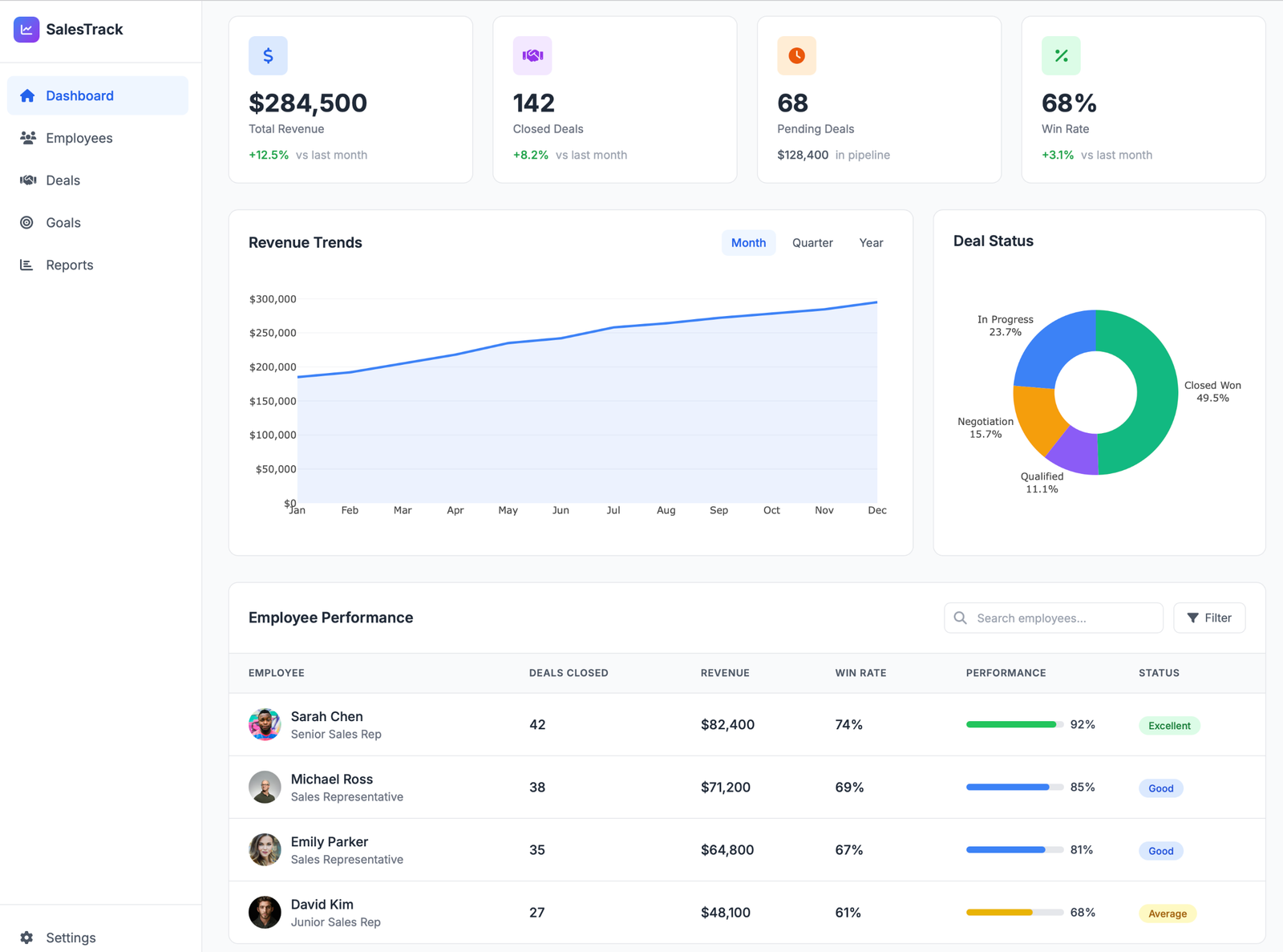
2. What UX Pilot Actually Does
UX Pilot translates plain text into structured visual layouts.
Whether you are using their standalone web interface or their dedicated Figma plugin, you provide a prompt detailing the screen you need. The AI analyzes standard UI/UX patterns and instantly generates a multi-screen flow, complete with placeholder text, buttons, and navigation elements. It isn't just generating a flat image; it generates layered, editable components that you can immediately tweak. Once generated, it also offers predictive heatmaps to show you exactly where a user's eye will be drawn before you ever run a live usability test.
3. Core Features
4. The Data: Prototyping Velocity
For product teams and agencies, speed is everything. Moving from ideation to a testable prototype quickly is what keeps client feedback loops tight.
5. The Technical Setup (Responsive & Code Exports)
Because mobile users are the primary buyers for modern SaaS tools, you need a tool that generates high-converting mobile breakpoints natively. UX Pilot handles mobile-first generation effortlessly.
Furthermore, when restructuring a B2B landing page, you often need to bypass rigid theme constraints—like stretching background content to be full-width to balance an oversized logo. UX Pilot’s HTML/CSS export provides the clean, raw code necessary to make those specific container adjustments without fighting a visual site builder.
6. Practical Workflow & Timeline
Here is what the "Zero-to-Prototype" process looks like for a product designer:
Step 1: The Prompt
Open the UX Pilot Figma plugin or web app. Type a specific prompt: "A mobile checkout flow for a meal delivery app with an upsell screen."
Step 2: Generation
The AI takes a few seconds to generate the multi-screen flow, utilizing standard, high-conversion UX layout principles.
Step 3: Figma Import & Edit
Import the design directly into Figma. All text, buttons, and shapes are editable layers. Swap out the AI's colors for your specific brand hex codes.
Step 4: Heatmap Validation
Run the predictive heatmap to ensure the primary "Buy Now" CTA is actually drawing the eye. Make structural adjustments if necessary.
7. Example Use Cases
8. The Real ROI (Speed vs. Quality)
Hover over the metrics below to see the baseline operational advantages of introducing AI into your design stack.
Eliminates the tedious hours spent drawing boxes and searching for placeholder text.
Unlike image generators (like Midjourney), UX Pilot produces structured, fully modifiable Figma layers.
9. Who UX Pilot Is Best For
- Non-Designers & Developers: If you know how to code but lack an eye for visual hierarchy, UX Pilot generates beautiful, standard-compliant layouts for you to build from.
- Fast-Paced Agencies: If your team handles high-volume client prototyping, generating the base wireframes with AI allows you to move to the feedback stage almost instantly.
- Solo Product Managers: Helps PMs visualize new features and user flows clearly before handing them off to the engineering team.
10. Who Should Avoid UX Pilot
- Pixel-Perfect Purists: The AI generates strong structural starting points, but it rarely produces a 100% finished, high-fidelity masterpiece on the first click. You will still need to manually tweak paddings, margins, and brand-specific typography.
- Heavy Animation Needs: If you are looking for a tool that generates complex, logic-driven interactive prototypes with advanced micro-animations, you will still need to use native Figma prototyping features.
11. Pricing & Credit Limits
UX Pilot operates on a highly accessible freemium model, making it incredibly easy to test before committing to a paid tier.
Free Plan
- Up to 15 screens generation
- Basic wireframes & Hifi UI
- Non-commercial use only
- Perfect for testing the AI
Standard / Pro
- Commercial rights included
- Native Figma & Code Export
- Predictive Heatmaps & Scoring
- Unlimited flows (Pro tier)
12. Best Practices: "The Alpha Plan"
If you want to drastically scale your agency's output or speed up your product launches, you must execute the Alpha Plan for design workflows. Stop treating AI as a toy and start treating it as an operational pipeline.
13. How UX Pilot Compares
| Feature | UX Pilot | Uizard | Relume |
|---|---|---|---|
| Primary Focus | UI/UX Apps & Dashboards | Rapid Ideation / MVPs | Websites & Landing Pages |
| Figma Integration | Native Plugin | Limited | Excellent |
| Component Sync | Yes (Imports your styles) | Uses native templates | Uses Relume library |
| Predictive Heatmaps | Yes (Built-in) | No | No |
14. Limitations & Reality Check
- The "Plugin Dependency" Trap: While you can generate designs on the web app, getting the absolute most out of UX Pilot requires using the Figma plugin. If you use Sketch or Adobe XD exclusively, your workflow will not be nearly as seamless.
- AI Homogenization: Because the AI is trained on standard UX practices, the generated layouts tend to look highly functional but slightly generic. If you are designing a highly avant-garde, award-winning creative portfolio site, the AI's structured, block-based logic might feel too restrictive.
15. PROS & CONS
- Massively accelerates the wireframing and prototyping phase.
- Generates editable, layered Figma components, not flat images.
- Predictive heatmaps validate design structure instantly.
- Clean HTML/CSS export gives developers a major head start.
- Free plan is highly restrictive (15 screen cap).
- Generated designs still require manual styling and padding tweaks.
16. Frequently Asked Questions
1. What can UX Pilot actually generate? +
UX Pilot can generate everything from low-fidelity wireframes and complex SaaS dashboards to landing pages, flowcharts, and multi-screen user journeys directly from a simple text prompt.
2. Does it work inside Figma? +
Yes! One of UX Pilot's strongest features is its native Figma plugin. You can generate screens, pull in web-generated layouts, and even import your own Figma components to ensure the AI matches your brand guidelines.
3. Can I export the code for the designs? +
Yes, the platform includes an HTML/CSS export feature. While it won't entirely replace a front-end developer, it provides clean, foundational code that drastically speeds up the implementation process.
4. How does the Predictive Heatmap work? +
The heatmap tool simulates human visual attention on your generated layouts. It helps you identify whether users will actually look at your primary Call-to-Action (CTA) buttons before you run live usability tests.
5. Can I use the designs for commercial projects? +
Commercial rights are granted starting on the Standard paid plan ($15/mo). The Free plan is strictly for non-commercial ideation and testing.
6. Is UX Pilot better than Uizard? +
It depends on your workflow. Uizard is fantastic as a standalone app for rapid ideation and MVPs. However, UX Pilot provides a much deeper, seamless integration for teams whose primary workflow relies heavily on Figma.
7. Do I need to be a designer to use it? +
No. While designers love the Figma plugin, founders and developers can use the web interface to generate clean, standard-compliant UI layouts just by typing what they want to build.
8. Will it write the copy for my landing page? +
Yes. Instead of using generic "Lorem Ipsum" text, the AI analyzes your prompt and generates relevant placeholder copy, headings, and CTA button text to match the context of your design.
17. Final Verdict
Staring at a blank screen and nudging vector shapes around for hours is a terrible use of a product designer's time. Your value comes from solving user problems, not from drawing standardized login screens.
UX Pilot acts as the ultimate structural assistant. By generating functional, editable UI layouts natively inside Figma, it allows agencies and founders to bypass the tedious wireframing phase completely. While the AI won't replace your senior designer, it will undoubtedly make them five times faster.
Generate Your First Layout for Free →