
The "App Trap" is real: You pay for Asana (Projects), Pipedrive (Sales), and QuickBooks (Finance). Suddenly, your agency is spending $500/month just on subscriptions, and your data is scattered across three different tabs.
Flowlu promises to fix this by offering all those tools in one dashboard for a fraction of the cost. But are "all-in-one" tools actually good, or do they just do a lot of things poorly? In this Flowlu review, we tested the CRM, Project, and Invoicing modules to see if it can replace your stack.
Quick Summary
The Agency's Secret Weapon
Flowlu is what Bitrix24 should have been: Powerful, but clean. It is the only affordable tool we've found that seamlessly links Project Tasks to Invoices. If you run a digital agency or consultancy with 5-20 people, this workflow alone is worth the switch.
Try Flowlu Free (No Credit Card) →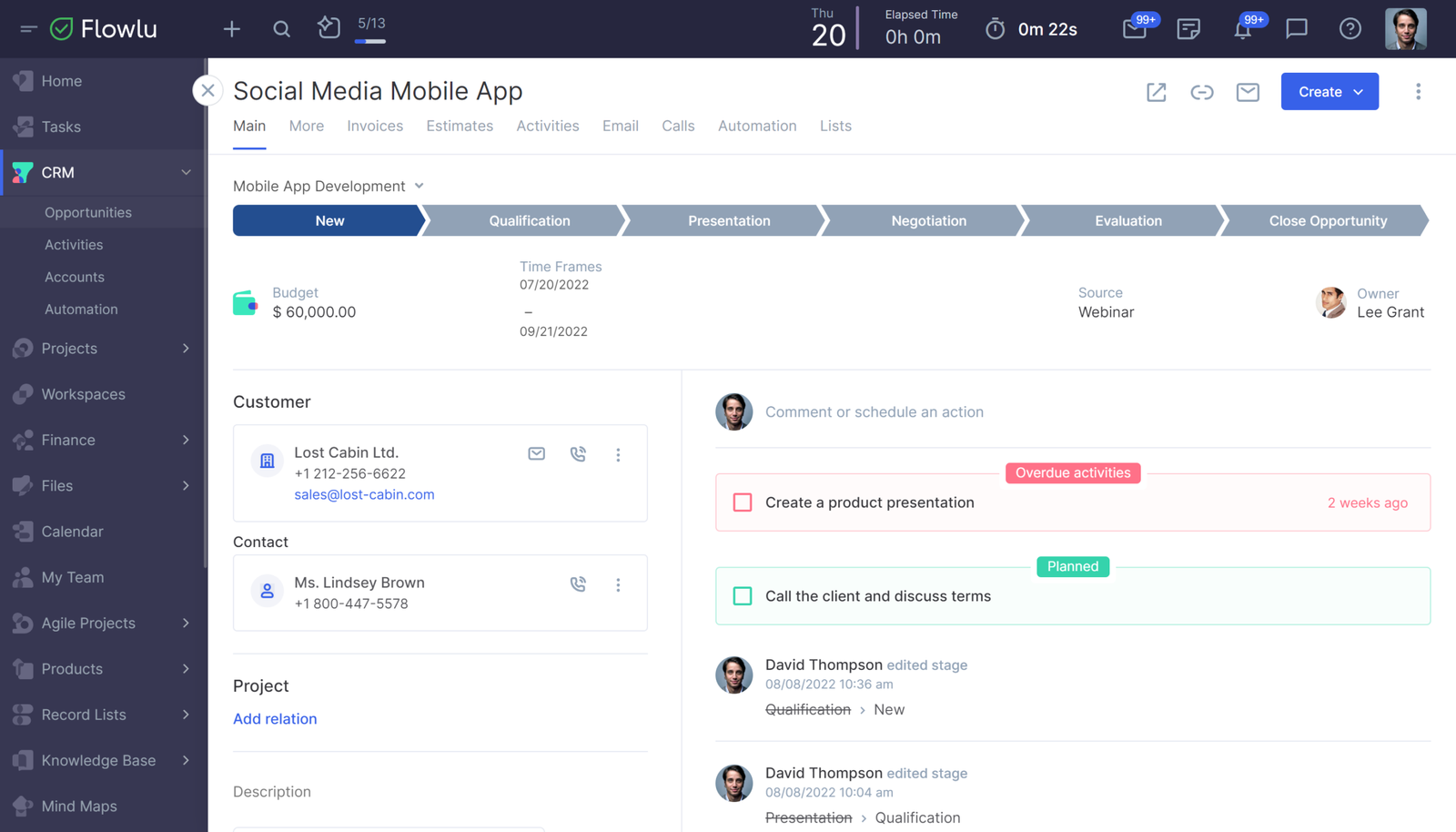
What Flowlu Actually Does
Flowlu acts as the central nervous system for your business. Instead of having clients in a CRM and projects in Trello, Flowlu connects them.
When you win a deal in the CRM, it automatically creates a Project. When you finish the Project, you can generate an Invoice based on the hours tracked. It eliminates the manual data entry between sales and delivery teams.
Core Features
How to Use Flowlu — Workflow
We tested the "Project-to-Cash" workflow, which is the biggest headache for agencies.
- The Setup: We created a project called "Website Redesign" and added a task "Homepage Mockup."
- The Work: We used the built-in timer to log 4 hours of work on that task.
- The Invoice: We clicked the "Finance" tab inside the project. We selected "Create Invoice."
- The Magic: Flowlu automatically pulled the billable hours, applied our rate ($100/hr), and generated a PDF invoice for $400. We emailed it to the client directly from the platform.
Example Use Cases
Who Flowlu Is Best For
- Teams of 5-50: The flat pricing model saves thousands compared to "per user" tools.
- Service Businesses: If you sell time or projects, Flowlu is built for you.
- Operational Founders: Leaders who want to see "Cash Flow" and "Project Status" on one screen.
Who Should Avoid Flowlu
- E-commerce Stores: It is not built for inventory management or shipping (Stick to Shopify/ERP).
- Solo Freelancers: It might be overkill if you just need a simple ToDo list. Trello is simpler.
Pricing & Plans
- Unlimited Projects & Tasks
- 2 Users Included
- 1 TB Storage
- Basic CRM & Invoicing
- 8 Users included (Huge Value)
- Unlimited Knowledge Bases
- Email Integration (Sync Inbox)
- Task Automation
How Flowlu Compares
| Feature | Flowlu | Bitrix24 | Zoho One |
|---|---|---|---|
| Ease of Use | High (Clean) | Low (Cluttered) | Medium (Complex) |
| Pricing Model | Flat (Batch) | Flat Rate | Per User |
| Invoicing | Native | Native | Requires Zoho Books |
| Client Portal | Yes | Yes | Yes |
Limitations & Reality Check
- Mobile App: The mobile app is functional but limited compared to the desktop version. You can't do complex admin tasks on the go.
- Reporting: While decent, the custom reporting isn't as flexible as Tableau or advanced BI tools. It's good enough for 90% of agencies.
Best Practices: "The Client Portal"
Don't just email invoices. Invite your clients to the Portal.
Pros & Cons
- Incredible value ($29 for 8 users is a steal).
- Combines CRM + Projects + Finance perfectly.
- The interface is modern and fast (unlike Bitrix).
- Client Portal looks professional.
- Mobile App is basic.
- No native payroll features (Just invoicing).
- Email sync can be tricky to set up initially.
Frequently Asked Questions
Is Flowlu really free?
Yes. The Free plan is free forever for up to 2 users. It includes unlimited projects and contacts, making it perfect for freelancers or couples running a business.
Is it better than Bitrix24?
For most small businesses, Yes. Bitrix24 has more features, but it is extremely cluttered and hard to navigate. Flowlu is cleaner, faster, and easier to learn for your team.
Can I manage multiple businesses?
Yes. Flowlu allows you to create multiple "Organizations" under one account (on higher tiers), so you can keep the data for different businesses completely separate.
Does it integrate with QuickBooks?
Yes. Flowlu integrates with QuickBooks Online and Xero, so if you prefer to do your heavy accounting there, you can sync your invoices automatically.
Can clients see the projects?
Yes. The "Client Portal" feature allows you to invite clients as guests. They can see project progress, approve tasks, and view invoices without seeing your internal team chats.
Final Verdict
If you are a 5-20 person agency, switching to Flowlu is a no-brainer.
You will likely save $300+/month by cancelling your separate CRM, Project, and Knowledge Base subscriptions. It is robust, it is affordable, and the "Project-to-Invoice" workflow is a massive time saver.
Get Started for Free →