Picture this: You have a hot prospect on a cold call. You want to show them a pricing table or a contract to close the deal right now.
If you ask them to "Check your email, click the Zoom link, download the app, and join the meeting," you have already lost them. Friction kills sales. CrankWheel is a screen-sharing tool built specifically for inside sales and telesales. It requires zero downloads and works instantly on any device via a simple link or SMS text. But is it robust enough to replace your standard video conferencing tool? In this CrankWheel review, we put its "frictionless" claim to the test on a live sales floor.
Quick Summary
The 10-Second Visual Pitch
CrankWheel isn't trying to be a 50-person webinar tool. It is designed for one-on-one sales. The ability to text a link to a prospect while they are on the phone, and have your presentation appear on their smartphone screen 3 seconds later, drastically increases close rates for visual products.
Start Screen Sharing for Free →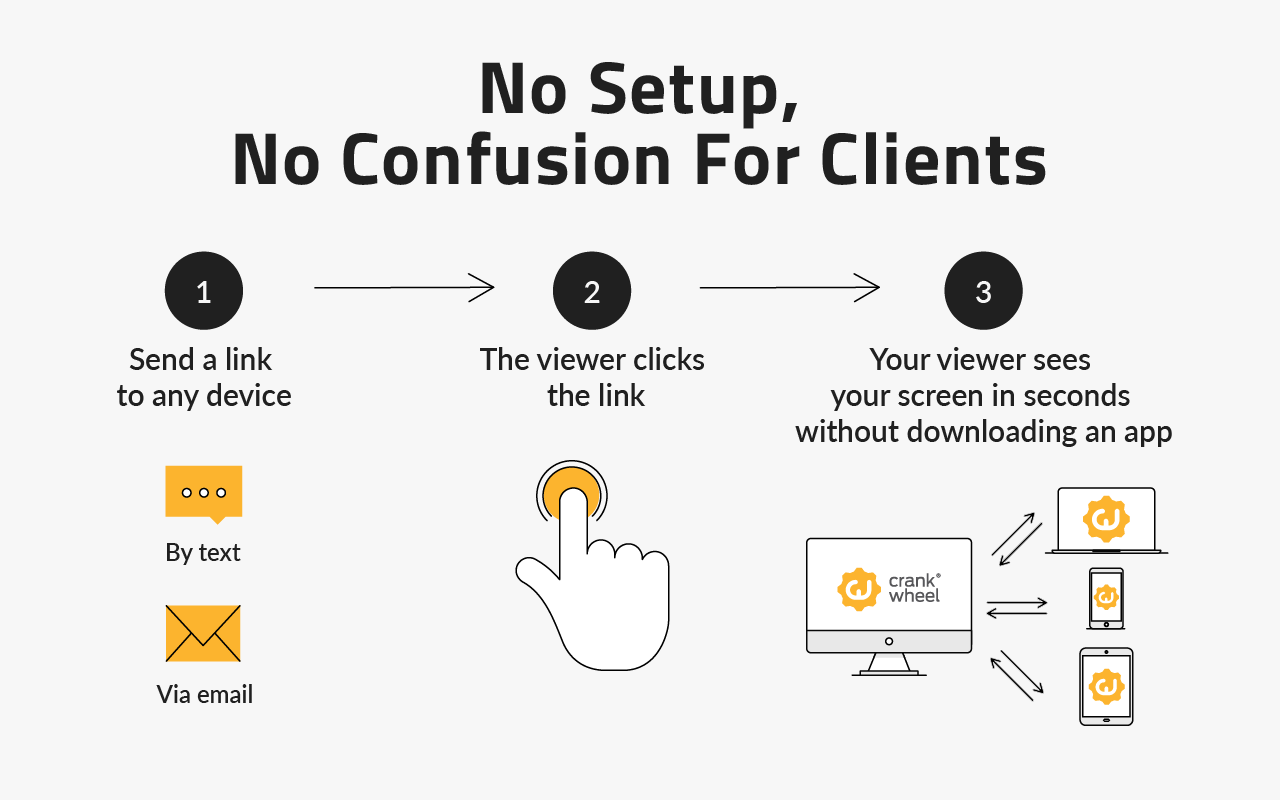
What CrankWheel Actually Does
CrankWheel lives as a lightweight extension in your browser.
When you are on a phone call, you click the extension, choose what to share (a specific browser tab, an application, or your full screen), and type in the prospect's mobile number or email. They receive a link. The moment they tap it, their browser opens and they see your screen. They do not have to install an app, create an account, or navigate any complex permissions.
Core Features
How to Use CrankWheel — Workflow
We tested CrankWheel during a B2B software demo to a prospect who was traveling and only had their iPhone.
- The Call: We connected via our VoIP dialer. The prospect asked a complex question about the software's analytics dashboard.
- The SMS: Instead of explaining it, we clicked the CrankWheel extension, typed their mobile number, and hit "Send SMS."
- The Visual: "I just texted you a link, tap it really quick." They tapped it. Their phone browser opened, instantly displaying our analytics dashboard.
- The Polish: Because we could see the "Preview" window, we knew exactly when the image loaded for them, eliminating the awkward "Can you see my screen yet?" dance.
Example Use Cases
Who CrankWheel Is Best For
- Telesales & Inside Sales: If your primary weapon is the telephone, this is the missing visual link.
- B2C Sales: Consumers are terrible at navigating Zoom/Teams software. CrankWheel removes the technical friction entirely.
- High-Volume Call Centers: The instant nature of the tool keeps average handle time (AHT) down.
Who Should Avoid CrankWheel
- Internal Team Meetings: If you are hosting a daily standup with 10 coworkers, use Google Meet or Slack Huddles. CrankWheel is built for external sales.
- Remote Control Needs: If you need to actually take control of the prospect's mouse (like IT support for viruses), use TeamViewer. CrankWheel is for viewing only.
Pricing & Meeting Limits
CrankWheel offers a highly functional free tier, with paid plans scaling based on the number of monthly meetings.
| Plan | Price (Monthly) | Limits & Features |
|---|---|---|
| Free | $0 | 15 Screen Shares / mo. Great for testing. |
| Pro | ~$19 /mo | 50 Screen Shares / mo + Custom Branding. |
| Enterprise | ~$89 /mo | Unlimited Screen Shares + API Access. |
How CrankWheel Compares
| Feature | CrankWheel | Zoom | Glance (Cobrowse) |
|---|---|---|---|
| Prospect Download | None (Browser) | Required (App) | None |
| SMS Invite | Yes (Built-in) | Manual Copy/Paste | Varies |
| Focus | 1-on-1 Sales | Video Conferencing | Enterprise Support |
| Pricing | $19/mo | $15/mo | Enterprise ($$$) |
Limitations & Reality Check
- One-Way Audio/Video: CrankWheel assumes you are already talking to the prospect on the phone. While it has a feature to turn on your webcam, it is not a 2-way video conferencing platform like Teams.
- Meeting Caps: The Pro plan caps you at 50 screen shares per month. If you are a high-volume SDR doing 5+ demos a day, you will be forced into the $89/mo Enterprise tier.
Best Practices: "The Attention Check"
Know when you are being ignored.
Pros & Cons
- Zero friction: The prospect installs absolutely nothing.
- Works flawlessly on mobile browsers (iOS and Android).
- Built-in SMS feature guarantees link delivery instantly.
- "Preview window" ensures you never share the wrong screen.
- Not suitable for large group meetings or webinars.
- Unlimited plan is relatively expensive for solo reps.
- UI design on the presenter side feels slightly dated.
Frequently Asked Questions
Does the prospect need to be on a computer?
No, this is CrankWheel's biggest advantage. The screen share renders perfectly on mobile phone browsers, making it ideal for calling consumers on the go.
Can the prospect control my screen?
No, CrankWheel is a presentation tool. The prospect can view what you are showing them, but they cannot click or take control of your mouse.
Does it record the meetings?
Yes, CrankWheel offers audit logging and recording features on its higher-tier plans, which is crucial for compliance in industries like insurance and finance.
Does it work with any phone system?
Yes, because it operates completely independently of your audio. You can use your cell phone, a desk phone, or a VoIP softphone (like CloudTalk or RingCentral) while running CrankWheel in your browser.
Final Verdict
If you have ever lost a deal because the prospect couldn't figure out how to join a web conference, CrankWheel will pay for itself on day one.
It strips away all the bloated features of modern video conferencing and focuses entirely on speed to visual. By allowing you to instantly beam a quote, a contract, or a presentation directly to a prospect's phone while you have them on the line, it is the ultimate closing tool for inside sales teams.
Start Closing Faster (Free Tier Available) →