If you are an electrical estimator, your life is ruled by highlighters, digital clickers, and massive PDF blueprints. Manually counting hundreds of smoke detectors and duplex receptacles across a 10-story commercial project isn't just mind-numbing—it creates a massive bottleneck for your business. If you take too long to submit a bid, you lose the job.
Countfire is an automated takeoff and estimating software built specifically to solve this problem. It uses AI pattern recognition to auto-count symbols across entire drawing sets. But does the AI actually catch everything, or does it leave you with dangerous miscounts? In this Countfire review, we put its automated takeoff engine to the test.
Quick Summary
The Estimator's Unfair Advantage
Countfire completely eliminates the manual drudgery of electrical takeoffs. Instead of clicking every single symbol on every single page, you select a symbol once, and the software finds every instance of it across the entire project. It turns a 4-day estimating job into a 4-hour review process.
Book a Demo with Countfire →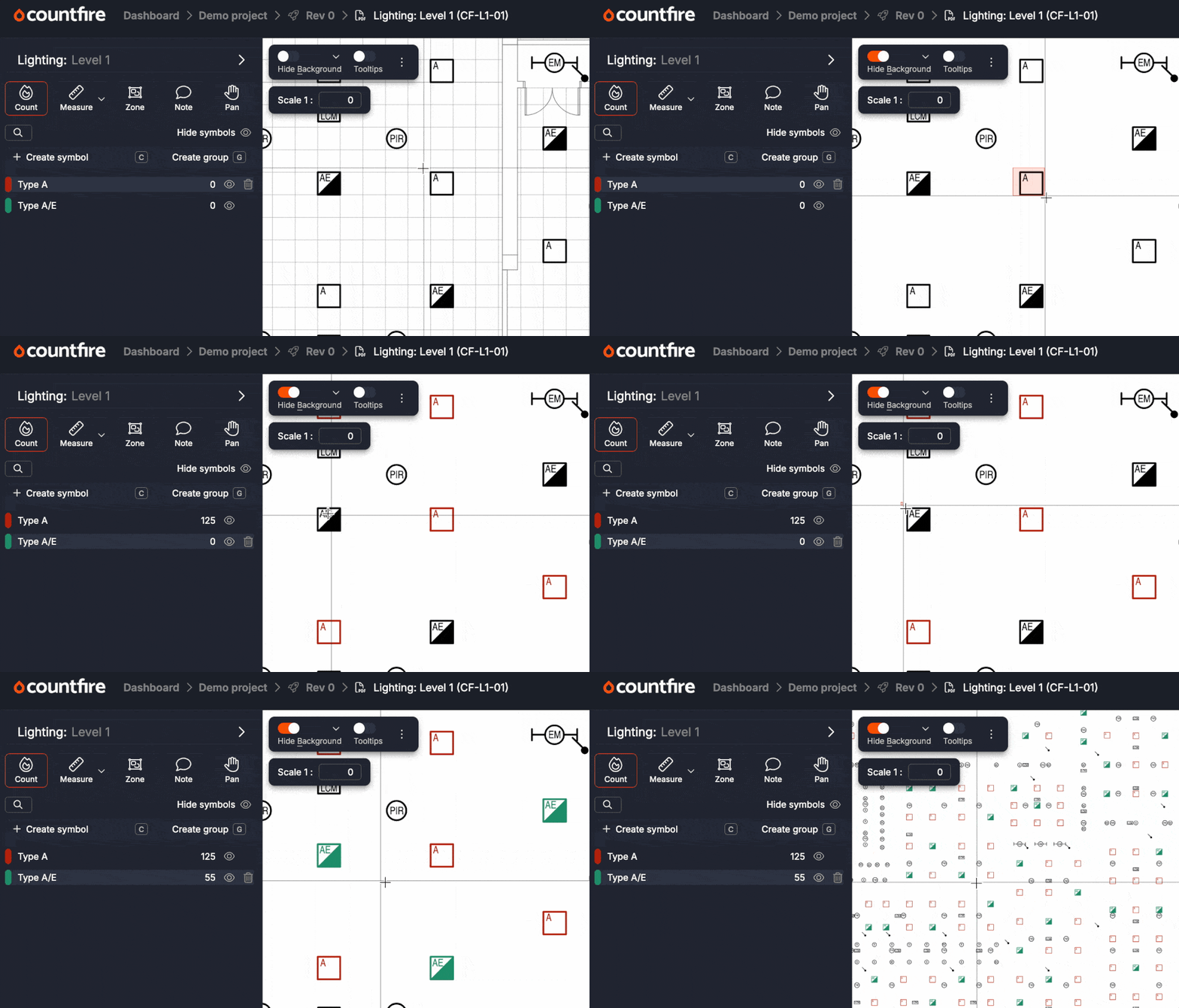
What Countfire Actually Does
Countfire replaces legacy PDF viewers and manual click-counters.
You upload your project blueprints (PDFs) into the cloud. You highlight a specific symbol on the legend (e.g., a Type A light fixture). Countfire's algorithm instantly scans every single page of the uploaded drawings, finding and tallying that exact symbol. It then automatically groups these counts by drawing, floor, or zone, and ports the data directly into a finalized estimate sheet with your custom pricing applied.
Core Features
How to Use Countfire — Workflow
We tested Countfire on a 50-page commercial lighting and power plan.
- The Upload: We dragged the massive PDF set into the browser. Countfire processed the sheets quickly without lagging.
- The Selection: We used the crop tool to select a specific emergency exit sign from the legend.
- The Automation: We hit "Count." The software instantly scanned all 50 pages and found 142 instances of the sign.
- The QA Check: Countfire presents a "Review" screen showing cropped images of every match. We spotted two false positives (symbols that looked similar but weren't exact), unclicked them, and approved the final count. Total time: 3 minutes.
Example Use Cases
Who Countfire Is Best For
- Electrical Estimators: This tool was built specifically by estimators, for estimators. It speaks your language.
- Growing Contracting Firms: If your company is losing out on bids simply because your estimating team is too slow to submit them on time.
- Remote Teams: Because it's cloud-based, multiple estimators can work on the same project simultaneously without passing bulky files back and forth.
Who Should Avoid Countfire
- General Contractors: If you need software to estimate concrete, framing, and plumbing all in one, you need a generalist tool like PlanSwift. Countfire is highly specialized.
- Solo Residential Electricians: If you mostly wire single-family homes, the volume of your blueprints likely doesn't justify enterprise-grade AI software.
Pricing & ROI Expectations
Countfire does not list public pricing tiers on their website, opting instead for custom quotes based on the size of your team and the volume of estimates you process.
Best Practices: "The Alpha Plan"
If you want to absolutely dominate your local market and beat competing electrical contractors, you must execute the Alpha Plan for bidding.
How Countfire Compares
| Feature | Countfire | PlanSwift | Bluebeam Revu |
|---|---|---|---|
| Automated Counting | Excellent (AI-Driven) | Basic / Add-ons | Manual / Visual Search |
| Platform | Cloud-Based (Web) | Windows Desktop | Windows Desktop |
| Specialization | Electrical Focus | General Construction | General PDF Editing |
| Pricing Model | Custom Subscription | High Upfront Cost | Subscription |
Limitations & Reality Check
- Terrible Blueprints: The AI is incredibly smart, but it cannot perform miracles. If an architect sends you a low-resolution, scanned-in napkin sketch with blurry, hand-drawn symbols, the auto-count feature will struggle. It works best on clean, vector-based PDFs.
- Linear Measurements: While Countfire handles linear measurements (like conduit runs and cable trays) very well, its absolute superpower is symbol counting. Linear takeoffs still require a bit more manual routing.
Pros & Cons
- Automated symbol counting saves days of manual labor per project.
- Cloud-based architecture means no slow, crashing desktop software.
- The QA review screen ensures you never miss a hidden symbol.
- Seamlessly bridges the gap between takeoff and final pricing estimate.
- Pricing is custom, which adds friction for smaller companies.
- Highly specialized; not ideal for general contractors needing all trades.
- Accuracy drops significantly on poorly scanned or pixelated blueprints.
Frequently Asked Questions
Is Countfire accurate?
Yes, the pattern recognition is highly accurate on standard vector PDFs. Crucially, the software provides a "Review" screen so a human estimator can quickly verify the AI's selections before finalizing the count.
Does it work on Mac/Apple?
Yes! Unlike legacy software (like PlanSwift) which only runs on Windows, Countfire is entirely cloud-based. You can run it on a Mac, PC, or even an iPad browser.
Can it handle revised drawings?
Yes. If you receive an updated blueprint, Countfire allows you to easily compare the new version against your original takeoff to instantly identify added or removed symbols.
Does it price the estimate too?
Yes, Countfire includes an estimating module where you can build your own pricing database, linking your automatic symbol counts directly to material and labor costs.
Final Verdict
If your highly-paid senior estimators are spending 80% of their day clicking a mouse to count circles on a PDF, you are wasting their talent and capping your business growth.
Countfire is a specialized, surgical tool that solves the biggest bottleneck in electrical contracting. By automating the takeoff process, it allows your team to focus on what actually matters: analyzing the project, negotiating with suppliers, and winning the bid. It is a mandatory upgrade for any serious electrical firm looking to scale.
See Countfire in Action (Book Demo) →