Faxing in 2026 feels absurd, but if you work in healthcare, real estate, or the legal sector, it is an unavoidable reality. Certain compliance laws still refuse to accept standard email as a secure method of document transfer.
However, paying for a dedicated landline, a physical machine, and toner is a waste of money. CocoFax bridges the gap between ancient bureaucracy and modern workflows. It acts as a cloud-based fax machine, allowing you to send and receive faxes directly from your Gmail or Slack account. In this CocoFax review, we tested its integration features and HIPAA compliance protocols to see if it's the right fit for modern businesses.
Quick Summary
Faxing Without the Hardware
CocoFax wins because it doesn't force you to use a clunky, outdated portal. By plugging directly into Google Workspace and Microsoft 365, it turns faxing into a standard email workflow. You attach a PDF, hit send, and CocoFax handles the analog translation on the backend securely.
Start Your 14-Day Free Trial →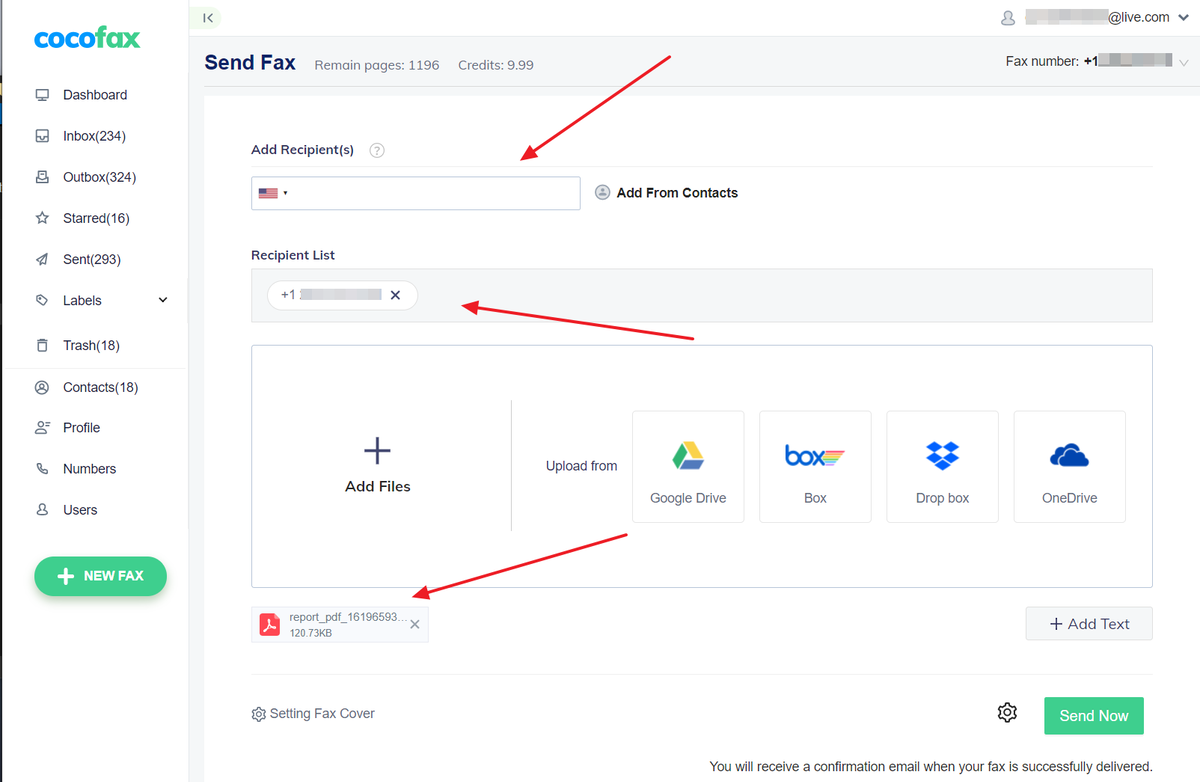
What CocoFax Actually Does
CocoFax provides you with a dedicated, virtual fax number (Local or Toll-Free).
When someone sends a physical fax to that number, CocoFax intercepts it, converts the analog signal into a high-quality PDF, and routes it instantly to your email inbox or web dashboard. Conversely, when you need to send a fax, you simply upload your digital document to CocoFax, enter the recipient's traditional fax number, and CocoFax dials their physical machine to print it out on their end.
Core Features
How to Use CocoFax — Workflow
We tested the core "Email-to-Fax" feature to see how fast it actually works.
- The Setup: We registered our email address in the CocoFax settings.
- The Draft: We opened Gmail and composed a new email. In the "To" field, we typed the destination fax number followed by `@cocofax.net` (e.g., `[email protected]`).
- The Document: We left the email body blank (this acts as the cover page) and attached a PDF contract.
- The Delivery: We hit send. Within 60 seconds, we received a confirmation email from CocoFax stating the fax was successfully delivered to the recipient's machine.
Example Use Cases
Who CocoFax Is Best For
- Compliance-Heavy Industries: Healthcare, legal, and financial services that require rigid document trails.
- Google Workspace Users: The native integration makes setup virtually invisible to your employees.
- Cost Cutters: Businesses looking to eliminate the $50/month landline bill and maintenance costs of a physical brother/HP machine.
Who Should Avoid CocoFax
- Modern B2B/SaaS: If your industry fully accepts e-signatures (like DocuSign), you simply don't need a fax service anymore.
- High-Volume Enterprise: If you are blasting 10,000+ faxes a month, an enterprise API solution might offer better bulk rate pricing.
Pricing & Page Limits
Online fax services charge based on "Pages per Month."
| Plan | Price (Annual) | Page Limits & Features |
|---|---|---|
| Basic | ~$14.99 /mo | 200 Pages/mo. 1 User. Great for occasional use. |
| Business | ~$24.99 /mo | 500 Pages/mo. 5 Users. Slack Integration. |
| Enterprise | Custom | Unlimited Users. API Access. Custom page volumes. |
How CocoFax Compares
| Feature | CocoFax | eFax | SRFax |
|---|---|---|---|
| Ease of Use | High (Modern UI) | Medium (Dated UI) | Medium |
| HIPAA Compliant | Yes | Yes (Corporate Tier) | Yes |
| Setup Speed | Instant | Slow | Fast |
| Mobile App | Excellent | Good | Basic |
Limitations & Reality Check
- International Sending: The monthly page allowance usually applies to US/Canada numbers. Sending faxes internationally consumes credits at a much higher rate.
- Dependency on Recipient's Hardware: Even though you send a digital file instantly, if the receiving office's fax machine is out of paper, busy, or unplugged, the fax will fail and you will have to retry. You are still dealing with analog problems on the other end.
Best Practices: "The Cover Page"
Don't send naked documents.
Pros & Cons
- Email-to-Fax workflow is incredibly smooth.
- Eliminates phone line and physical hardware costs.
- Permanent, searchable digital archive of all sent/received faxes.
- Free number porting so you don't lose your established business line.
- Overage charges apply if you exceed your monthly page limit.
- International faxing can burn through allowances quickly.
- No free tier (only a free trial).
Frequently Asked Questions
Can I keep my current fax number?
Yes, CocoFax allows you to port your existing fax number into their system so your clients and partners don't need to update their contact books.
Is it secure enough for medical records?
Yes, CocoFax uses 256-bit Advanced Encryption Standard (AES) and is fully HIPAA and PHI compliant, making it safe for the healthcare industry.
Do I need a landline?
No. Because CocoFax is entirely cloud-based, it operates over your standard internet or cellular data connection. You can cancel your dedicated phone line.
What file types are supported?
You can attach PDF, DOC, DOCX, XLS, XLSX, PNG, and JPG files. CocoFax automatically renders them into fax format for transmission.
Final Verdict
Nobody actually *wants* to fax, but if your industry demands it, you need to make the process as painless as possible.
CocoFax successfully modernizes a dinosaur technology. By letting you send legally binding, encrypted documents directly from Gmail or Slack, it removes the friction and hardware costs of traditional faxing. It is highly recommended for medical clinics, law firms, and remote real estate teams.
Claim Your Virtual Fax Number (Free Trial) →