

The traditional email marketing business model is a trap. Legacy platforms like Mailchimp and ActiveCampaign punish you for your success. They operate on a "contact-based" pricing model, meaning the larger your database grows, the higher your monthly bill spikes—even if you aren't emailing 80% of those contacts regularly. This forces businesses into constantly deleting old leads just to keep their operational costs down.
Brevo (formerly Sendinblue) was designed to destroy this billing model. It operates as a full-stack CRM and marketing engine that charges you strictly based on the volume of emails you send, allowing you to store an unlimited number of contacts for free. But does a platform that competes on price sacrifice enterprise-grade automation and deliverability? In this Brevo infrastructure audit, we strip down their workflows, SMTP routing, and CRM engine to find out.
- Unlimited Contacts: Store as many leads as you want for free; you only pay based on the volume of emails sent per month.
- All-in-One Hub: Replaces your ESP, basic Sales CRM, and SMS gateway with a single unified dashboard.
- WhatsApp Integration: Execute highly engaging multimedia text campaigns globally via the native WhatsApp Business API.
- High Deliverability: Features a dedicated transactional SMTP routing engine to ensure critical emails never hit the spam folder.
1. Quick Summary
2. The TL;DR Verdict
Growth Without the Tax
Brevo shifts the economics of database management. By allowing you to store up to 100,000 contacts completely free, it lets you maintain historical data without financial penalty. While it lacks the hyper-granular predictive analytics of a specialized tool like Klaviyo, its native inclusion of WhatsApp, SMS, and an internal Sales CRM makes it an unbeatable all-in-one hub for small to mid-market teams.
Create Your Free Brevo Account →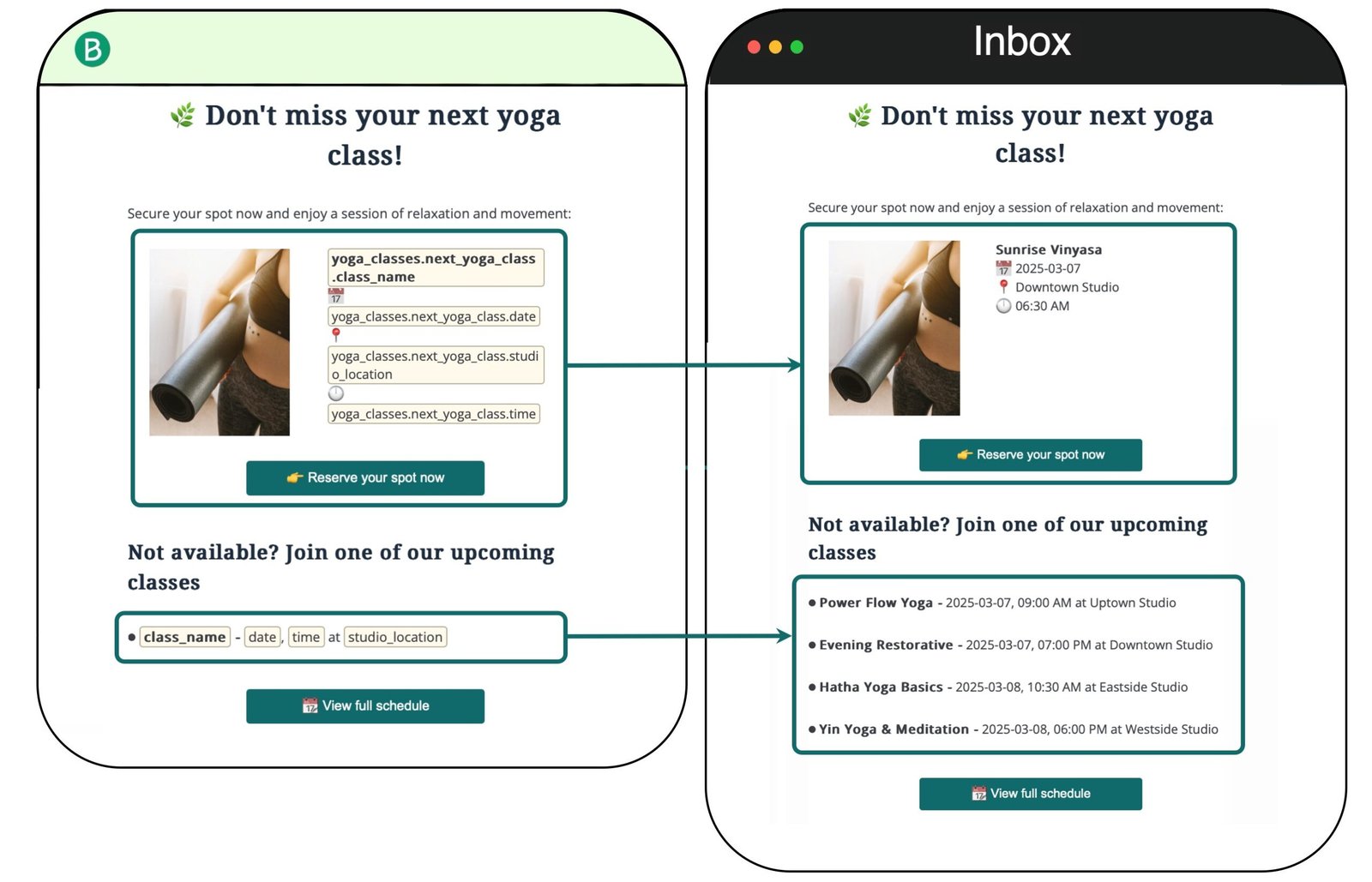
3. How We Evaluated Brevo
To ensure an objective technical audit, we deployed Brevo across a live testing environment over a 30-day period. Our evaluation process included:
- Deliverability Testing: Routing 10,000 test emails through their shared IP pools to measure spam placement rates vs. primary inbox delivery.
- API Stress Testing: Pinging the Brevo Transactional SMTP API to measure latency for critical system alerts (like password resets).
- Workflow Engineering: Building a 5-step omnichannel flow (Email -> Delay -> SMS -> CRM Task Creation) to test the visual builder's logical constraints.
- Cost Analysis: Modeling the total cost of ownership (TCO) for a database of 50,000 contacts against legacy competitors like Mailchimp.
4. What Brevo Actually Does
Brevo is an orchestration layer for customer communication.
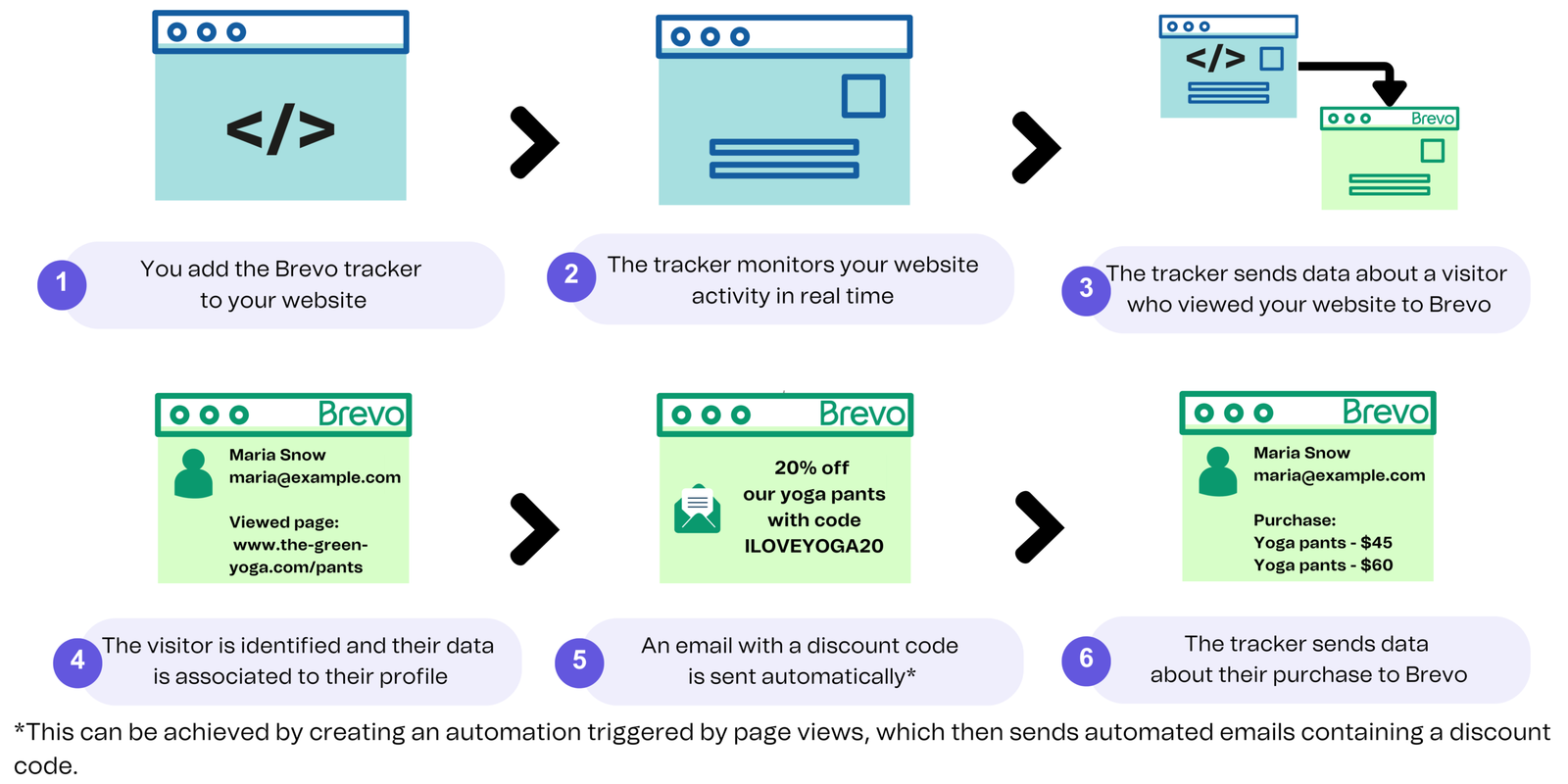
It replaces fragmented stacks by combining an Email Service Provider (ESP), a basic Sales CRM, and an SMS/WhatsApp gateway into one dashboard. If a user fills out a form on your WordPress site, that lead enters the Brevo CRM. You can trigger an automated welcome email. If the user clicks a specific link, the automation can instantly create a "Deal" in your Sales Pipeline and assign a task to a human sales rep, ensuring zero friction between marketing and sales.
Watch our deep-dive visual teardown of the Brevo automation canvas.
5. Core Features Matrix
6. The Data: The Cost of Contact-Based Pricing
If you have an email list of 40,000 subscribers but only actively mail 10,000 of them every month, legacy platforms force you to pay for the dead weight. Here is the financial reality of database scaling.
7. Technical Setup: SMTP & Deliverability
A marketing platform is useless if emails land in the spam folder. Brevo takes deliverability incredibly seriously. Because they attract cost-conscious senders, they aggressively police their shared IP pools to prevent spammers from degrading the reputation of legitimate businesses.
Upon setting up a new account, you must verify your domain via standard DNS records (SPF, DKIM, DMARC). Furthermore, new accounts are heavily throttled. If your first campaign yields high bounce rates or spam complaints, Brevo's compliance team will temporarily suspend your sending privileges to protect the network.
8. Workflow & Deployment Timeline
Here is what the execution pipeline looks like for deploying a lead-gen funnel:
Step 1: Domain Authentication
Connect your custom domain and insert the provided TXT records into your DNS provider to validate DKIM and DMARC compliance.
Step 2: Database Migration
Import your existing contacts via CSV. Brevo allows unlimited contacts, so you don't need to arbitrarily prune inactive leads during migration.
Step 3: Multi-Channel Automation
Use the visual builder to create an onboarding series. Send Email 1 immediately. Wait 2 days; if the email was unread, trigger an automated SMS text message.
Step 4: Sales Handoff
Set a condition: If the user clicks the "Book Demo" link in the email, the system automatically creates a new Opportunity card in the Brevo Sales CRM.
9. Feature Focus: The Native Sales CRM
Most email platforms force you to integrate a third-party CRM like HubSpot or Pipedrive via Zapier, causing data delays and sync errors. Brevo includes a native Sales CRM. It utilizes Kanban-style pipelines (drag and drop deal stages). Because the CRM shares the exact same database as the email marketing tool, your sales reps can see the exact email opens, clicks, and web page visits a prospect has triggered before picking up the phone.
10. Feature Focus: WhatsApp Automation
This is Brevo's secret weapon. Traditional SMS marketing is heavily regulated and expensive outside the US. Brevo natively integrates with the WhatsApp Business API. You can design automated workflows where, if a user abandons a cart, they receive a rich-media WhatsApp message containing an image of the item and a direct checkout link. Because WhatsApp is encrypted and widely used globally, engagement rates dwarf standard email metrics.
11. Feature Focus: Transactional Routing (SMTP)
Most businesses make the mistake of sending marketing newsletters and critical system emails (like receipts or password resets) from the same IP address. If a newsletter gets marked as spam, your password reset emails will start going to the spam folder too. Brevo provides a dedicated Transactional API and SMTP relay. This physically separates your marketing traffic from your critical system alerts, guaranteeing that your most important customer communications actually hit the primary inbox.
12. Example Use Cases
13. The Real ROI (Database Ownership)
Hover over the metrics below to see the baseline operational advantages of adopting volume-based software.
Maintain your historical data. You can store a massive list of inactive or old prospects for future retargeting without paying a dime in monthly fees for holding them.
Cancel your separate subscriptions for a CRM, an Email tool, and an SMS platform. Manage your entire customer lifecycle under one unified invoice.
14. Who Brevo Is Best For
- Budget-Focused Scalers: If you are tired of being penalized financially simply because your newsletter list grew to 20,000 subscribers, Brevo's pricing is a breath of fresh air.
- International Audiences: The native integration of WhatsApp campaigns is crucial. For companies marketing to Europe, LatAm, or India, WhatsApp boasts a 90%+ open rate compared to standard email.
- Agencies: Managing multiple client communication stacks is tedious. Consolidating a client's CRM and email into a single Brevo account streamlines reporting and setup.
15. Who Should Avoid Brevo
- Enterprise D2C Brands: If your e-commerce store is doing $10M+ a year and you require predictive AI models (like "Expected Date of Next Order"), Brevo lacks the hyper-specialized data science found in platforms like Klaviyo.
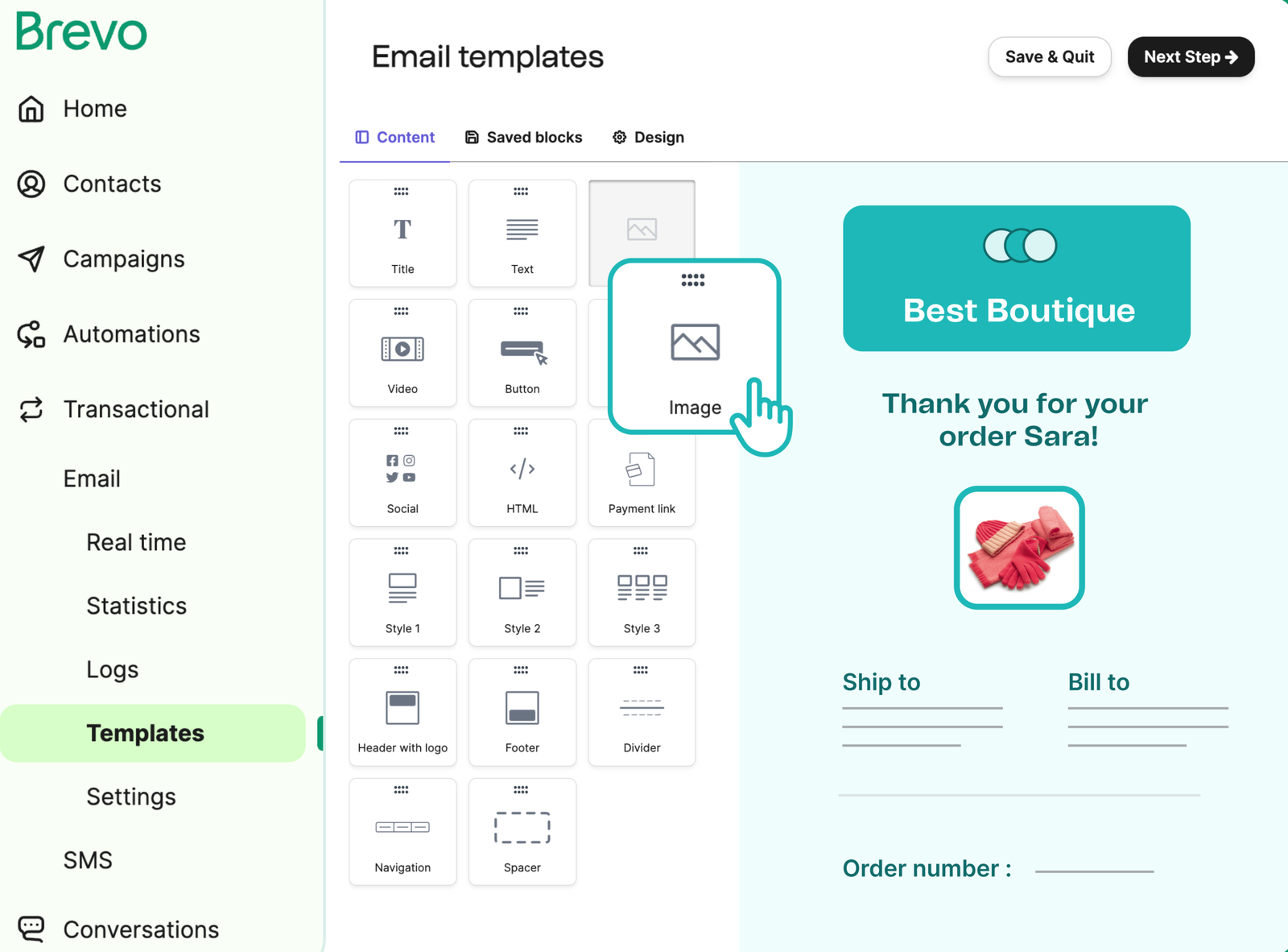
- Design Purists: While functional, Brevo's email template library feels basic compared to the sprawling, highly polished design ecosystems of its competitors. Customizing them deeply can feel rigid.
16. Integration & Operational Synergy
17. Real User Sentiment (G2 & Trustpilot)
Across major review aggregators, Brevo holds a strong consensus rating, but with distinct polarizing themes:
- The Praise: The overwhelming majority of positive reviews celebrate the aggressive pricing model and the simplicity of having transactional emails and marketing emails housed under one roof.
- The Complaints: Negative reviews almost universally target the strict account validation process. New users who upload cold, purchased lists are frequently suspended immediately by the automated compliance algorithm.
18. Pricing Realities & Hidden Costs
Brevo's pricing is transparent, but you must pay attention to feature gating. While you only pay based on email volume, certain capabilities require specific plan tiers.
Free Plan
- Store up to 100,000 Contacts
- Send 300 emails per day
- Drag & drop email editor
- Basic automation workflows
Standard Plan
- No daily sending limits
- A/B Testing & Advanced Reporting
- Remove Brevo logo from emails
- AI send-time optimization
The Hidden Costs & Add-Ons: While the base pricing is incredibly cheap, scaling operations requires add-ons that can inflate your monthly invoice if you aren't paying attention.
- Removing the Logo: On the $9/mo "Starter" plan, your emails still contain a "Sent with Brevo" watermark. You must pay an extra $10.80/mo to remove it, effectively making the true starting price for a professional appearance around $20/mo.
- User Seats: The Starter plan is strictly limited to 1 user. If you want your marketing assistant to log in without sharing passwords, you must upgrade to Standard and pay roughly $9/mo per additional seat.
19. Best Practices: "The Alpha Plan"
If you want to maximize deliverability and avoid account suspension, you must execute the Alpha Plan for list hygiene.
20. Integration Ecosystem (API & Webhooks)
Brevo connects seamlessly into the modern tech stack. Beyond native plugins for Shopify, WooCommerce, and WordPress, it features a robust set of RESTful APIs and Webhooks. This allows developers to push and pull contact attributes, trigger custom SMS alerts based on backend software events, and securely pipe transactional email data directly into custom BI dashboards.
21. Security & Compliance
Brevo operates out of Europe (headquartered in Paris), making it exceptionally stringent regarding data privacy. It is fully GDPR compliant by default. The platform provides built-in tools for double opt-in confirmation, explicit consent tracking, and 1-click data deletion requests to ensure your business remains legally compliant when marketing globally.
22. How Brevo Compares
| Feature | Brevo | Mailchimp | ActiveCampaign |
|---|---|---|---|
| Pricing Model | Volume Based (Emails sent) | Contact Based (List size) | Contact Based (List size) |
| Native CRM | Included (Free Tier) | Very Basic | Deep (Enterprise tier) |
| WhatsApp Campaigns | Native Integration | Limited/Add-on | Complex APIs |
| Automation Depth | Moderate (Visual Logic) | Basic | High (Industry Leader) |
23. PROS & CONS
- Pay-per-send pricing makes it the most cost-effective platform for large databases.
- Native WhatsApp and SMS integration allows for true multi-channel campaigns.
- The built-in Sales CRM perfectly aligns marketing leads with sales follow-ups.
- Robust SMTP infrastructure ensures reliable transactional email delivery.
- Free plan and base Starter plan limit you to only 1 user seat.
- Must pay a premium to remove the Brevo watermark on entry-level plans.
24. Frequently Asked Questions
1. Is Brevo the same as Sendinblue?
Yes. Sendinblue officially rebranded to Brevo in 2023 to reflect its evolution from a simple email tool into a full, omnichannel CRM platform.
2. Does the Free Plan really allow 100,000 contacts?
Yes. You can store up to 100,000 contacts completely free. However, your sending capability is strictly capped at 300 emails per day. It is a sandbox for testing, not a viable plan for executing a large launch.
3. What does "Volume-based pricing" mean?
Unlike Mailchimp, which charges you based on how many email addresses you have stored in your account, Brevo charges you based on how many actual emails you send per month. You only pay for active usage, not storage.
4. Can I use Brevo for E-commerce?
Absolutely. Brevo features deep plugins for Shopify, WooCommerce, and Magento, allowing you to sync purchase data, trigger abandoned cart emails, and send automated product recommendations.
5. How does the WhatsApp integration work?
Brevo integrates natively with the WhatsApp Business API. You purchase prepaid message credits and can build automated workflows that send rich-media WhatsApp messages directly to your customers' phones.
6. Do I have to use the Sales CRM?
No. The Sales CRM is entirely optional. If you prefer to use HubSpot or Salesforce, you can ignore the Brevo CRM and use integrations or APIs to push marketing data to your external system.
7. What is a Dedicated IP, and do I need one?
A Dedicated IP ensures your email deliverability is entirely controlled by your own sending practices, isolating you from other users. Brevo recommends purchasing one ($251/year) if you send over 100,000 emails per month.
8. Can I remove the Brevo branding from my emails?
Yes. The Brevo logo is removed automatically on the Standard plan ($18/mo). If you are on the $9/mo Starter plan, you must purchase a $10.80/mo add-on to remove the branding.
25. Final Verdict
Marketing software should scale with your revenue, not penalize you for collecting data. Legacy platforms rely on outdated contact-based billing models that force businesses to make operational sacrifices to keep software costs down.
Brevo fundamentally fixes this infrastructure flaw. By offering unlimited contact storage and pricing solely on sending volume, it is the most financially logical choice for scaling businesses. When you combine this cost efficiency with native WhatsApp capabilities, transactional routing, and a built-in sales CRM, Brevo ceases to be just an email platform. It is a comprehensive growth engine.
Deploy Your Omnichannel CRM Today →