


Every email marketing platform follows the same arc. It launches as a simple way to send newsletters, then adds automation, then landing pages, then a CRM, then SMS, then an AI agent — until the thing you bought to send a monthly update has a sidebar with forty items and a pricing page that needs a spreadsheet.
Benchmark Email just did something almost nobody does: it went backwards. The 2026 platform has been rebuilt around a deliberately minimal feature set, and the company says so openly — its own FAQ describes competitors as bloated marketing suites and states that Benchmark has stripped email marketing down to what actually matters. That is a genuinely defensible strategy. It also means the automation, landing pages, and A/B testing that every existing review of this product describes are not in what you sign up for today. This Benchmark Email review covers what's actually in the box now, what it costs, and who that trade is right for.
- There is no marketing automation. No drip sequences, no visual journey builder, no autoresponders in the current feature list. This is the single most important fact about the 2026 product and most published reviews still describe the old one.
- The free plan is genuinely unrestricted on features. 500 contacts and 2,500 sends a month, with every feature — including AI text and AI image generation — switched on. Only contacts and extra users are gated.
- The 10× send ratio is unusually generous. Paid plans allow ten times your contact limit in monthly sends, so a 5,000-contact plan permits 50,000 emails.
- Two platforms exist side by side. "Benchmark NEW" and "Benchmark Classic" have separate logins and separate help centres. New signups land on NEW; long-standing customers may still be on Classic.
- Pricing varies by region. The pricing page includes a region selector, so your rate depends on where you are as well as your list size.
Quick Summary
Deliberately Less Software
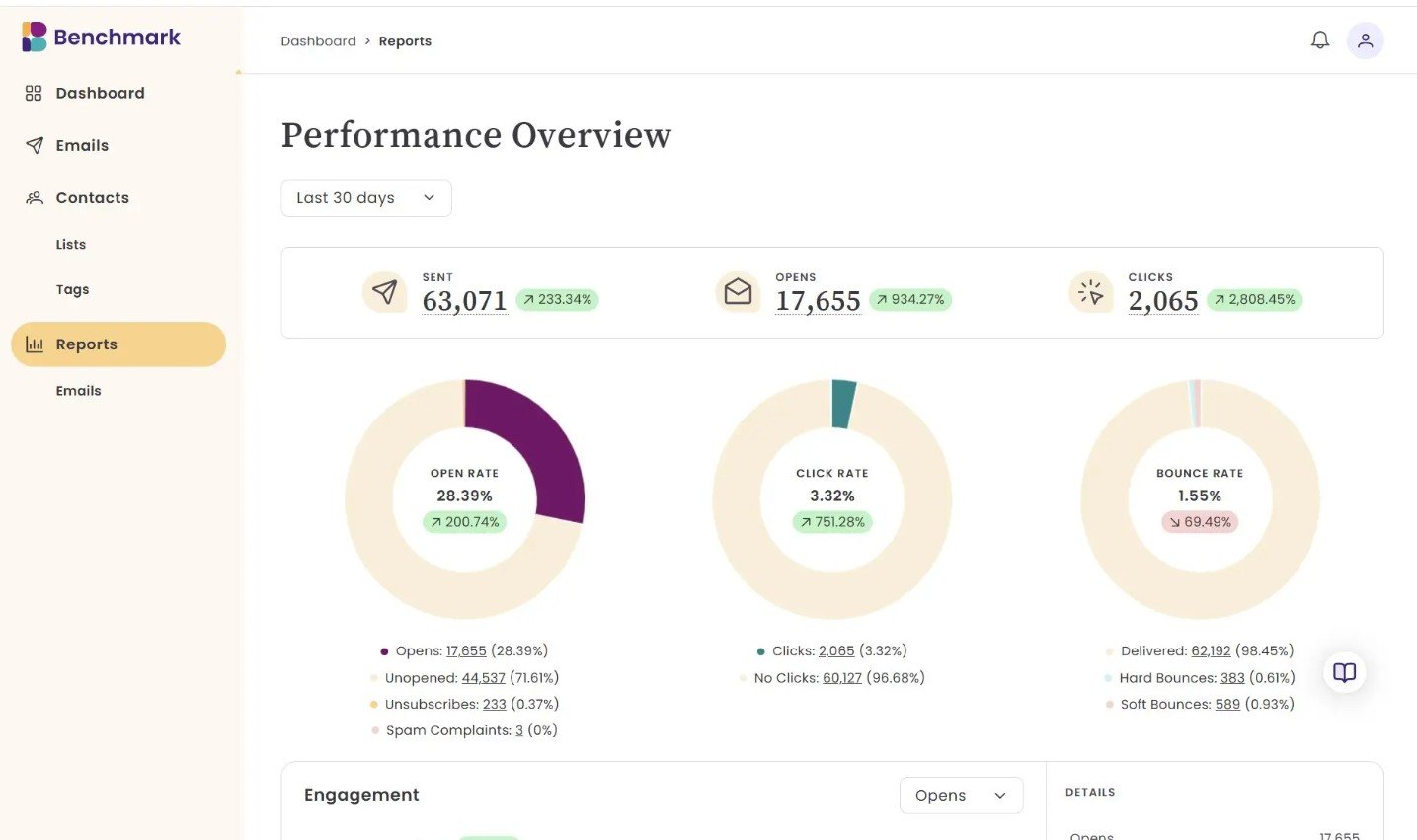
Judged as a newsletter tool, Benchmark is very good and very fairly priced: a clean drag-and-drop editor, AI writing and image generation included even on the free tier, popup and hosted forms, real-time reporting, and a send allowance ten times your contact count. Judged as an email marketing platform in 2026, it's missing the thing most buyers assume is table stakes — there is no automation of any kind. That's not an oversight, it's the strategy, and for a café owner sending a monthly update it's arguably the right one. But it makes the buying decision unusually binary: this is either exactly enough software or nowhere near enough, with very little middle ground.
Quick Pros & Cons
- Every feature available on the free plan — no feature gating at all.
- AI text refinement and AI image generation included at $0.
- Send up to 10× your contact limit each month on paid plans.
- Popup forms, hosted form pages, and reCAPTCHA built in.
- Genuinely fast to learn — the whole pitch is fewer decisions.
- Zapier plus API access, with API keys even on free.
- Recognised repeatedly on G2 for small-business deliverability.
- No marketing automation, drip sequences or autoresponders.
- No A/B testing — you cannot split-test subject lines.
- No landing pages, surveys, polls or RSS campaigns.
- Extra users cost $15/month each on top of the plan.
- Free plan is single-user with no way to invite teammates.
- Two parallel platforms with separate logins and help centres.
- Reporting is functional but shallow versus rivals.
The 2026 Rebuild: What Benchmark Removed
If you've read a Benchmark Email review published before this year, it almost certainly described Automation Pro — a visual customer-journey builder — alongside landing pages, surveys, polls, A/B testing, and RSS-to-email campaigns. None of that appears in the current product's feature list. Benchmark's pricing page now runs a section headed "Every Feature in Every Plan," and that list is the complete product: email editor, form builder, contact management, personalisation, reporting, and integrations. Nothing else.
Here's what a buyer coming from an older review will be looking for and won't find:
Read that list as a disqualifier rather than a criticism. If your email programme depends on a welcome sequence firing when someone subscribes, Benchmark cannot do it and you should stop reading here — ActiveCampaign or Brevo are where that conversation goes. If your email programme is "write a good email, send it to the list, see who clicked," you're the customer this rebuild was designed for, and the rest of this review is worth your time.
Benchmark NEW vs Benchmark Classic
There's a second thing the marketing doesn't foreground: Benchmark currently runs two platforms in parallel, with separate login URLs and separate knowledge bases.
Practically, if you're a new customer this is a non-issue — you'll only ever see NEW. If you're an existing Benchmark customer on Classic weighing whether to migrate, the honest advice is to inventory which features you actually rely on first, because the rebuilt platform's feature list is materially shorter than what you may be using today.
What Benchmark Email Actually Includes
Every feature below is available on every plan, including the free one — Benchmark's FAQ confirms free users get all features with no watered-down version. That's rare enough to be a genuine selling point.
Two smaller touches worth calling out because they show the product's philosophy. The editor runs an email audit checklist before you send, flagging missing links, absent alt text, and broken image URLs — the exact mistakes that embarrass people on send day. And list verification is included on Pro, letting you validate one list up to your plan size, which is the sort of thing most platforms sell separately. If you're cleaning larger or multiple lists regularly, a dedicated tool like Clearout still does more.
Benchmark Email Pricing in 2026
Three tiers, with the paid rate driven by contact count. Note that Benchmark's pricing page includes a region selector alongside the contact slider and a monthly/annual toggle — so the number you see depends on where you are, how big your list is, and how you pay. The advertised entry point is $19/month; setting the slider to other contact counts and regions returns different figures, so check your own combination rather than trusting any single quoted price.
Free
- 500 contacts · 2,500 sends/mo
- Every feature unlocked
- 1 user · 1 sending domain
- 2 API keys
Pro
- 1,000–100,000 contacts
- Send 10× your contact limit monthly
- 10 domains · 10 API keys
- List verification included
Enterprise
- Everything in Pro
- Dedicated account management
- Monthly health checks
- Chat, email and phone support
Verified August 2026 against benchmarkemail.com/pricing. All plans include one user; additional users are $15/month each, billed à la carte with no plan upgrade required. Free plans cannot invite additional users at all. Benchmark Email is a registered trademark of Polaris Software, LLC.
- There is no automation. Worth repeating because it's the assumption most buyers don't think to check. If you need a welcome email to fire on signup, this platform cannot do it.
- Team access costs extra. One user is included on every plan and each additional seat is $15/month. On the free plan you cannot add teammates at all.
- Free sends are capped at 5×, not 10×. The free tier allows five times its contact limit to a maximum of 2,500 emails a month; the 10× ratio applies to paid plans only.
- Prices differ by region. The pricing page asks you to choose a region before quoting, so figures published in reviews written for a different market may not match what you're offered.
- Playable video needs a separate subscription. The in-email video feature requires a Playable plan of its own, with special pricing for Benchmark customers — it isn't bundled.
Getting Your First Campaign Out
Step 1: Verify your sending domain
Free gets one verified domain, Pro up to ten. Do this before importing anything — authenticating properly is the single biggest lever on whether your campaigns land in inboxes rather than spam.
Step 2: Import and tag as you go
Bring contacts in from a spreadsheet or another platform, and apply tags during import rather than promising yourself you'll organise later. With no behavioural automation available, your tags are the whole segmentation strategy.
Step 3: Put a form somewhere real
Popup forms and hosted form pages both come standard. A hosted page is useful if you don't have a website — you can drop the link in a social bio and start collecting subscribers the same afternoon.
Step 4: Build, audit, test, send
Draft in the editor, use Smart Text to tighten the copy, then run the audit checklist and send yourself a test. Since there's no A/B testing, that manual test send is your only quality gate — don't skip it.
Step 5: Read the engagement timeline
The reporting shows when your audience actually engages. Without automated send-time optimisation, that timeline is how you manually choose better send slots for the next campaign.
How Benchmark Compares
| Feature | Benchmark Email | Automation Platforms | Budget Senders |
|---|---|---|---|
| Marketing Automation | None | Full journey builders | Basic sequences |
| A/B Testing | None | Included | Often included |
| Free Plan Features | All features unlocked | Heavily gated | Partially gated |
| AI Writing & Images | Included, even free | Usually paid tiers | Varies |
| Send Allowance | 10× contacts monthly | Varies, often lower | Often credit-based |
| Extra Users | $15/mo each | Often bundled by tier | Varies |
Who Benchmark Email Is Best For
- Small businesses sending a regular newsletter. Restaurants, clinics, retailers, local services — anyone whose email programme is "tell our list what's happening this month" gets everything they need and nothing they don't.
- Nonprofits and community organisations. A free tier with all features and 500 contacts covers a genuine mailing list, and the 10× send ratio on Pro means frequent updates don't force an upgrade.
- Anyone who has bounced off a bigger platform. If you've abandoned a setup halfway through because the automation builder demanded decisions you didn't want to make, fewer options is a feature.
- Solo operators and one-person marketing functions. The single included user fits perfectly — and the $15 per extra seat only stings if you're a team.
- Publishers testing an audience cheaply. All features free at 500 contacts is a real testing ground. If you're building an audience alongside a course or community on something like Teachable, this covers the email side at no cost while you validate.
Who Should Skip It
- Anyone running ecommerce email. Abandoned cart, browse abandonment, and post-purchase flows are automation by definition, and none of it exists here.
- SaaS and product businesses. Onboarding sequences and lifecycle messaging are the core of the job — this is the wrong category of tool entirely.
- Teams of more than two or three. Per-user billing on top of contact-based pricing makes collaborative use disproportionately expensive.
- Marketers who optimise. No A/B testing means no systematic improvement of subject lines or content — you're sending on instinct.
- Anyone needing landing pages. Hosted form pages exist, but they're forms, not pages. Dedicated tools like Leadpages handle that job properly.
Limitations & Reality Check
- The missing automation is genuinely disqualifying for many. Not a weakness to weigh against strengths — for anyone whose programme depends on triggered email, it's a hard no regardless of how good the editor is.
- Simplicity has a ceiling. Businesses grow into automation. Choosing Benchmark today means accepting you may migrate later, which is a real switching cost worth pricing in.
- Published information is unreliable right now. Between the platform rebuild and the two parallel systems, most reviews and tutorials online describe features you won't find. Verify against the live site.
- Per-user pricing sits oddly with the positioning. A platform aimed at busy small businesses charging $15 for a second person to log in is a friction point at exactly the wrong moment.
- Reporting tells you what happened, not why. Activity feeds, link activity, and engagement timelines are solid; deeper funnel or revenue attribution isn't part of the product.
- Long tenure cuts both ways. Benchmark has been around for years with a good deliverability reputation — but a product that just removed major features has demonstrated its roadmap can subtract as well as add.
Best Practice: Buy the Simplicity Deliberately
Frequently Asked Questions
Does Benchmark Email have marketing automation?
No. The current platform's feature list covers the email editor, form builder, contact management, personalisation, reporting, and integrations — there are no drip sequences, autoresponders, or visual journey builders. Benchmark has deliberately rebuilt around simplicity, describing rival platforms as bloated marketing suites. Reviews describing Automation Pro are referring to the older product.
How much does Benchmark Email cost in 2026?
The free plan is $0 with 500 contacts and up to 2,500 sends a month. Pro is advertised from $19/month and scales with contact count from 1,000 up to 100,000 contacts. Enterprise covers 100,000+ contacts and is quoted by sales. All plans include one user; extra users cost $15/month each. Pricing varies by region and billing frequency, so check the live pricing page with your own settings.
Is the Benchmark Email free plan any good?
Unusually good on features, limited on capacity. Free users get every feature the platform offers — including AI text tools and AI image generation — with the only restrictions being 500 contacts, 2,500 monthly sends, one user, one sending domain, and two API keys. You cannot invite teammates on free. As a way to run a real small mailing list at no cost, it's one of the more genuine free tiers available.
How many emails can I send with Benchmark?
Paid plans allow up to ten times your contact limit each month, so a 5,000-contact plan permits 50,000 sends. The free plan allows five times its contact limit up to a maximum of 2,500 emails monthly. Benchmark frames these caps as sender-reputation protection rather than upsell pressure, and the 10× ratio is generous compared with most competitors.
What's the difference between Benchmark NEW and Benchmark Classic?
They're two separate platforms running in parallel, with different login URLs and different help centres. New signups go to Benchmark NEW at app.benchmarkemail.io, which is the rebuilt, simplified product. Benchmark Classic at ui.benchmarkemail.com remains accessible for existing customers who haven't migrated. Guides and screenshots online may describe either, so check which one a tutorial refers to.
Does Benchmark Email include AI features?
Yes, and on every plan including free. Smart Text refines tone, expands or summarises copy, fixes spelling and grammar, and rephrases writing. There's also AI image generation alongside stock libraries from Unsplash, Pexels, and Pixabay. Getting AI writing and image tools at no cost is one of the stronger arguments for the free tier.
Can I do A/B testing in Benchmark Email?
No. Split testing of subject lines or content isn't part of the current feature set. Combined with the absence of automation, this makes Benchmark unsuitable for teams running systematic optimisation programmes — your quality control is a manual test send and the built-in email audit checklist.
Who owns Benchmark Email?
Benchmark Email is a registered trademark of Polaris Software, LLC. The platform is available in nine languages including Spanish, German, Japanese, Portuguese, French, Italian, and both traditional and simplified Chinese, and holds several G2 recognitions in email marketing and small-business deliverability.
Final Verdict
Benchmark Email in 2026 is a genuinely unusual product: a platform that looked at where the category was going and walked the other way. Every feature unlocked on the free plan, AI writing and images included at zero cost, a send allowance ten times your list size, and an interface designed so that sending a campaign takes twenty minutes rather than an afternoon. For a small business whose email marketing is a newsletter, that combination is excellent value and a real relief.
But be clear about the trade you're making, because it's bigger than the marketing suggests. There is no automation, no A/B testing, no landing pages. Do the ninety-day audit in the section above — if every email you sent last quarter was one you pressed send on yourself, Benchmark will serve you well and cost you very little. If even a couple were triggered automatically, this platform can't run your programme at any price, and you should be reading about ActiveCampaign or Brevo instead. Start on the free tier either way: with every feature unlocked, it tells you the answer within a week and costs nothing to find out.
Start Free — Every Feature, 500 Contacts →