


Building internal AI workflows is currently a logistical nightmare for most enterprise teams. If you try to build a custom RAG (Retrieval-Augmented Generation) application from scratch, your developers waste months connecting vector databases and fighting with OpenAI API limits. Conversely, if you just hand your staff generic ChatGPT accounts, the AI hallucinates wildly because it has no secure access to your proprietary company data.
Cassidy AI was built to bridge this massive gap. It is a no-code enterprise platform designed to build AI agents and multi-step workflows that are deeply connected to your company's live knowledge base (SharePoint, Salesforce, Notion). But does it actually provide reliable business automation, or is it just another wrapper over the ChatGPT API? In this Cassidy AI infrastructure audit, we deploy their agent builder to find out.
1. Quick Summary
2. The TL;DR Verdict
The End of Hallucinations
Cassidy AI acts as the operational brain of your company. By continuously syncing with your existing tech stack (Google Drive, Zendesk, Salesforce), it ensures that when your AI agent answers a support ticket or drafts an RFP, it is pulling from your actual, up-to-date company policies—not generic internet data. It removes the need for complex engineering to deploy secure, context-aware AI.
Deploy Your Knowledge Base Today →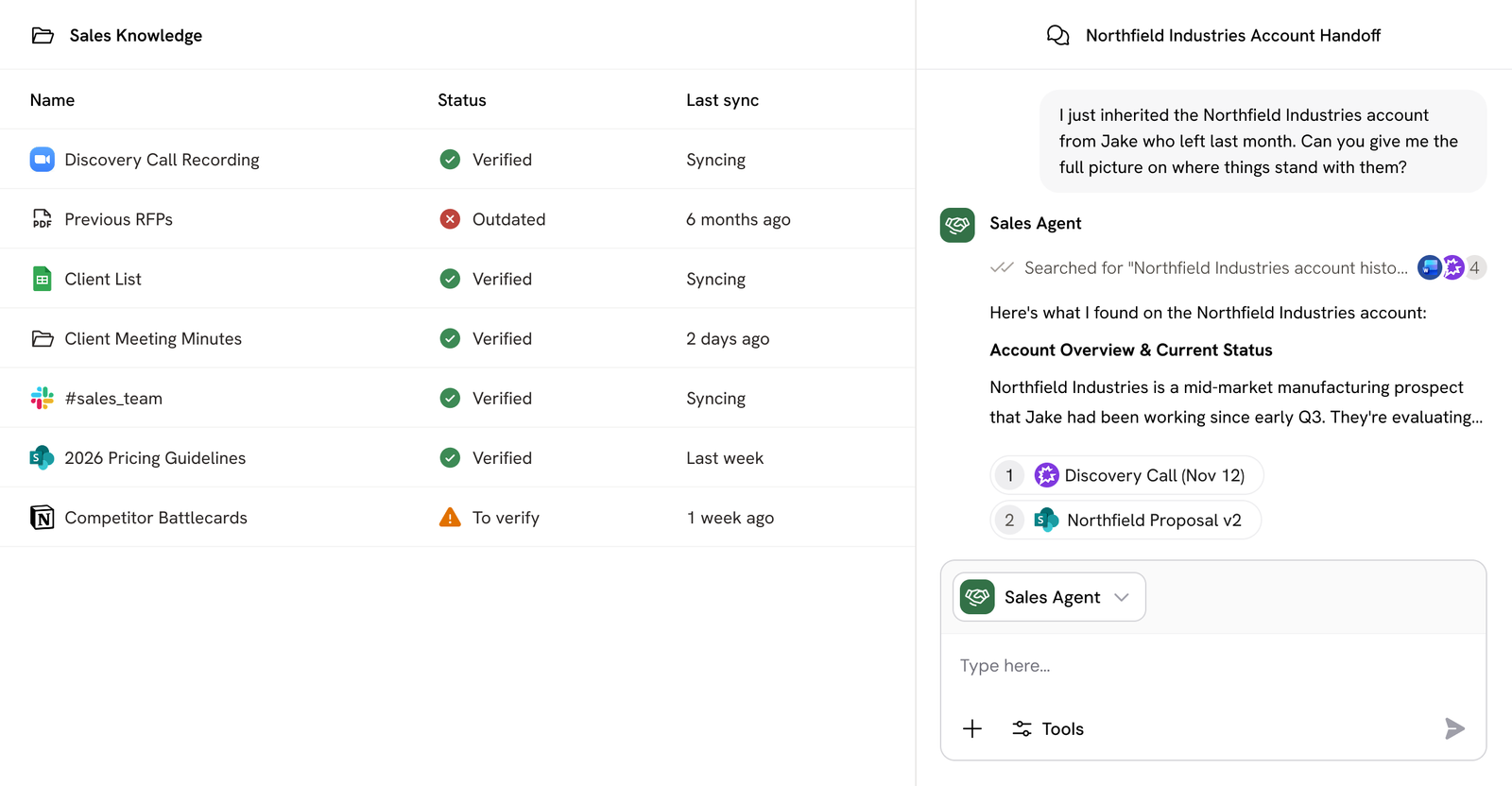
3. What Cassidy AI Actually Does
Cassidy replaces disjointed prompt-engineering with structured, data-grounded automation.
First, it ingests your business context. You connect it to your internal drives, and it automatically reads and processes PDFs, call transcripts, and SOPs into a centralized Knowledge Base. Second, it allows non-technical users to build "Agents" and "Workflows." You instruct an Agent in plain English (e.g., "You are a Sales Engineer. Use our product specs to answer technical questions"). Because the Agent only references your synced Knowledge Base, the answers are perfectly accurate, on-brand, and secure.
4. Core Features
5. The Data: The Cost of Manual Procurement
For B2B sales teams, drafting Request for Proposal (RFP) responses is a massive, low-value time sink. Here is the operational difference when utilizing Cassidy’s context-aware AI.
6. The Technical Setup (RAG Architecture)
Behind the simple interface, Cassidy is managing complex Retrieval-Augmented Generation (RAG) architecture.
When you upload a 200-page employee handbook, Cassidy’s OCR (Optical Character Recognition) parses it, chunks it, and vectorizes it. When an employee asks a question in Slack, the system retrieves only the exact paragraphs relevant to the query, feeds that context into the LLM alongside your system prompt, and outputs a highly specific answer. It handles all the token-limit management and vector indexing automatically in the background.
7. Practical Workflow & Deployment
Here is what deploying a Customer Support Triage agent looks like:
Step 1: Knowledge Integration
Connect Cassidy to your Zendesk macro library and your internal Notion wikis so it understands your standard operating procedures.
Step 2: Agent Configuration
Create a new Agent. Assign it the "Claude" model (best for nuanced writing) and instruct it to read incoming tickets and draft a polite resolution.
Step 3: Human-in-the-Loop
Set up a Workflow where the drafted reply is sent to a private Slack channel. A human agent reviews it and clicks "Approve."
Step 4: Execution
Once approved, the workflow pushes the final response back through the Zendesk API to the customer, drastically reducing resolution time.
8. Example Use Cases
9. The Real ROI (Security vs. Deployment)
Hover over the metrics below to see the baseline operational advantages of using an enterprise-grade platform over generic ChatGPT.
Unlike consumer AI tools, your proprietary financial data and client contracts are strictly walled off from public model training loops.
Deploy robust AI solutions across your organization in days, entirely bypassing the IT and engineering department backlog.
10. Who Cassidy AI Is Best For
- RevOps & Systems Architects: The ability to easily string together API webhooks, conditional logic, and specific LLM models makes this a playground for operations teams scaling internal processes.
- Enterprise Teams: The strict adherence to SOC 2 Type II, GDPR, and HIPAA compliance means your legal and infosec teams will actually approve the software for deployment.
- Non-Technical Managers: The no-code visual builder allows content strategists and HR managers to build their own functional AI tools without writing a single line of Python.
11. Who Should Avoid Cassidy AI
- Solopreneurs & Hobbyists: If you are just a solo freelancer trying to write a few blog posts, a standard $20/month ChatGPT Plus subscription is all you need. Cassidy is built for team scale and complex data.
- On-Premise Purists: If your company has absolute military-grade security requirements that mandate running open-source LLMs entirely on local, air-gapped servers, a cloud-based SaaS platform will not pass compliance.
12. Integration & Operational Synergy
13. Feature Focus: The Unified Knowledge Base
The fatal flaw of most AI integrations is stale data. If you manually upload a PDF to an AI agent, and your pricing changes the next day, the AI will confidently quote the wrong price to a client. Cassidy's Knowledge Base connects directly to your live systems (like Google Drive or SharePoint). If an employee updates a document in Drive, Cassidy syncs that update (every 24 hours on Starter, instantly on Enterprise), ensuring your agents always act on the exact truth of the present moment.
14. Feature Focus: Multi-System Execution
Adoption fails when you force employees to log into a new, unfamiliar dashboard. Cassidy solves this by deploying agents directly into the interfaces your team already uses. You can deploy a Cassidy agent as a bot inside your Slack workspace, inside Microsoft Teams, or even via a Chrome Extension and Microsoft Word add-on. The AI meets the employee directly inside their existing workflow.
15. Pricing Realities & Feature Tiers
Cassidy AI uses a streamlined tier system. They offer a Starter plan for small teams to test the waters, but the real power is unlocked at the Custom Business/Enterprise level.
Starter Plan
- 3 User Seats included
- 10,000 AI credits per month
- Up to 30,000 pages of KB storage
- Basic tool integrations (Drive, Slack)
Business Plan
- Custom Seats & AI Credits
- Instant live data syncing
- Advanced Workflows & API Access
- Dedicated Solution Engineering support
16. Best Practices: "The Alpha Plan"
If you want to successfully roll out AI across an organization, you must execute the Alpha Plan for adoption. Stop trying to automate the hardest tasks first.
17. How Cassidy AI Compares
| Feature | Cassidy AI | ChatGPT Enterprise | Zapier Central |
|---|---|---|---|
| Knowledge Sync | Live Auto-Sync (Drive/SharePoint) | Manual Uploads / Custom API | Basic Sync |
| Model Agnosticism | Yes (OpenAI, Claude, Gemini) | No (OpenAI only) | Yes |
| Deployment Location | Browser, Slack, Teams, API | Web App Only | Web App / Embed |
| Workflow Logic | Deep (Conditional, Human-in-Loop) | None (Conversational only) | Strict IF/THEN actions |
18. Limitations & Reality Check
- Data Cleanliness is Mandatory: "Garbage in, garbage out" applies heavily here. If your company's Google Drive is a disorganized mess of outdated SOPs and conflicting policy drafts, Cassidy will inevitably retrieve the wrong document. You must perform an internal data hygiene audit before connecting the Knowledge Base.
- Credit Consumption: Running complex, multi-step workflows that process hundreds of pages of text consumes AI credits rapidly. On lower tiers, you must carefully monitor usage to avoid hitting monthly caps before your billing cycle resets.
19. PROS & CONS
- Live auto-syncing guarantees the AI never hallucinates outdated information.
- Model agnostic architecture protects you from being locked into a single AI provider.
- Strict enterprise compliance (SOC 2, GDPR, HIPAA) makes infosec approval easy.
- Deploying natively into Slack and Teams drives massive employee adoption rates.
- Requires pristine internal data management to function accurately.
- Starter plan has restrictive sync limits (24 hours instead of instant).
20. Frequently Asked Questions
1. Is my data used to train AI models?
Absolutely not. Cassidy AI maintains strict data privacy. Your proprietary documents and CRM data are used solely to provide context for your specific automations and are never fed back into public model training loops (like OpenAI's baseline models).
2. How does Cassidy keep information up to date?
Cassidy continuously syncs with your connected external data sources (like Google Drive or SharePoint). If you update a document in your drive, the Knowledge Base updates automatically, ensuring the AI is acting on the latest version.
3. Can I deploy agents into Microsoft Teams or Slack?
Yes. Cassidy is designed to meet your employees where they already work. You can deploy agents directly into Slack, Microsoft Teams, Google Chat, and even as extensions in Chrome, Word, and Excel.
4. What security certifications does Cassidy hold?
Cassidy is built for the enterprise. It is SOC 2 Type II, GDPR, HIPAA, and CASA certified. All data is encrypted in transit and at rest, and the platform features advanced Role-Based Access Control (RBAC).
5. What are "Credits" in Cassidy?
Credits are the currency used to measure AI tasks. When an agent runs a task—such as writing an RFP response or processing a document through the OCR engine—it consumes credits based on the complexity and the specific AI model used.
6. Does Cassidy integrate with Salesforce or HubSpot?
Yes. It features deep CRM integrations, allowing agents to pull context from past deals, update opportunity stages, and log call notes automatically within your existing Salesforce or HubSpot environments.
7. What happens if an agent makes a mistake?
To mitigate risk on critical workflows, Cassidy includes a "Human-in-the-Loop" feature. You can design workflows where the AI drafts a response or prepares an action, but requires a human manager to click "Approve" before the action is executed.
8. Can I choose which AI model I use?
Yes. Cassidy is model agnostic. Within your workflows, you can choose to route specific tasks to the model best suited for the job, selecting from OpenAI (GPT-4), Anthropic (Claude), Google (Gemini), and other enterprise-tuned variants.
Final Verdict
Handing your employees generic ChatGPT accounts is a massive security liability and produces mediocre results because the AI lacks the specific context of your business operations.
Cassidy AI solves the enterprise AI dilemma. By providing a secure, auto-syncing Knowledge Base that seamlessly feeds proprietary data into powerful, multi-step workflows, it allows non-technical teams to build highly accurate autonomous agents. If you want to safely deploy AI to slash operational bottlenecks in sales, support, and HR without burdening your engineering team, Cassidy is a mandatory infrastructure upgrade.
Deploy Your AI Knowledge Base Today →