


If you are running a scaling business, your most expensive operational bottleneck is human administration. Hiring junior virtual assistants to monitor inboxes, manually update CRM statuses, or transcribe meeting notes is a slow, error-prone, and financially draining process. You don't need another consultant or another dashboard—you need an autonomous worker.
Lindy AI represents the next major shift in business automation. Instead of rigid, rules-based IF/THEN pipelines like Zapier, Lindy allows you to build cognitive, autonomous AI agents ("Lindies") that can actually read context, make decisions, and execute tasks across your tech stack. But does letting an AI operate your email inbox autonomously actually work, or is it an operational hazard? In this Lindy AI review, we tear apart the agent builder to find out.
1. Quick Summary
2. The TL;DR Verdict
The End of Robotic Data Entry
Lindy is not just a chatbot that answers questions; it is a worker that *takes action*. By connecting it to your Gmail, Calendar, and CRM, you can create a dedicated "Support Agent" that reads inbound tickets, determines the customer's sentiment, updates their CRM profile, and drafts a highly personalized resolution email while you sleep.
Build Your First AI Agent For Free →
3. What Lindy AI Actually Does
Lindy provides a platform to create, instruct, and deploy a digital workforce.
Instead of writing complex API webhooks, you use natural language to "hire" an agent. You give it a role (e.g., "You are an Executive Assistant"), you provide strict instructions (e.g., "If an email asks for a meeting, check my Google Calendar and reply with three available times"), and you grant it access to the necessary tools. Lindy waits in the background for a specific trigger (like a new email arriving), processes the data cognitively, and executes the sequence autonomously.
4. Core Features
5. The Data: Execution Velocity
For an operations team or customer success department, processing unstructured data is the largest time-sink. Here is the difference between human triage and cognitive automation.
6. The Technical Setup (No-Code Natural Language)
The genius of Lindy is that it democratizes software engineering. You do not need to understand JSON payloads or Python scripting to build complex automations.
The builder operates on "Natural Language Programming." You type your instructions in plain English exactly as you would speak to a human employee. If a step breaks or errors out, the AI will often flag it and suggest how to re-word your prompt to clarify the workflow. You simply plug in your SaaS accounts via standard OAuth connections (just clicking "Sign in with Google") and the system handles the backend data routing.
7. Practical Workflow & Timeline
Here is what the "Zero-to-Agent" pipeline looks like for an operations manager:
Step 1: Define the Trigger
Create a new Lindy and select the starting event. For example, "Trigger when a new email arrives in the support@company inbox."
Step 2: Connect the Tools
Authenticate your required apps. Connect Lindy to your Slack workspace and your Salesforce account with one click.
Step 3: Write the Prompt (Instructions)
Tell the AI what to do: "Read the email. If the customer asks for a refund, update their Salesforce status to 'Churn Risk' and Slack the CS Manager."
Step 4: Test & Deploy
Run a test simulation in the sandbox. Once verified, flip the agent to "Live" and let it process the queue autonomously 24/7.
8. Example Use Cases
9. The Real ROI (Capital vs. Labor)
Hover over the metrics below to see the baseline operational advantages of using an AI workforce.
Agents do not take weekends off or sleep. Inbound requests are handled at 3:00 AM instantly.
Once properly instructed, an AI agent will never accidentally paste the wrong client name into a CRM field.
10. Who Lindy AI Is Best For
- Agency Owners: If you are scaling client onboarding, an agent can automatically generate Google Drive folders, send welcome emails, and set up Slack channels the moment a Stripe payment clears.
- Solo Founders: Replaces the immediate need to hire an Executive Assistant. Let Lindy manage your calendar, draft email replies, and categorize your inbox.
- Sales Operations: Automatically enriches inbound leads by scraping LinkedIn and updating HubSpot records before the sales rep ever makes the call.
11. Who Should Avoid Lindy AI
- Highly Regulated Enterprise: If you are dealing with ultra-sensitive HIPAA medical data or banking compliance, handing autonomous read/write access of your inbox to an AI model requires strict legal clearance that a startup might not have.
- Hardcore Developers: If you love writing Python and want complete, granular control over the raw API payloads and execution environments, a no-code visual builder will feel restrictive.
12. Integration & Operational Synergy
13. Feature Focus: Autonomous Triggers
The differentiator between a "Chatbot" (like standard ChatGPT) and an "Agent" is autonomy. You do not have to open the Lindy dashboard to get value out of it. By setting up Autonomous Triggers (e.g., "Every Friday at 4 PM, read my calendar, summarize my week, and draft an update email to my boss"), the agent operates proactively in the background, pushing value to you without being prompted.
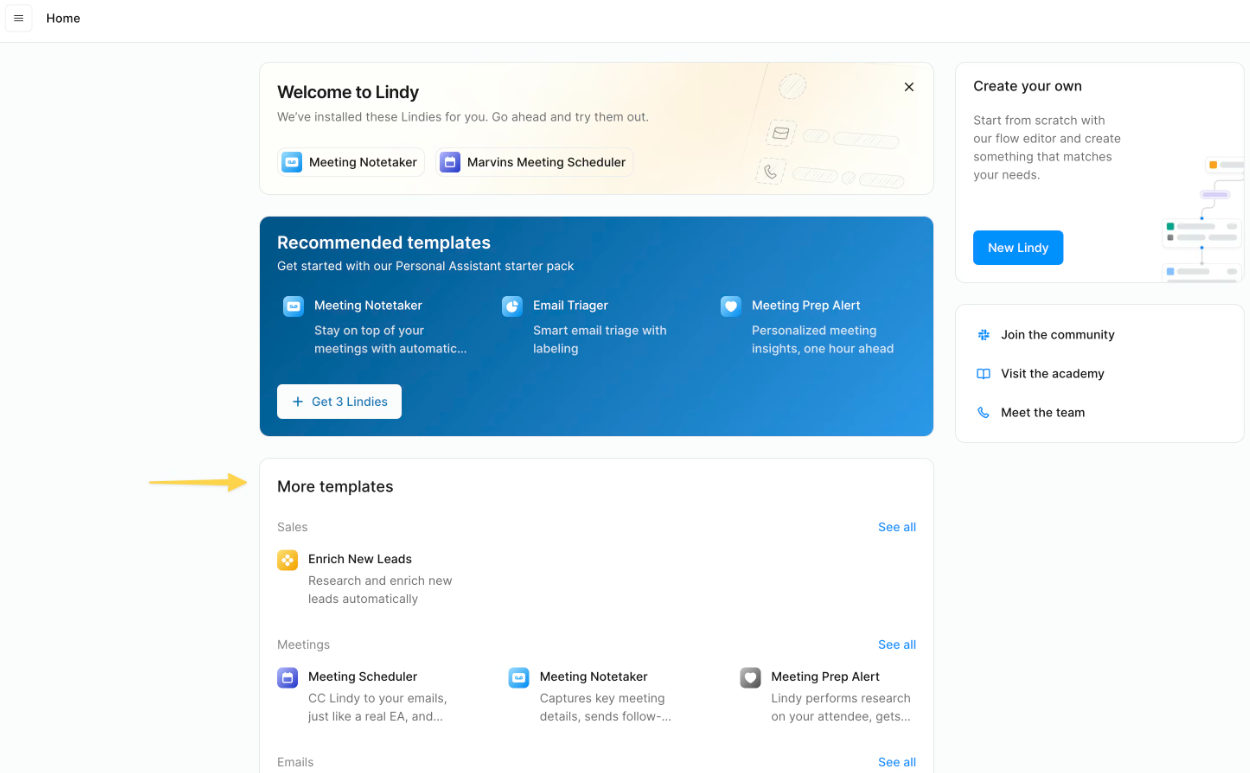
14. Pricing Realities & Credits
Lindy utilizes a usage-based credit system. Creating basic agents and connecting them is incredibly cheap or free, but as they process more complex cognitive tasks, credits are consumed.
Free Plan
- Generous monthly credits
- Access to core integrations
- Create custom Lindies
- Perfect for testing workflows
Pro Tier
- Massive credit expansion
- Priority execution speeds
- Advanced multi-step reasoning
- Premium 3rd party tool hooks
15. Best Practices: "The Alpha Plan"
If you want to actually scale your company using AI, you must execute the Alpha Plan for agent architecture. Stop trying to build a "God Agent."
16. How Lindy AI Compares
| Feature | Lindy AI | Zapier | ChatGPT (Custom GPTs) |
|---|---|---|---|
| Execution Style | Cognitive (Autonomous) | Rigid Logic (IF/THEN) | Conversational (Manual input) |
| Unstructured Data | Excellent | Fails without exact formatting | Excellent |
| Background Triggers | Yes | Yes | No (Requires you to hit Enter) |
| Builder Interface | Natural Language | Visual Flowchart | Natural Language |
17. Limitations & Reality Check
- The "Vague Instruction" Trap: AI agents are confident idiots. If your prompt is loose (e.g., "Reply to unhappy customers"), the Lindy might offer a massive refund that ruins your margins. You must write hyper-specific, boundaried instructions (e.g., "Draft a reply, but NEVER authorize a refund. Save it as a draft for my review.")
- API Limitations: While Lindy connects to thousands of apps, it relies on those apps' APIs. If a specific legacy tool you use has a closed ecosystem, Lindy cannot magically force its way in to update the data.
18. PROS & CONS
- Replaces rigid, brittle Zapier workflows with cognitive, adaptable intelligence.
- Zero coding required; you build agents by typing in English.
- Autonomous triggers allow work to happen completely in the background.
- Generous free tier allows you to prove ROI before spending a dime.
- Agents will confidently hallucinate if your instructions are not strict.
- Complex, multi-step integrations require extensive testing to perfect.
19. Frequently Asked Questions
1. How is Lindy different from ChatGPT?
ChatGPT is a consultant; you have to go to the website, type a question, and copy the answer. Lindy is a worker; it connects directly to your tools, waits for a trigger, and takes action (like sending an email or updating a spreadsheet) autonomously in the background.
2. Do I need to know how to code to use it?
Not at all. Lindy is built entirely on Natural Language Processing. You construct workflows and agents by typing plain English instructions, just as if you were writing a training manual for a human employee.
3. Can Lindy read my emails?
Yes, if you grant it permission. You can connect your Gmail or Outlook via standard secure OAuth. You can then instruct an agent to monitor your inbox, sort messages, or draft replies based on the context of the email.
4. Is it better than Zapier?
It serves a different purpose. Zapier is fantastic for strict, data-mapping tasks (e.g., "Move this exact row from Excel to Airtable"). Lindy is better for cognitive tasks where the data is messy (e.g., "Read this angry paragraph from a client and extract the main issue").
5. Can it schedule meetings for me?
Yes. You can connect your Google Calendar and instruct Lindy to monitor your inbox for meeting requests. It can automatically check your availability and reply to the sender with proposed times without you lifting a finger.
6. Will it accidentally send a bad email?
If you tell it to "Send Email," yes, it will send it automatically. The safest best practice for new users is to instruct the agent to "Save the reply as a Draft." This allows the AI to do the heavy lifting while you maintain final approval before sending.
7. What tools does it integrate with?
Lindy integrates natively with over 3,000 SaaS applications, including major platforms like Slack, Notion, Salesforce, HubSpot, Gmail, Google Drive, and Trello.
8. Is my company data secure?
Lindy uses standard, encrypted OAuth connections to access your tools and does not use your private organizational data to train public AI models. However, highly regulated industries (medical/finance) should review their compliance documentation before deploying.
20. Final Verdict
The companies that survive the next decade will be the ones that decouple their operational output from their headcount. If you are paying a human being to read emails, categorize them, and copy-paste data into a CRM, you are burning capital on tasks that software can execute for pennies.
Lindy AI is the bridge between rigid automation and human intelligence. By allowing anyone to build autonomous, cognitive agents using plain English, it effectively gives every founder, manager, and developer a limitless army of digital assistants. Stop doing robotic work, and start building your AI workforce.
Deploy Your First AI Agent Today →