

Content creators and video agencies bleed money on audio. Subscribing to legacy stock music libraries costs hundreds of dollars a year, and even then, you are stuck using the exact same lo-fi background tracks as a thousand other creators. Worse, dealing with false copyright claims on a client's YouTube video can ruin an agency's reputation overnight.
Mureka AI was built to solve the audio licensing nightmare entirely. It is an advanced AI music generator that creates studio-quality, 100% original, royalty-free tracks from simple text prompts. But can a neural network actually generate emotionally resonant music, or does it just sound like robotic elevator jazz? In this Mureka AI review, we dive deep into the audio engine to find out.
1. Quick Summary
The End of Stock Music Subscriptions
Mureka provides endless, original audio on demand. Whether you need a cinematic score for a documentary, an upbeat synthwave track for a TikTok, or a full song with AI-generated vocals, Mureka delivers studio-quality output in under 60 seconds with zero copyright risk.
Start Generating Free Music →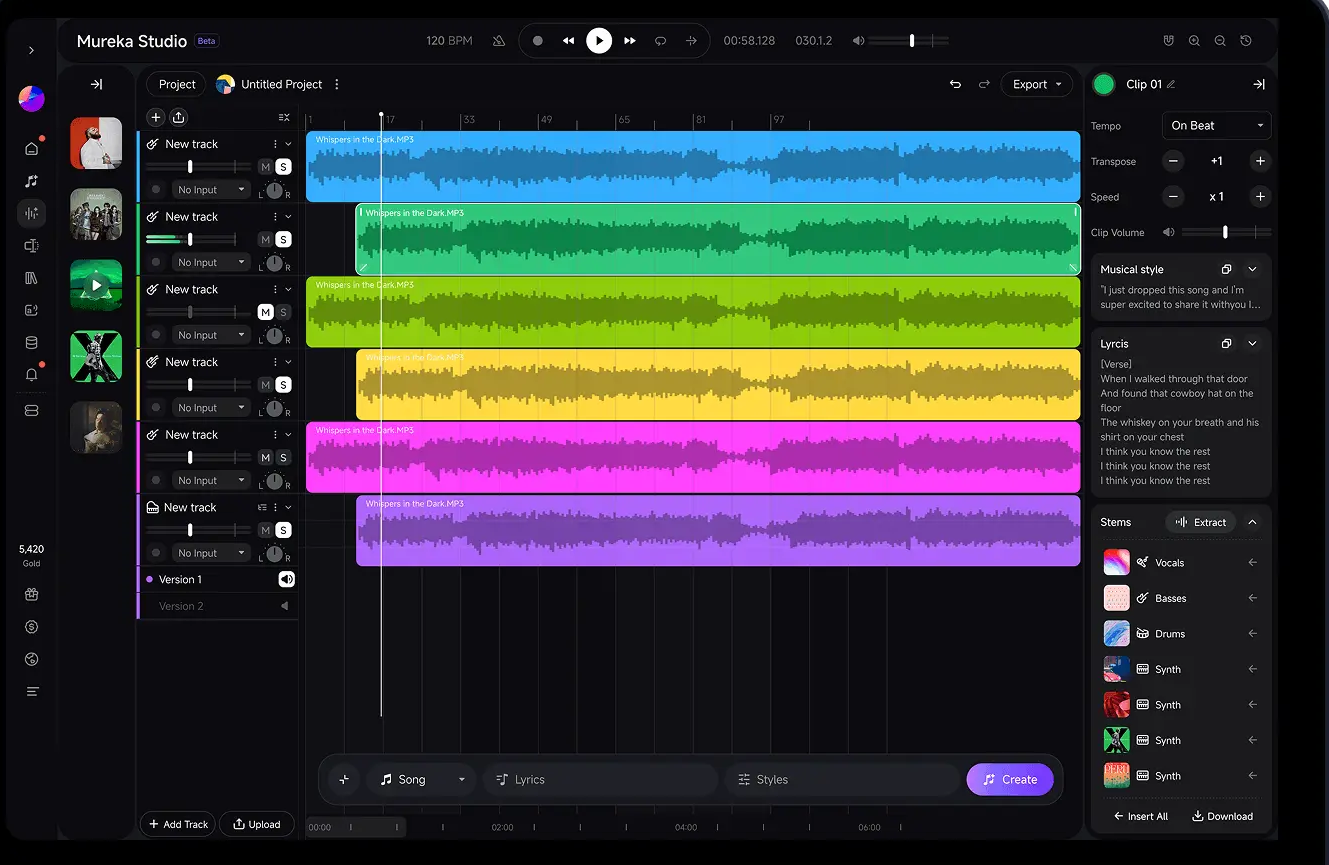
2. What Mureka AI Actually Does
Mureka operates as an on-demand AI composer and studio producer.
You type in a descriptive text prompt—for example, "Energetic synthwave track with a driving bassline at 120 BPM"—and the underlying neural networks analyze millions of musical data points to generate an entirely unique composition. You can create purely instrumental background music, or use their integrated Lyrics Generator to write a song and have realistic AI voice models sing it. Because the output is generated dynamically, the tracks belong to you.
3. Core Features
4. The Data: The Cost of Background Audio
Paying monthly subscriptions for access to the same libraries everyone else uses is an outdated model. Here is how AI generation changes the financial math for content creators.
5. The Technical Setup (DAW Integration & Stems)
Where Mureka truly separates itself from basic "toy" AI generators is its focus on the professional music production workflow.
If you are on the Pro plan, Mureka does not just hand you a flattened MP3 file. It allows you to download the stems. This means you receive the isolated drum track, the isolated bassline, and the isolated melodies. You can drop these individual WAV files directly into Premiere Pro for precise video editing or into a Digital Audio Workstation (DAW) like Logic Pro to add your own real instruments over the AI foundation.
6. Practical Workflow & Timeline
Here is what the "Prompt-to-Production" pipeline looks like inside the platform:
Step 1: Ideation & Prompting
Input a detailed text prompt detailing the genre, tempo, and mood. If you want vocals, generate lyrics using the built-in AI tool.
Step 2: Generation
The neural network processes your request in under 60 seconds, outputting multiple variations of the track for you to review.
Step 3: Refining & Extension
Select the best variation. If the track is too short, use the "Extend" feature to seamlessly add a bridge or an outro to fit your video's timeline.
Step 4: Export & Mix
Download the high-quality WAV files or individual stems to drop into your video editor or DAW with full commercial clearance.
7. Example Use Cases
8. The Real ROI (Security vs. Uniqueness)
Hover over the metrics below to see the baseline operational advantages of using an AI music generator over traditional licensing.
Never worry about YouTube demonetizing your videos or a client receiving a DMCA takedown notice.
Stop using the same generic corporate ukulele track that every other creator uses. Your music is exclusively yours.
9. Who Mureka AI Is Best For
- High-Volume Content Creators: If you produce daily podcasts, YouTube Shorts, or TikToks, Mureka provides an endless well of fresh, safe background audio.
- Producers & Beatmakers: The ability to download stems makes this a massive asset for sampling. You can generate a jazz piano loop, download the stem, and build a hip-hop beat around it in Ableton.
- Marketers: Perfect for generating catchy, brand-specific jingles and intro tracks for advertising campaigns.
10. Who Should Avoid Mureka AI
- Live Performers: While the AI is incredible at production, it obviously cannot replace the dynamic, improvisational energy of a live session band.
- Acoustic Purists: If you demand the hyper-specific, nuanced imperfections of a real human playing an acoustic guitar, AI models can sometimes sound a bit *too* polished and clean.
11. Pricing & Feature Tiers
Mureka offers a highly competitive pricing model that completely undercuts traditional stock music libraries while providing massive volume.
Basic Plan
- Up to 400 songs generated/mo
- Standard MP3 Downloads
- Full Commercial Licensing
- Priority generation queue
Pro Plan
- Up to 1,600 songs/mo
- WAV & Stem Downloads
- Advanced Voice Cloning
- Reference audio uploads
12. Best Practices: "The Alpha Plan"
If you are running a creative agency or a media company, you must execute the Alpha Plan for digital asset management to drastically scale your operational margins.
13. How Mureka AI Compares
| Feature | Mureka AI | Suno / Udio | Epidemic Sound |
|---|---|---|---|
| Generation Style | Text-to-Music & Stems | Text-to-Music | Manual Search (No AI Gen) |
| Stem Downloads | Yes (Pro Plan) | Varies / Often Limited | Yes |
| Copyright Ownership | Royalty-Free (You own it) | Commercial (Paid tiers) | Strict License (Rented) |
| Cost | Very Low ($8/mo start) | Moderate | High ($15-$30/mo) |
14. Limitations & Reality Check
- Vocal Artifacts: While the instrumental generation is practically flawless, AI-generated vocals can occasionally exhibit slight robotic artifacts or weird pronunciations on complex lyrical phrasing. It usually takes a few generation attempts to get the perfect vocal take.
- The Randomness Factor: Because it relies on neural networks, you cannot dictate exact chord progressions (e.g., "Play a C major followed by a G minor"). You provide the mood and genre, and the AI interprets the composition creatively.
15. PROS & CONS
- Eliminates expensive stock music subscription costs permanently.
- Stem downloads allow for incredible precision during video editing.
- Provides full commercial rights, ending YouTube copyright strike fears.
- Lightning-fast generation allows for rapid creative iteration.
- Cannot dictate specific, exact musical notes or chord charts.
- AI vocals occasionally require multiple re-rolls for perfect pronunciation.
16. Frequently Asked Questions
1. Can I monetize Mureka AI music on YouTube and Spotify?
Yes! When you generate music on Mureka's paid plans, you receive full commercial rights. You can confidently use the tracks in YouTube videos, client projects, podcasts, and even release them on streaming platforms like Spotify without fear of copyright strikes.
2. What file formats can I download?
The Basic plan allows for standard MP3 downloads, which is perfect for general web content. The Pro plan unlocks high-fidelity WAV downloads as well as individual stem tracks for professional mixing.
3. What is a "Stem" download?
A stem is an isolated audio track. Instead of just downloading the final mixed song, a stem download gives you separate files for the vocals, the drums, the bass, and the melody. This allows you to mute the vocals or adjust the drum volume independently inside your video editor or DAW.
4. Does it generate both vocals and lyrics?
Yes. Mureka includes a built-in Lyrics Generator to help write the song. You can then select an AI voice model to sing those lyrics naturally over the generated instrumental track.
5. How fast does it generate a song?
Mureka's advanced neural network is incredibly fast, typically processing your text prompt and generating the complete audio track within 30 to 120 seconds, depending on server load and track complexity.
6. Do I own the copyright to the generated music?
Yes. The music generated via Mureka's platform on paid plans is entirely yours to use commercially. It is royalty-free, meaning you never have to pay ongoing backend royalties to Mureka or anyone else.
7. Is there a free trial available?
Mureka offers a free tier that allows you to test the AI engine, generate a limited number of tracks, and see the quality of the output before committing to a commercial subscription.
8. How does it compare to Suno or Udio?
While Suno and Udio are fantastic consumer-level AI music toys, Mureka leans heavily into the professional creator workflow by offering crucial features like Stem downloads, advanced audio reference uploads, and voice cloning, making it a superior choice for actual production environments.
17. Final Verdict
If you are producing content in 2026, renting your background audio from a stock library is an inefficient use of capital. You are paying a premium to sound exactly like everyone else.
Mureka AI completely disrupts the audio licensing industry. By allowing creators to generate studio-quality, highly specific, 100% royalty-free tracks on demand, it serves as an infinite sonic sandbox. The addition of professional stem downloads makes it an absolute no-brainer for any serious agency, podcaster, or video editor.
Start Generating Custom Music Today →