

The biggest problem with AI video generators like Sora or Kling isn't quality; it's consistency. You generate a character in Scene 1, and in Scene 2, they have a different face and different clothes.
MagicLight AI claims to solve this. It positions itself as a "Long-Form" video generator that keeps your characters consistent across 50+ scenes. But is it reliable enough for a YouTube channel? In this MagicLight AI review, we tried to create a 5-minute animated story to test the "Character Lock" feature.
Quick Summary
The "Netflix" of AI Generators?
MagicLight is not for making 3-second realistic clips. It is for storytellers. The ability to upload a character face and see that exact same face in 20 different scenes is a game-changer for anyone making narrative content on YouTube.
Try It Free (300 Credits) →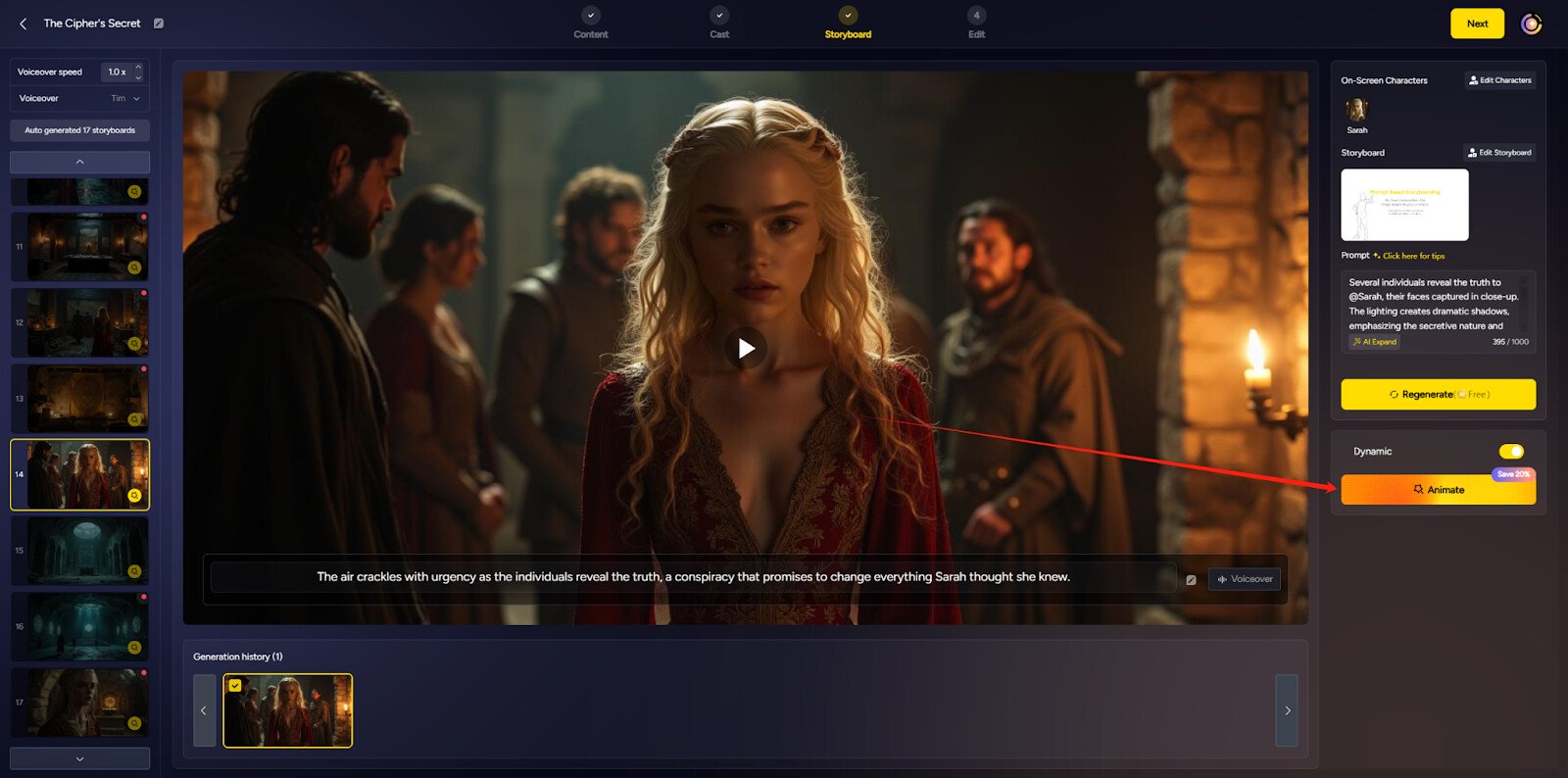
What MagicLight Actually Does
MagicLight combines a Script Writer, Image Generator, and Video Animator into one timeline.
You paste a story (e.g., "A robot learns to love"). MagicLight breaks it down into scenes. It generates consistent images for each scene using your defined character. Then, it animates those images (Motion) and adds Lip-Sync voiceovers. It is an end-to-end studio.
Core Features
How to Use MagicLight — Workflow
We tested it by creating a **"Faceless YouTube"** video about the history of AI.
- The Character: We generated a host: "Cyberpunk Professor with neon glasses." We saved this as a Character Asset.
- The Script: We pasted a 500-word script about Neural Networks.
- The Generation: MagicLight created 15 scenes. In scene 3, the professor was holding a microchip. In scene 5, he was pointing at a screen. The glasses and face remained 90% consistent.
- The Edit: We swapped one scene where the hand looked weird (AI hands are still tricky) and exported the final video in 1080p.
Example Use Cases
Who MagicLight Is Best For
- YouTube Automators: If you run a "Cash Cow" channel and need original footage that isn't stock clips.
- Storytellers: Writers who want to visualize their novel or screenplay concepts.
- Educators: Teachers creating engaging history or science lessons for students.
Who Should Avoid MagicLight
- Realism Seekers: The videos look like high-quality animation or "AI Art." They do NOT look like real life (Sora/Kling are better for realism).
- Control Freaks: You cannot control specific camera movements (pan/tilt) as precisely as you can in LTX Studio.
Pricing & Credits
MagicLight uses a credit system. Generating a scene costs credits.
| Plan | Price (Approx) | Credits / Features |
|---|---|---|
| Free Trial | $0 | 300 Credits (Watermarked) |
| Standard | ~$8 - $15 /mo | ~5,000 Credits (No watermark) |
| Pro | ~$24 - $35 /mo | ~30,000 Credits + Priority |
How MagicLight Compares
| Feature | MagicLight | LTX Studio | HeyGen |
|---|---|---|---|
| Consistency | High | High | Perfect (Avatar) |
| Style | Animation/Art | Cinematic | Talking Head |
| Long Form | Yes (50m) | Yes | No (Short) |
| Price | Low ($15) | Waitlist/$$$ | High ($29+) |
Limitations & Reality Check
- "Slide Show" Feel: Sometimes, the animation is just a subtle camera pan on a static image (Ken Burns effect) rather than full character motion. It's getting better, but don't expect Pixar level movement.
- Support: Some user reviews cite slow customer support response times. It's a smaller team compared to Runway or Pika.
Best Practices: "The Regen Loop"
Don't accept the first result.
Pros & Cons
- Best-in-class character consistency for the price.
- Generates long videos in one go (huge time saver).
- Simple interface for non-technical users.
- Includes sound effects and music automatically.
- Motion can sometimes look stiff or "floating."
- Credit system is confusing for beginners.
- Not suitable for photorealistic "Deepfake" style content.
Frequently Asked Questions
Is MagicLight free?
It offers a free trial with 300 credits to test the features, but you cannot export watermarked-free videos without a paid plan.
Can I use my own voice?
Yes, you can upload your own audio file, and the AI will lip-sync the character to your voice track.
Does it support 4K?
Currently, it supports up to 1080p HD export, which is standard for most AI video generators at this price point.
Do I own the videos?
Yes, on paid plans, you have commercial rights to the videos you generate, meaning you can monetize them on YouTube.
Final Verdict
If you are trying to make a Kids Story Channel or a Narrative History Channel, MagicLight AI is currently the best tool for the job because of its character consistency.
It saves you from the "random face" problem that plagues Midjourney/Runway workflows. It's not Hollywood quality yet, but for social media storytelling, it is a productivity beast.
Create Your Story Now →