


Operating a profitable Amazon FBA (Fulfillment by Amazon) business requires precision, but Amazon’s native Seller Central dashboard is notoriously opaque. Gross revenue figures look impressive, but once you deduct FBA fulfillment fees, storage costs, inbound shipping, PPC ad spend, refunds, and actual Cost of Goods Sold (COGS), many sellers realize their net margins are dangerously thin—or nonexistent.
Sellerboard was built specifically to solve this financial blind spot. Operating as an accurate profit analytics tool, it pulls data directly from the Amazon API to calculate real-time P&L (Profit and Loss), down to the individual SKU level. It also includes inventory forecasting, PPC bid automation, and FBA reimbursement tracking. But does it truly account for all 100+ hidden Amazon fees, or does it leave financial gaps? In this Sellerboard technical audit, we examine its data accuracy, FIFO accounting logic, and refund recovery systems.
- Accurate P&L Tracking: Calculates true net profit by factoring in over 100 distinct Amazon fees, advertising costs, returns, and your exact Cost of Goods Sold (COGS).
- Refund Recovery (Money Back): Automatically identifies instances where Amazon lost or damaged your inventory and provides the exact data needed to file a reimbursement claim.
- FIFO Accounting Logic: Supports "First In, First Out" accounting, meaning it accurately tracks your margins even if your supplier raises manufacturing costs between different manufacturing batches.
- Cost-Effective Consolidation: Starting at $15/month (billed annually), it replaces several expensive standalone tools by including inventory alerts, PPC bid automation, and review request automation.
1. Quick Summary
2. The TL;DR Verdict
Stop Guessing Your Profit Margins
Sellerboard provides a critical operational shift for Amazon merchants. By moving away from complex, error-prone spreadsheets and utilizing a real-time, API-driven dashboard, it gives sellers immediate visibility into the financial health of every SKU. If you are scaling an FBA business and struggling to track exact net profits after PPC spend and hidden Amazon storage fees, Sellerboard is arguably the most mathematically sound software investment you can make.
Start Your 1-Month Free Trial →3. Pros & Cons
- Real-time, hyper-accurate net profit calculations broken down by individual product.
- The "Money Back" feature routinely pays for the software by uncovering missed Amazon reimbursements.
- Aggressive pricing starting at $15/month significantly undercuts larger all-in-one suites.
- Supports complex accounting methods like FIFO, essential for businesses dealing with fluctuating supplier costs.
- It is not a product research tool; it focuses purely on post-launch analytics and management.
- The sheer density of financial data can feel overwhelming to brand new, low-volume sellers.
- Shopify integration currently requires a separate/secondary Sellerboard product.
4. How We Evaluated Sellerboard
To ensure an objective operational audit, we connected Sellerboard to an active Amazon Seller Central account over a 30-day reporting cycle. Our evaluation process included:
- Data Accuracy Check: Cross-referencing Sellerboard’s final net payout calculations against actual Amazon bank disbursements and internal Excel COGS tracking.
- Refund Recovery Audit: Running the "Money Back" report to identify FBA inventory discrepancies (lost/damaged items) and verifying if the generated data resulted in successful Seller Support claims.
- PPC Automation: Testing the bid automation features to measure its ability to maintain a target ACoS (Advertising Cost of Sales) without manual intervention.
- Cost Analysis: Modeling the Total Cost of Ownership (TCO) compared to maintaining heavier suites like Helium 10 or Jungle Scout purely for profit tracking.
5. What Sellerboard Actually Does
Sellerboard acts as an automated financial controller for your Amazon business.
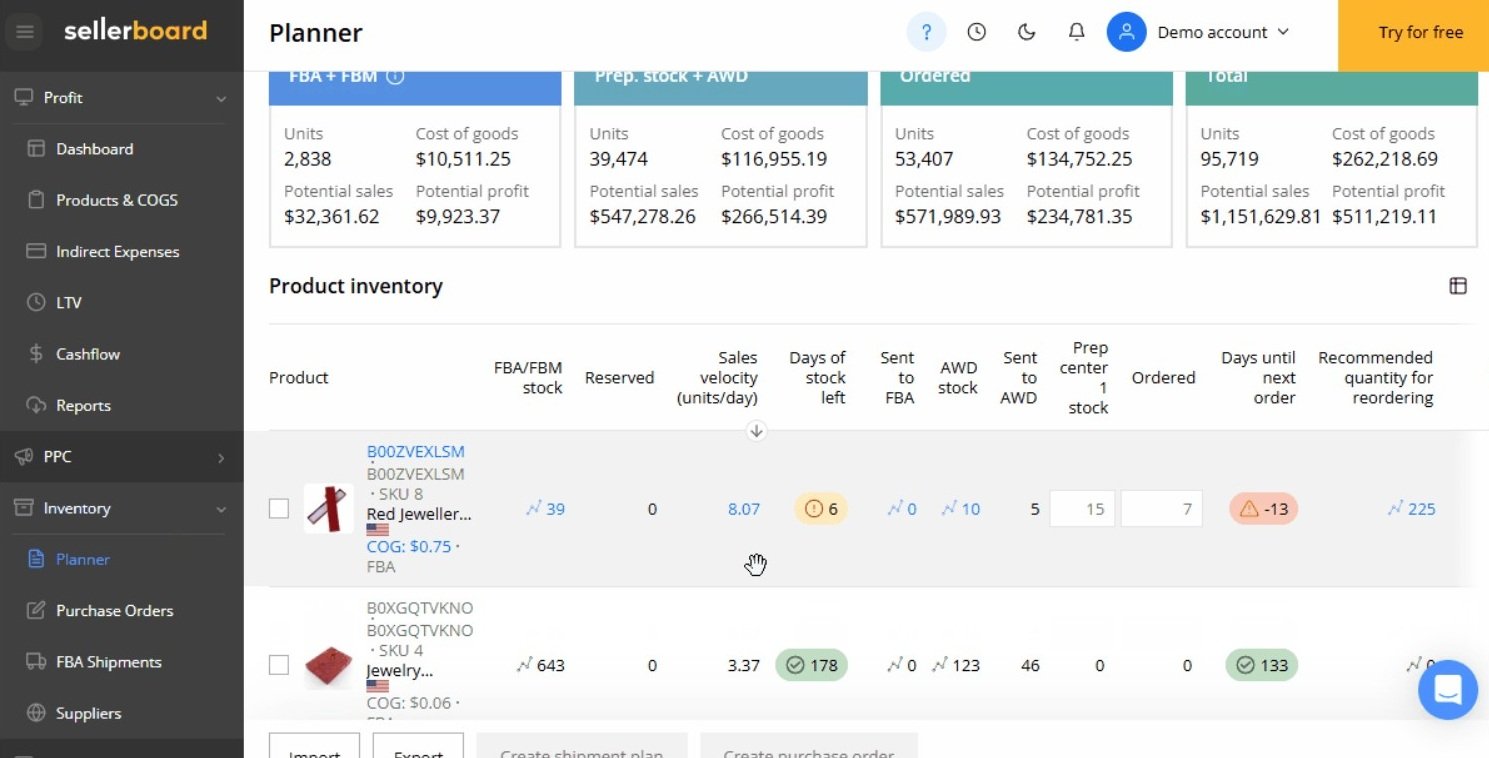
Amazon’s native reporting makes it difficult to see true profitability because fees are scattered across different reports. Sellerboard connects to your Seller Central account via the official API. You input your manufacturing costs and shipping expenses (COGS). Whenever an item sells, Sellerboard instantly calculates the sale price, subtracts Amazon’s referral fee, the FBA fulfillment fee, the specific PPC ad spend that drove the click, any return costs, and your COGS, displaying your precise net profit in real-time.
6. Core Features Matrix
7. The Data: The Cost of Financial Blind Spots
Failing to track exact margins frequently leads to sellers scaling unprofitable products. Here is a baseline look at the operational advantage of automated API tracking versus manual spreadsheet math.
8. How Sellerboard Compares to the Market
To understand Sellerboard's positioning, we must evaluate it against broader Amazon seller suites and specialized financial tools.
| Feature | Sellerboard | Helium 10 | Jungle Scout |
|---|---|---|---|
| Primary Focus | Profit Analytics & Ops | Product Research & SEO | Market Intel & Launches |
| Starting Price | ~$15 / mo (Annual) | ~$39 / mo | ~$49 / mo |
| Refund Recovery | Included natively | Included (Refund Genie) | Limited functionality |
| Pricing Model | Tiers based on order volume | Flat feature tiers | Flat feature tiers |
9. Sellerboard vs Helium 10: Which is Better?
Helium 10 is an expansive, all-in-one suite known primarily for product research (Black Box) and keyword tracking (Cerebro). Sellerboard is laser-focused on post-launch financial analytics and operations.
- Significantly cheaper entry price ($15/mo vs $39/mo) for accurate profit tracking.
- More granular, accounting-grade P&L statements (supports FIFO COGS).
- Cleaner interface dedicated solely to operational metrics, avoiding tool bloat.
- Industry-leading product research and keyword data for launching new products.
- Robust listing optimization and SEO tools.
- A true "all-in-one" platform if you have the budget for higher tiers.
Note: Many successful sellers use a hybrid approach—relying on a Helium 10 basic plan for research, while using Sellerboard for accurate daily accounting.
10. Sellerboard vs Jungle Scout: The Analytics Divide
Similar to Helium 10, Jungle Scout is heavily tailored toward initial product discovery and market intelligence. While Jungle Scout does feature a "Sales Analytics" module, it is often viewed by sellers as less comprehensive than Sellerboard’s dedicated financial controller approach. If your primary pain point is managing complex supplier expenses, tracking LTV (Life Time Value) of customers, and automating PPC bids based on strict profit margins, Sellerboard provides a more robust operational view.
11. Workflow & Deployment Timeline
Here is what the execution pipeline looks like for setting up accurate financial tracking:
Step 1: API Synchronization
Connect Sellerboard to your Amazon Professional Seller account. The software securely downloads your historical sales data, fees, and PPC metrics.
Step 2: Input COGS
Enter your Cost of Goods Sold (manufacturing and inbound shipping costs) for each SKU. Sellerboard applies this against Amazon's fee data. (Need help managing your broader e-commerce supply chain logistics? We reviewed Gelato for localized print fulfillment.)
Step 3: Enable Automations
Turn on the "Autoresponder" to send automated, Amazon-compliant review request emails to buyers upon delivery.
Step 4: Refund Recovery
Regularly check the "Money Back" tab. Download the generated discrepancy reports and open support tickets with Amazon to claim lost inventory funds.
12. Feature Focus: FBA Refund Recovery (Money Back)
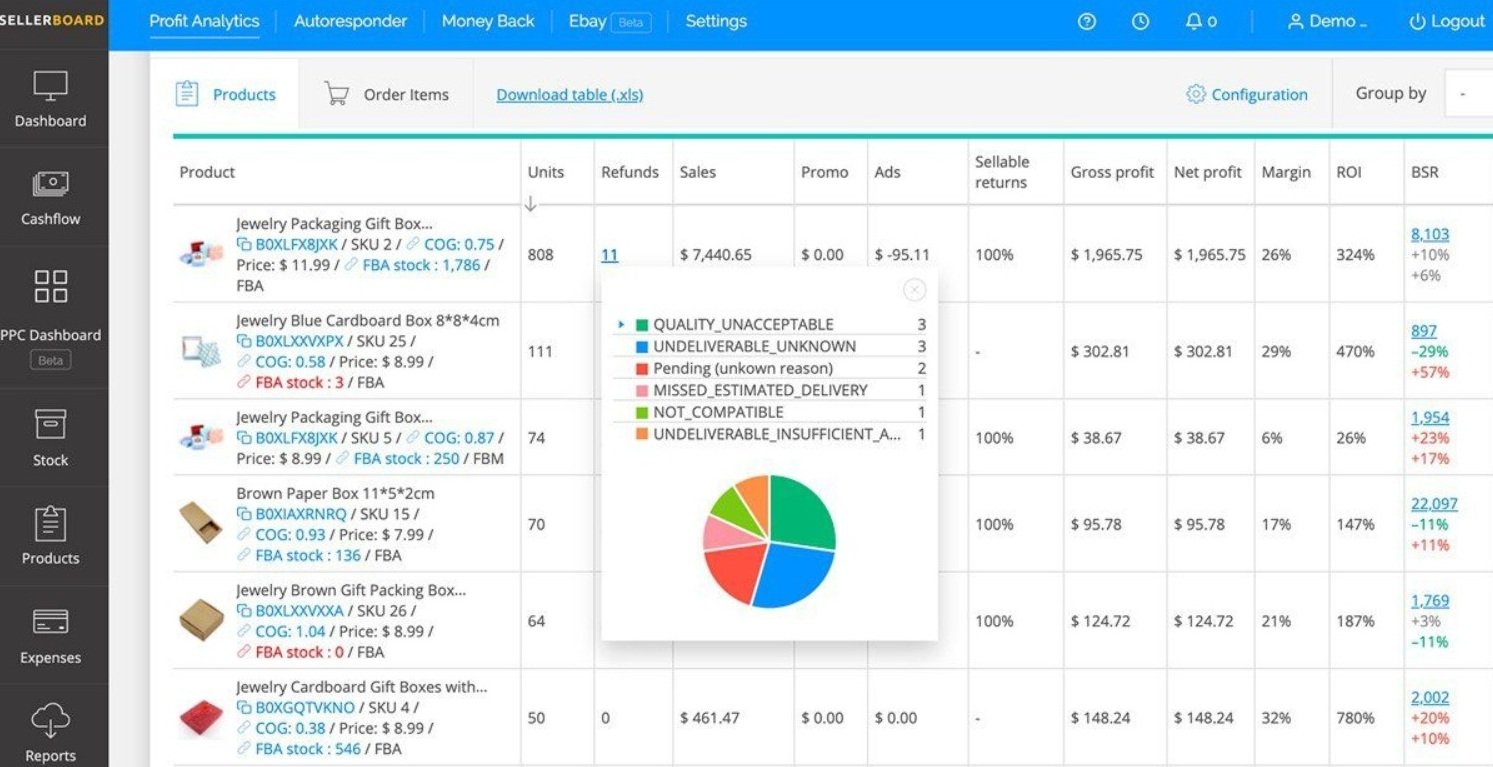
Amazon's warehouses process millions of items daily; inevitably, some of your inventory will be lost, damaged, or a customer will be refunded without actually returning the item. Amazon expects you to catch these errors and file claims manually. Sellerboard’s "Money Back" feature cross-references your inventory logs automatically, highlighting exact discrepancies and providing the raw data text needed to copy/paste into a Seller Support case to get your money back. For many users, this feature alone covers the cost of the subscription.
13. Feature Focus: Accounting & FIFO Logic
Basic profit trackers use a static cost model (e.g., assuming a product always costs $5 to make). This is inaccurate in the real world. Shipping container costs fluctuate, and manufacturers raise prices. Sellerboard utilizes FIFO (First In, First Out) accounting. If your first batch cost $5/unit, and your second batch cost $6/unit, the software accurately applies the $5 cost to the older sales and shifts to the $6 cost only when the new batch starts selling, ensuring your tax reporting and margins are flawless.
14. Example Use Cases
15. Operational Advantages
Uncovers hidden FBA fees, inbound shipment charges, and storage penalties that are typically buried deep within Amazon's native transaction reports.
Many sellers report that the funds recovered via the automated "Money Back" FBA discrepancy reports exceed the monthly cost of the software itself.
16. Who Sellerboard Is Best For
- Budget-Conscious Sellers: At a starting price equivalent to $15/mo, it offers enterprise-grade analytics without the $50-$100/mo premium of larger software suites.
- Data-Driven Operators: Sellers who recognize that "revenue is vanity, profit is sanity" and need daily, hourly, or SKU-level P&L visibility to make purchasing decisions.
- Sellers with Large FBA Inventories: High inventory volume inherently means a higher rate of Amazon warehouse errors; the refund tracking is essential for these accounts.
17. Who Should Avoid Sellerboard
- Brand New Product Researchers: If you do not yet have a product to sell and are looking for software to find a niche or analyze competitor search volume, you need a research tool like Jungle Scout or Helium 10 first.
- Non-Amazon Pure D2C Brands: While Sellerboard does offer a separate product for Shopify, its core strength and primary architecture are heavily optimized for the specific complexities of the Amazon FBA ecosystem.
18. Real User Sentiment
Across seller communities and aggregate review platforms, Sellerboard maintains an exceptionally strong reputation:
- The Praise: The overwhelming consensus highlights the cost-to-value ratio. Sellers appreciate the clean UI, the ease of viewing net profit per order, and the utility of the inventory forecasting tools which prevent stockouts.
- The Complaints: The primary critique centers around integration boundaries. Some users express frustration that tracking Shopify sales requires a separate Sellerboard product rather than a unified dashboard integrating both Amazon and Walmart/Shopify seamlessly.
19. Pricing Realities & Feature Tiers
Sellerboard utilizes volume-based pricing. The tiers below reflect the 20% discount applied when opting for annual billing (2026 pricing data).
Standard Plan
- Up to 3,000 orders per month
- 150 Follow-up emails per month
- Includes 1 additional user
- Full Profit Dashboard & Refund Tracking
Professional Plan
- Up to 6,000 orders per month
- 6,000 Follow-up emails per month
- Includes 2 additional users
- PPC Optimization & Automation
20. The Hidden Costs & Limitations
The pricing model is straightforward, but users must monitor their order volume. If a successful product launch or holiday season pushes your sales volume past 3,000 orders in a single month, you will be required to upgrade from the Standard to the Professional plan. However, because the pricing scales strictly with your sales volume, the software remains highly cost-effective relative to the revenue being generated.
21. Best Practices: "The Alpha Plan"
To effectively leverage the platform, you must feed it accurate data from day one.
22. Security & Compliance
Sellerboard integrates via Amazon’s official Selling Partner API (SP-API). This means it does not require your actual Amazon login credentials. It utilizes secure, token-based authentication approved by Amazon. The platform operates within Amazon's strict data protection and privacy policies required of all third-party developers in the Appstore.
23. Is Sellerboard Worth It in 2026?
For any seller moving past their first product launch, Sellerboard is highly recommended. Relying on Amazon's native reports to calculate profitability is tedious and prone to human error. At roughly $15 to $23 a month, Sellerboard replaces manual spreadsheets, expensive email autoresponders, and basic PPC tools, while frequently paying for itself via FBA reimbursement discoveries. It is a highly practical operational investment.
24. Frequently Asked Questions
Is Sellerboard better than Helium 10?
They serve different purposes. Helium 10 is superior for product research and keyword optimization. Sellerboard is generally considered superior for pure financial tracking, accounting, and refund recovery at a much lower price point.
Does Sellerboard help me find products to sell?
No. Sellerboard is a post-launch operations and analytics tool. It does not include a product research database or market intelligence features for finding new niches.
How does the refund recovery (Money Back) feature work?
Sellerboard automatically analyzes your FBA inventory reports to find discrepancies—such as lost items, damaged goods, or unreturned customer refunds—and generates the exact text needed to open a reimbursement case with Amazon support.
Does it track PPC advertising costs?
Yes. Sellerboard pulls your PPC ad spend data directly via the API and deducts it from your gross sales, allowing you to see the true net profit of a product after advertising costs are applied.
Can I track different manufacturing costs over time?
Yes. Sellerboard supports FIFO (First In, First Out) and batch accounting. If your manufacturing costs change between shipments, you can input the new costs, and the software will apply them accurately to the corresponding sales.
Do I need an Amazon Professional Selling Plan to use it?
Yes. Amazon restricts third-party software API access to users on the Professional Selling Plan ($39.99/mo). Individual accounts cannot connect to tools like Sellerboard.
Does it send review request emails?
Yes. Sellerboard includes an autoresponder that can trigger Amazon's official "Request a Review" button or send customized, compliant follow-up emails to buyers.
Is there a free trial?
Yes. Sellerboard typically offers an extended 1-month free trial (no credit card required) allowing you to connect your account and verify your historical profitability before committing to a plan.
25. Final Conclusion
Attempting to scale an Amazon business without clear financial visibility is a significant operational risk. Hidden fees, fluctuating ad spend, and unrecovered FBA inventory can quickly turn high-revenue products into net-negative liabilities.
Sellerboard provides a robust, highly accurate financial infrastructure. By automating P&L calculations, enforcing precise COGS tracking, and streamlining refund recoveries, it empowers sellers to make data-driven purchasing and advertising decisions. For merchants focused on maximizing actual profit rather than vanity revenue metrics, Sellerboard represents a highly effective and affordable software solution.
Audit Your Amazon Profits Today →