
If you live by your calendar, you know the pain: Your "Deep Work" block gets interrupted by a meeting, and you forget to reschedule it. Suddenly, it's 5 PM and you haven't done the actual work.
Reclaim.ai promises to fix this by using AI to "defend" your time. It claims to be a smarter, cheaper alternative to Motion. But does it work for complex schedules? In this Reclaim.ai review, we tested its "Smart Habits" and Task integration to see if it really saves time.
Quick Summary
Smart Defense for Your Time
Reclaim isn't just a calendar; it's a negotiator. If a meeting conflicts with your "Lunch" or "Coding" block, Reclaim automatically moves your personal block to the next available slot. For solo founders and developers, it is indispensable.
Sync Your Calendar for Free →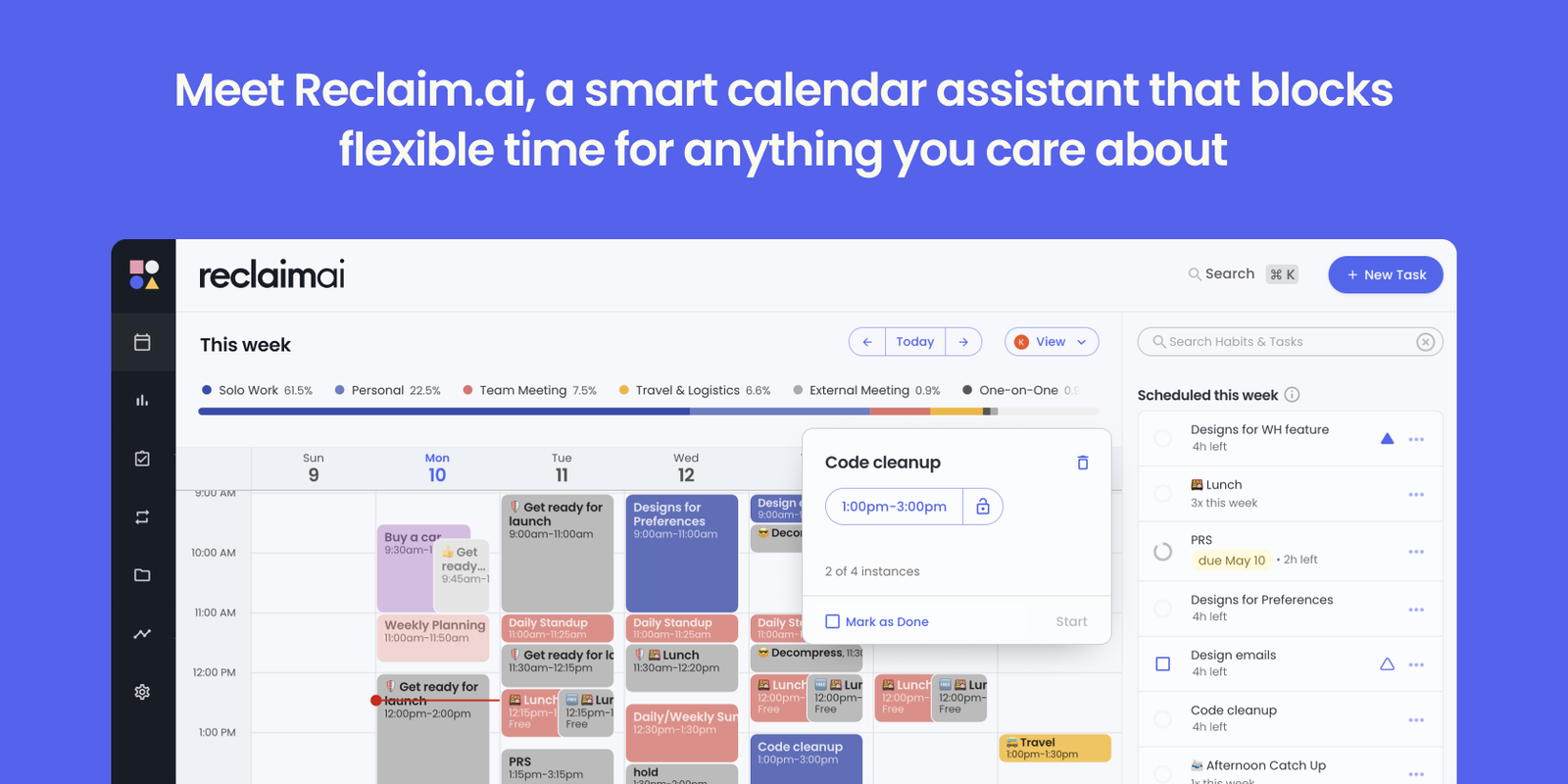
What Reclaim.ai Actually Does
Most calendars are "static." You put an event at 2 PM, and it stays there forever.
Reclaim makes your calendar "fluid." You tell it: "I need to work out for 2 hours sometime between 10 AM and 4 PM." Reclaim finds the best slot. If a client books a meeting at 11 AM, Reclaim automatically shifts your workout to 1 PM. It ensures your priorities actually happen.
Core Features
How to Use Reclaim — Workflow
To test the engine, we set up a "Morning Routine" defense strategy.
- Define the Habit: We created a "Workout" habit. We told Reclaim: "I need 1 hour 40 minutes for the gym, specifically between 10:00 AM and 12:00 PM."
- Set Priority: We marked this as "High Priority" so Reclaim would aggressively defend it against internal meetings.
- The Conflict Test: We intentionally tried to book a Zoom call at 10:30 AM.
- The Result: Reclaim marked the 10:00-11:40 AM slot as "Busy" to the public, preventing the booking. When we forced a meeting internally, Reclaim instantly alerted us that the Workout was "At Risk" and suggested moving it to 8:00 AM the next day.
Example Use Cases
Who Reclaim Is Best For
- Google Ecosystem Users: It lives and breathes Google Calendar.
- Solo Founders & Freelancers: The free plan is incredibly generous.
- ADHD Brains: If you forget to eat lunch or take breaks, Reclaim forces these onto your schedule.
Who Should Avoid Reclaim
- Outlook / Office 365 Users: Reclaim currently only supports Google Calendar. If you use Outlook, you must use Motion.
- Paper Planner Lovers: If you prefer physically writing things down, an AI shifting your schedule around will drive you crazy.
Pricing & Licensing Model
- Up to 3 Habits
- Sync 1 Calendar
- Task Integration (Limited)
- Scheduling Links
How Reclaim Compares (Motion vs Reclaim)
| Feature | Reclaim.ai | Motion | Google Calendar |
|---|---|---|---|
| Pricing | $8/mo | $19/mo | Free |
| Outlook Support | No (Google Only) | Yes | No |
| Project Mgmt | Basic Tasks | Full Projects | None |
| Ease of Use | High | Medium | High |
Limitations & Reality Check
- Google Calendar Only: This is the biggest dealbreaker. If your company uses Microsoft/Outlook, you cannot use Reclaim.
- Setup Time: It takes about 20-30 minutes to set up all your Habits and Priorities correctly. It's not "plug and play" instantly.
- Mobile App: The mobile app is decent but feels more like a "viewer" than a full editor. The desktop web app is much better.
Best Practices: "Defensive Scheduling"
Don't over-block your day. We recommend leaving 2 hours "Open" for chaos.
Pros & Cons
- Free plan is excellent for individuals.
- "Habits" feature is smarter than recurring events.
- Scheduling Links replace Calendly (saving you $12/mo).
- Beautiful UI that feels native to Google.
- Does not support Outlook/Office 365.
- Project management features are very basic.
- Can feel overwhelming if you have too many habits.
Frequently Asked Questions
Does Reclaim work with Outlook?
No. As of 2026, Reclaim is strictly for Google Calendar users. If you need Outlook support, check out Motion.
Is the free plan good enough?
Yes! The "Lite" plan allows for 3 Habits and basic sync. It is perfect for testing the waters before committing to the $8/mo plan.
Does it replace Todoist?
Not really. Reclaim is for scheduling tasks, not managing them. It integrates with Todoist, pulling your to-dos onto your calendar.
Final Verdict
If you use Google Calendar and you are tired of paying $19/mo for Motion (or $12/mo for Calendly), Reclaim.ai is the perfect switch.
It combines task blocking, habit tracking, and meeting scheduling into one $8/mo tool. It is the best ROI tool in the productivity space right now.
Start Using Reclaim for Free →