
Managed WordPress hosting (like WP Engine or Kinsta) is a trap. You pay $115/month for 5 websites, but underneath the hood, they are just renting a $20 DigitalOcean server and putting a pretty dashboard on top of it.
If you manage multiple client websites, you are losing thousands of dollars a year to these markups. Plesk is the tool that lets you cut out the middleman. It is a web hosting control panel that turns a raw, unmanaged server into a visual dashboard. But is it easy enough for non-developers to use? In this Plesk review, we spun up a cloud server to test its famous "WordPress Toolkit."
Quick Summary
The DevOps Cheat Code
You don't need to know how to write Linux command-line code to run your own server. Plesk handles the messy backend stuff—SSL certificates, PHP versions, database creation, and security firewalls—with a modern, click-to-deploy interface. It effectively allows you to build your own profitable hosting agency overnight.
Start Your 14-Day Free Trial →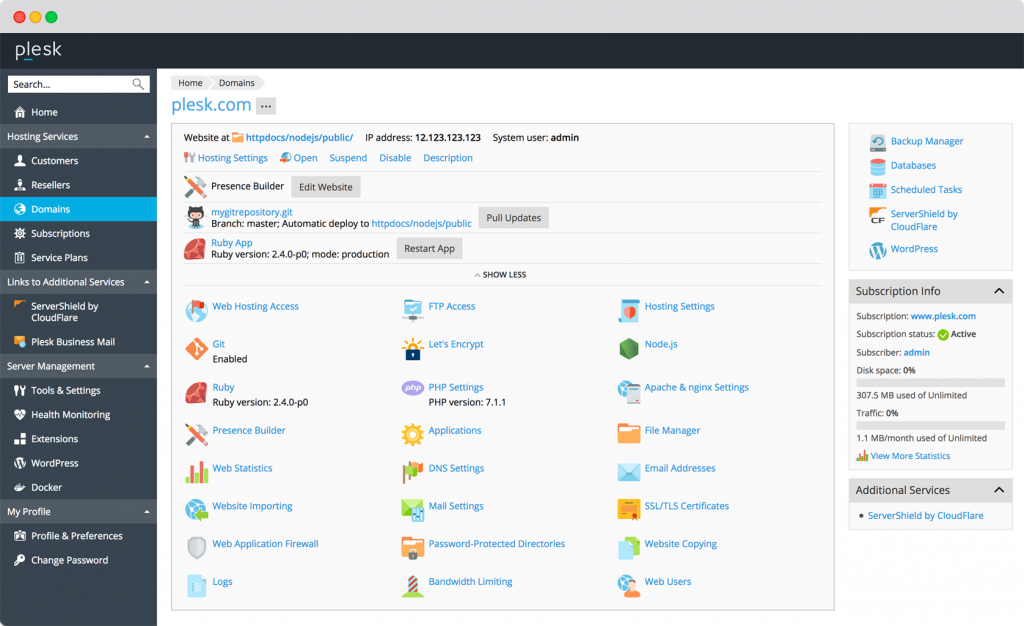
What Plesk Actually Does
When you rent a VPS (Virtual Private Server) from AWS, Vultr, or Linode, you get a blank black screen. You have to manually install Apache, PHP, MySQL, and configure firewalls just to get a website online.
Plesk is the software you install on top of that blank server. It provides a visual, browser-based dashboard. From there, you can click "Add Domain," "Install WordPress," or "Issue Let's Encrypt SSL," and Plesk writes the complex server code in the background to make it happen instantly.
Core Features
How to Use Plesk — The Agency Workflow
We set up a dedicated environment to host 10 client websites to test the profitability model.
- The Server: We rented a robust $24/mo DigitalOcean droplet (4GB RAM, 2 CPUs).
- The Install: We selected the "Plesk Image" from the DigitalOcean marketplace. It installed itself in 3 minutes.
- The Toolkit: We used Plesk's WordPress Toolkit to install 10 client sites. It automatically created the databases, generated strong passwords, and installed SSLs.
- The ROI: Instead of paying a managed host $150+/mo for 10 sites, our total infrastructure cost is now $39/mo ($24 server + $15 Plesk). We charge the clients $50/mo each for hosting. Pure profit.
Example Use Cases
Who Plesk Is Best For
- WordPress Professionals: The WordPress Toolkit is lightyears ahead of what cPanel offers. It is the best WP management system on the market.
- Windows Server Users: Unlike cPanel, which is Linux-only, Plesk offers full support for Windows Servers (ASP.NET).
- Growing Agencies: If you manage more than 5 websites, paying for a control panel and your own server makes financial sense.
Who Should Avoid Plesk
- Single Blog Owners: If you just run one small blog, managing your own server with Plesk is overkill. Stick to cheap shared hosting like Bluehost or SiteGround.
- Absolute Beginners: While Plesk is visual, you still need to understand basic DNS (pointing A-records) and website structure. It's easy, but not "Wix-level" easy.
Pricing & License Tiers
Plesk pricing is based on the number of domains you want to host and the type of server (VPS vs Dedicated).
| Plan (VPS Pricing) | Price (Monthly) | Limits |
|---|---|---|
| Web Admin | ~$14.50 /mo | Up to 10 Domains. Perfect for small portfolios. |
| Web Pro | ~$22.50 /mo | Up to 30 Domains + Developer pack + Subscription management. |
| Web Host | ~$36.00 /mo | Unlimited Domains. Built for full-scale hosting agencies. |
How Plesk Compares (vs cPanel)
| Feature | Plesk | cPanel | RunCloud |
|---|---|---|---|
| Interface | Modern / Clean | Dated / Cluttered | Modern (SaaS) |
| WP Management | Superior (WP Toolkit) | Basic (WP Toolkit Lite) | Good |
| OS Support | Linux & Windows | Linux Only | Linux Only |
| Architecture | Installed on Server | Installed on Server | Cloud-Based GUI |
Limitations & Reality Check
- Resource Consumption: Plesk is a robust piece of software. It consumes a decent chunk of RAM just to run itself. Do not install Plesk on a server with less than 2GB of RAM, or your websites will crawl.
- Backup Space: While Plesk makes automated backups easy, you have to pay for third-party storage (like Amazon S3 or Google Drive) to store those backups off-site.
Best Practices: "1-Click Hardening"
Don't leave WordPress vulnerable.
Pros & Cons
- The WordPress Toolkit is the best staging/cloning tool available.
- Allows you to bypass expensive managed hosting markups.
- Clean, intuitive UX compared to the messy cPanel dashboard.
- Built-in Node.js, Ruby, and Docker support for advanced apps.
- Requires a server with at least 2GB RAM to run smoothly.
- You are still responsible for your server's underlying health.
- License pricing scales up significantly for "Dedicated" servers.
Frequently Asked Questions
Is Plesk better than cPanel?
For most modern agencies and WordPress developers, yes. Plesk has a cleaner interface, better WordPress management tools, and supports both Windows and Linux, whereas cPanel is Linux only.
Do I need to be a developer to use it?
No, you do not need to know code to use Plesk. However, you should understand the basics of web hosting, like pointing DNS records and managing file directories.
Can I migrate a site from cPanel to Plesk?
Yes, Plesk includes a built-in migration manager tool that allows you to easily pull websites, databases, and emails from an old cPanel server to your new Plesk server.
Does it come with an email server?
Yes, Plesk includes comprehensive email server management, allowing you to create `[email protected]` addresses and manage spam protection directly.
Final Verdict
If you are an agency owner paying hundreds of dollars a month to WP Engine or Kinsta, you are leaking profit.
Plesk is the ultimate bridge between "Too Hard" (raw command line) and "Too Expensive" (managed hosting). By spending one afternoon learning the Plesk dashboard, you can spin up your own secure, high-performance hosting infrastructure and turn server management into a highly profitable revenue stream.
Start Managing Servers Easily (Free Trial) →