
Building a landing page is easy. Building a landing page that actually converts expensive Google Ad traffic into paying customers is a science.
Most people build a page in WordPress, realize it takes 4 seconds to load, and watch their ad budget burn. Leadpages claims to solve this with ultra-fast cloud hosting and an AI tool called the "Leadmeter" that tells you what to fix before you hit publish. But is it too restrictive for advanced marketers? In this Leadpages review, we built a live opt-in funnel to test its limits.
Quick Summary
Built for Conversions, Not Designers
Leadpages is intentionally restrictive. You cannot place a button three pixels to the left just because you want to. The builder snaps everything to a grid optimized for mobile conversions and fast load times. It trades ultimate design freedom for guaranteed marketing performance.
Start Your 14-Day Free Trial →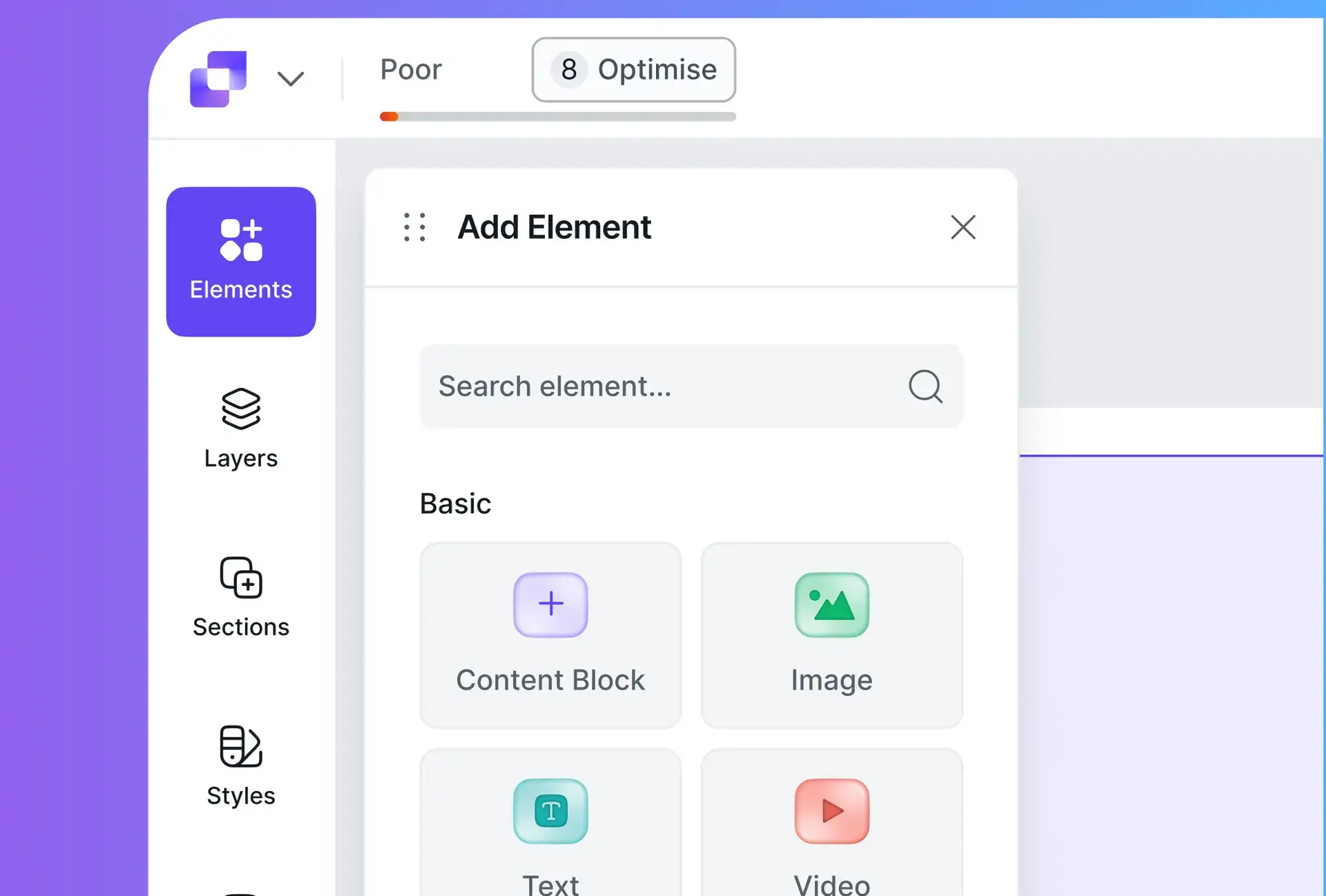
What Leadpages Actually Does
Leadpages is a cloud-based editor for creating landing pages, pop-ups, and alert bars.
You select a template (sorted by historical conversion rate data), customize the text and images, and publish it to a custom domain. The pages are hosted on Leadpages' servers, which are incredibly fast. When a user submits their email, Leadpages routes that data to your email marketing tool (Mailchimp, ConvertKit, etc.) or CRM.
Core Features
How to Use Leadpages — Workflow
We built an "Ebook Opt-In" page to test the Leadmeter.
- The Template: We picked a high-converting "Free Guide" template.
- The Build: We dragged in our cover image and adjusted the copy. The Leadmeter flagged our Call-to-Action button as "Too hard to read" because of poor color contrast. We changed it to bright orange, and the score jumped to "Excellent."
- The Integration: We clicked the form and connected it to our ActiveCampaign account with one click.
- The Launch: We hit publish. The page loaded instantly on mobile and passed Google's Core Web Vitals test effortlessly.
Example Use Cases
Who Leadpages Is Best For
- Solopreneurs & Non-Coders: If WordPress breaks your brain, Leadpages is a breath of fresh air.
- PPC Marketers: Fast-loading pages result in higher Google Ads Quality Scores, lowering your Cost Per Click.
- High-Traffic Campaigns: Leadpages never charges you for traffic or leads. You can send 100,000 visitors, and your bill stays the same.
Who Should Avoid Leadpages
- Design Perfectionists: The grid system prevents overlapping elements easily. If you want wild, free-form web design, use Webflow or Elementor.
- Complex Funnel Builders: It does not have advanced "Upsell/Downsell" sequential logic natively built-in like ClickFunnels does.
Pricing & Traffic Limits (The Big Advantage)
Unlike Unbounce (which limits your traffic) or ClickFunnels (which is very expensive), Leadpages offers an incredibly fair pricing model.
| Plan | Price (Annual) | Key Limits |
|---|---|---|
| Standard | ~$37 /mo | 1 Custom Domain / Unlimited Traffic |
| Pro | ~$74 /mo | 3 Domains / A/B Testing / Online Payments |
How Leadpages Compares
| Feature | Leadpages | Unbounce | ClickFunnels |
|---|---|---|---|
| Traffic Limits | Unlimited | Strict Limits | Unlimited |
| Ease of Use | High | Medium | Medium |
| A/B Testing | Pro Plan Only | Yes | Yes |
| Starting Price | ~$37/mo | ~$99/mo | ~$147/mo |
Limitations & Reality Check
- The "Website" Feature: Leadpages added a feature to build full websites. It works, but it's not a true CMS like WordPress. It's best used for very simple 3-page brochure sites. Stick to using it for landing pages.
- Mobile Customization: While pages are responsive, you have limited control to edit the mobile view completely independently from the desktop view.
Best Practices: "Pop-Up Triggers"
Don't just use standard forms.
Pros & Cons
- Unlimited traffic and leads on all plans.
- Leadmeter acts as a built-in conversion consultant.
- Pages load incredibly fast, improving ad performance.
- Very affordable starting price compared to competitors.
- A/B testing is locked behind the higher-tier Pro plan.
- Design grid can feel rigid if you want complex layouts.
- Not ideal for deep, multi-step sales funnels.
Frequently Asked Questions
Can I use my own domain name?
Yes, you can easily connect your own custom domain (e.g., `offer.yourwebsite.com`) so visitors never see the Leadpages branding.
Does it integrate with WordPress?
Yes, Leadpages has a free WordPress plugin that allows you to publish your landing pages directly onto your existing WordPress site seamlessly.
Is Leadpages better than ClickFunnels?
For simple lead generation and ease of use, Leadpages is better and much cheaper. If you need complex upsell/downsell carts, ClickFunnels is superior.
Can I sell digital products?
Yes, on the Pro plan, you can integrate a Stripe checkout widget to securely sell digital downloads, tickets, or consulting services directly on the page.
Final Verdict
If you are running paid ads, every second your page takes to load costs you money.
Leadpages removes the technical headaches of web design and forces you to focus on what matters: the offer. While it lacks the ultimate design freedom of Elementor, the speed, the Leadmeter guidance, and the "Unlimited Traffic" pricing make it the smartest choice for small businesses and solo marketers focused on pure ROI.
Build Your Landing Page (14 Days Free) →