
The #1 way to destroy your email deliverability is to guess. If you send cold emails to invalid addresses, Google and Outlook will blacklist your domain.
Hunter.io has been the industry standard for finding and verifying professional email addresses for years. But with new "All-in-One" competitors like Apollo offering millions of leads for a flat fee, is Hunter's "pay per search" model still worth it? In this Hunter.io review, we tested its accuracy against the competition.
Quick Summary
Quality Over Quantity
Hunter.io is not for "spraying and praying." It is for surgical precision. While Apollo gives you volume, Hunter gives you Deliverability. Their "Confidence Score" is the most reliable metric in the industry. If Hunter says an email is valid, it almost certainly is.
Try Free (25 Monthly Searches) →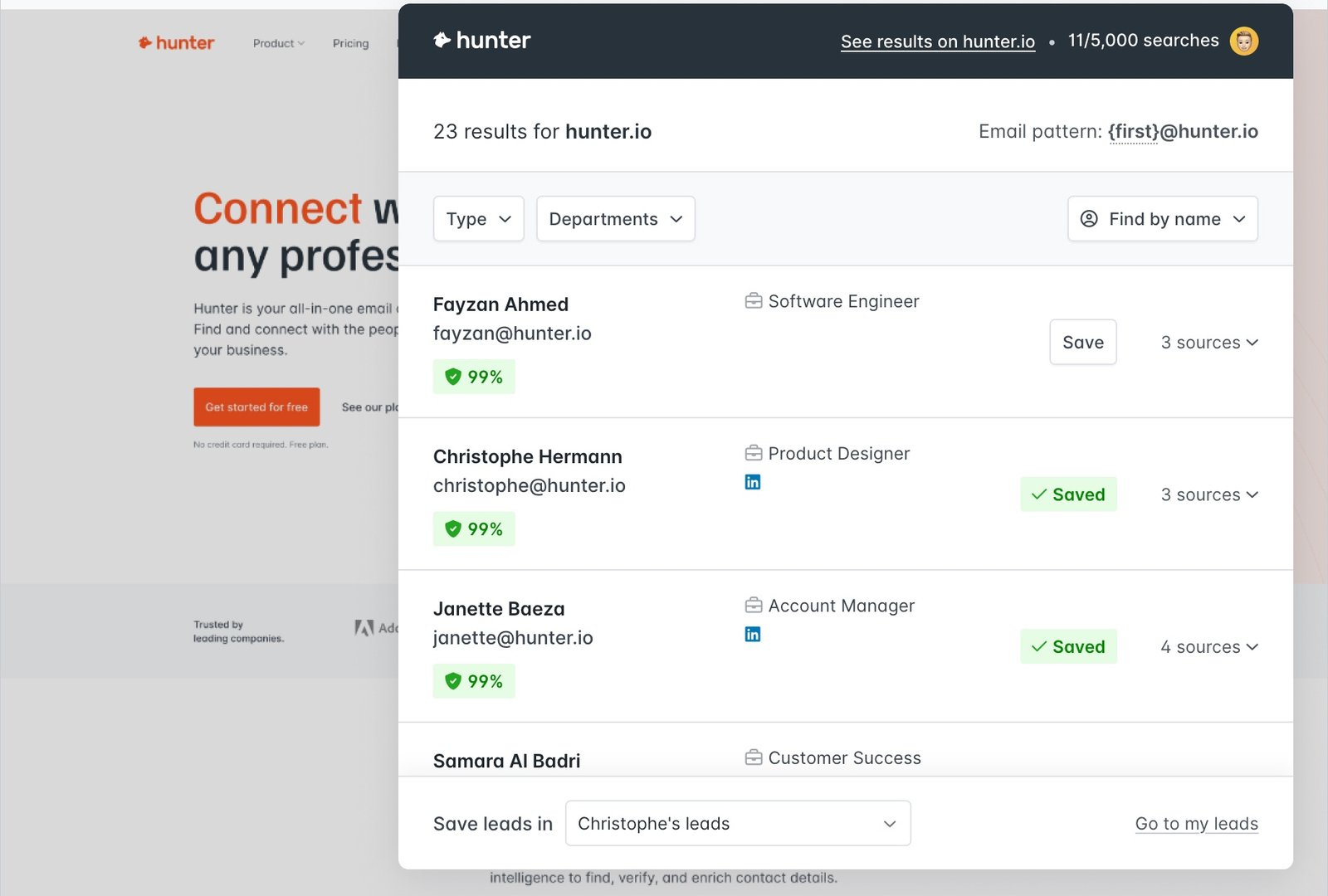
What Hunter.io Actually Does
Hunter crawls the entire web to find public email addresses associated with a domain.
You type in `stripe.com`, and Hunter returns a list of people working there, the pattern of their emails (e.g., `{first}.{last}@stripe.com`), and sources where that email was found on the web. It turns a company name into a contactable human.
Core Features
How to Use Hunter — Workflow
We used Hunter to find a contact for a guest post on a high-authority blog.
- The Discovery: We visited the target blog. We clicked the Hunter Chrome Extension icon.
- The Results: It listed 5 people. We saw the "Content Manager."
- The Verification: The email had a green dot (95% confidence). We clicked the "Sources" dropdown and saw the email was listed on their official "Write for Us" page. Verified.
- The Outreach: We saved the lead to "Leads" and sent a pitch directly via Hunter Campaigns.
Example Use Cases
Who Hunter Is Best For
- Snipers: If you send 50 highly personalized emails a week, Hunter is perfect.
- SEO Pros: It is the standard tool for link-building outreach.
- Clean Data Freaks: If you are terrified of high bounce rates, Hunter provides the safest data.
Who Should Avoid Hunter
- B2C Marketers: Hunter ONLY finds professional business emails. It does not find `@gmail.com` or personal Yahoo addresses.
- Phone Dialers: Hunter focuses on email. It is not good for finding direct dial phone numbers (use Apollo or ZoomInfo for that).
Pricing & Credits Explained
Hunter uses "Monthly Credits." 1 Search = 1 Credit. 1 Verification = 0.5 Credits.
| Plan | Price (Monthly) | Credits |
|---|---|---|
| Free | $0 | 25 Monthly Searches / 50 Verifications |
| Starter | $34 | 500 Monthly Searches |
| Growth | $104 | 5,000 Monthly Searches |
How Hunter Compares (vs Apollo)
| Feature | Hunter.io | Apollo.io | Snov.io |
|---|---|---|---|
| Data Quality | High (Verified) | Medium (Mixed) | Good |
| Database Size | Web Crawl | Massive | Medium |
| Phone Numbers | No | Yes | No |
| Cost per Lead | Higher | Lower | Medium |
Limitations & Reality Check
- LinkedIn Restriction: Hunter.io (like all tools) has to be careful with LinkedIn. The extension works best on company websites. For LinkedIn scraping, specific tools like Snov.io or Evaboot are sometimes more aggressive.
- No Personal Emails: You cannot find the CEO's personal Gmail. This is a privacy feature, but a limitation for some sales styles.
Best Practices: "The Confidence Check"
Don't send to "Risky" emails.
Pros & Cons
- Highest data accuracy in the industry.
- Transparent "Sources" (shows you where they found the email).
- Generous free plan resets monthly.
- Simple, clean interface.
- More expensive per lead than database tools.
- Does not provide mobile phone numbers.
- Strictly professional emails only.
Frequently Asked Questions
Is Hunter.io GDPR compliant?
Yes. Hunter only indexes publicly available professional data. They notify people when their data is processed, which is a key requirement for GDPR compliance.
Does it work for LinkedIn?
Yes, the Chrome extension can find emails associated with LinkedIn profiles, but it matches the *name* and *company* to their database; it doesn't "hack" LinkedIn.
Can I verify my existing list?
Yes, you can upload a CSV of emails you bought elsewhere (e.g., Fiverr) and use Hunter's "Bulk Verifier" to clean the list before sending.
Does it find phone numbers?
No. Hunter focuses exclusively on email. If you need cold calling data, you will need a different tool.
Final Verdict
If your goal is to build a massive list of 10,000 leads cheaply, use Apollo.
But if your goal is to land high-ticket deals or get high-quality backlinks where every email counts, use Hunter.io. The accuracy ensures your domain stays healthy, and the transparent sourcing gives you confidence that you aren't emailing a dead inbox.
Find 25 Verified Emails Free →