If your cold email bounce rate hits 3%, Google and Microsoft start routing your emails directly to the spam folder. Once your sending domain is "burned," your entire outreach operation is effectively dead.
Buying a list of 5,000 leads and loading them directly into your sending tool is digital suicide. Clearout.io acts as a bouncer for your email list. It pings every address to verify it exists before you ever send a message. But with heavyweights like ZeroBounce dominating the space, does Clearout offer better accuracy? In this Clearout review, we scrubbed a stale CRM list to test its validation engine.
Quick Summary
The Ultimate Spam Trap Filter
Clearout does more than check if an inbox exists. It identifies toxic "Spam Traps," temporary disposable emails, and hard bounces. What sets it apart from competitors is the included Email Finder and Chrome Extension, allowing you to source and verify leads in a single workflow instead of paying for two separate tools.
Get 100 Free Verification Credits →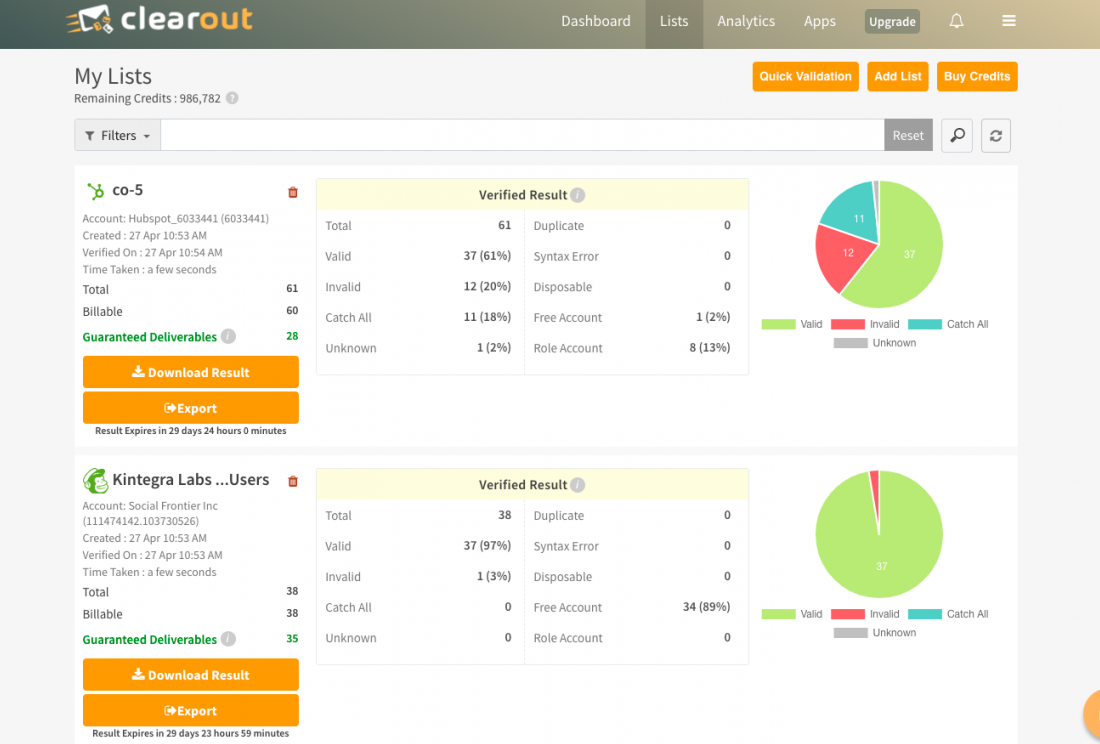
What Clearout Actually Does
Clearout connects directly to mail servers (SMTP) to simulate sending an email without actually sending one.
It checks syntax errors, verifies domain records (MX), and confirms if the specific user mailbox exists. It then categorizes your list into Valid, Invalid, Catch-All, and Unknown. Additionally, you can integrate their API into your website's contact form, stopping users from submitting fake emails (like `[email protected]`) in real time.
Core Features
How to Use Clearout — Workflow
We tested Clearout by exporting a 2-year-old list of 2,500 CRM contacts to see how many were still active.
- The Upload: We dragged the CSV into Clearout.
- The Processing: It took about 4 minutes to analyze the 2,500 rows.
- The Findings: Only 1,800 were valid. 400 were invalid (people had changed jobs), and 50 were identified as dangerous "Spam Traps."
- The Export: We used the "Guaranteed Deliverables" export option to download only the 1,800 valid addresses, keeping our next campaign completely safe.
Example Use Cases
Who Clearout Is Best For
- Sales & SDR Teams: Essential for maintaining high deliverability when reaching out to new B2B prospects.
- Affiliate Marketers: If you buy traffic or leads, you must clean the data before mailing them.
- Marketing Agencies: Cleaning a client's old database is a quick, high-value service you can charge for.
Who Should Avoid Clearout
- Spammers: If your email copy is terrible, having a verified list won't save you from being marked as spam by the recipients themselves.
- Micro-Businesses: If you only have 50 contacts, your standard CRM can handle bounce management. Bulk tools are for scale.
Pricing & Credits
Clearout uses a credit system (1 Credit = 1 Verification). You can Buy Once (Pay-as-you-go) or Subscribe.
| Credits | Pay-As-You-Go (One Time) | Subscription (Monthly) |
|---|---|---|
| 3,000 Credits | $21 | $16.80 /mo |
| 10,000 Credits | $58 | $46.40 /mo |
| 100,000 Credits | $350 | $280 /mo |
How Clearout Compares
| Feature | Clearout | ZeroBounce | NeverBounce |
|---|---|---|---|
| Verification Accuracy | 98%+ | 98%+ | 97%+ |
| Email Prospector | Yes (Included) | Basic | No |
| Pricing (10k Credits) | $58 | $65 | $50 |
| Credit Expiry | Never | Never | Never |
Limitations & Reality Check
- "Catch-All" Domains: Some enterprise servers (like high-security bank domains) accept all incoming pings but secretly delete invalid ones later. Clearout will flag these as "Catch-All". No tool can 100% verify these without sending a real email, which remains an industry-wide frustration.
- UI is Utilitarian: The interface is built for function, not beauty. It feels a bit like a spreadsheet tool, but for data operators, this isn't a problem.
Best Practices: "The API Shield"
Stop bad emails before they enter your database.
Pros & Cons
- Protects domain reputation by catching hard bounces.
- Pay-as-you-go credits never expire.
- Includes a powerful LinkedIn prospecting extension.
- Identifies toxic "spam traps" and disposable emails.
- "Catch-all" emails still require careful handling.
- Prospecting tool is good, but not as deep as Apollo's database.
- Customer support can be slow on weekends.
Frequently Asked Questions
Does it verify Gmail and Yahoo?
Yes, Clearout accurately verifies free B2C accounts (Gmail, Yahoo, Hotmail) as well as custom B2B corporate domains.
What is a "Catch-All" email?
A catch-all server is configured to receive all emails sent to a domain, even if the specific address (e.g., `[email protected]`) doesn't exist. Clearout flags these so you know there is a slight risk in emailing them.
Is it GDPR Compliant?
Yes. Clearout acts as a data processor and operates with strict data protection policies, ensuring uploaded lists remain secure and private.
Do I have to pay monthly?
No, you can purchase one-time "Pay-As-You-Go" credits that sit in your account until you need them.
Final Verdict
If you are running any form of cold email outreach, list verification is not optional; it is mandatory.
Clearout.io is currently the smartest choice for the average marketer. While ZeroBounce is excellent, Clearout's combination of highly accurate verification, non-expiring credits, and the bonus LinkedIn prospecting tool makes it a superior all-in-one value. It is the cheapest insurance policy you can buy for your domain.
Scrub Your List (100 Free Credits) →