

We have all been there: The meeting is in 30 minutes, and your slide deck is currently blank. You stare at PowerPoint, paralyzing yourself over which font to choose.
Gamma App claims to fix this by deleting the "blank canvas." You type a topic, and it builds a professional presentation, website, or document in seconds. But is it just a gimmick, or can you actually use these slides in a boardroom? In this Gamma review, we built a 12-slide strategy deck to find out.
Quick Summary
The "anti-PowerPoint"
Gamma is not for pixel-perfect designers. It is for people who care about the story. It forces you to focus on the content while the AI handles the alignment, colors, and layout. If you need a deck in 5 minutes, nothing beats this.
Create Your First Deck for Free →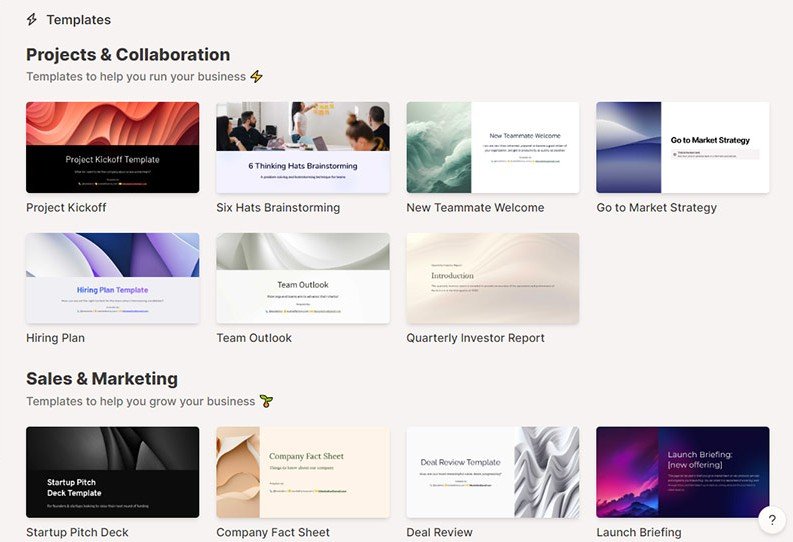
What Gamma Actually Does
Gamma is a "medium" that sits between a document and a slide deck.
It doesn't use slides; it uses "Cards." These cards can expand to fit as much text as you need, so you never have to shrink your font size to size 8 just to fit a paragraph. When you are ready to present, it packages these cards into a slick, clickable slideshow or a scrollable webpage.
Core Features
How to Use Gamma — Workflow
We used Gamma to build the "Q1 Growth Strategy" for TrakSource.
- The Research: We used Perplexity to find the latest benchmarks for SaaS growth in 2026.
- The Dump: We pasted those raw stats and our bullet points into Gamma's "Text to Deck" window.
- The Generation: Gamma generated a 10-card deck. It automatically chose a "Tech/Dark Mode" theme.
- The Edit: We didn't like the image on Slide 3, so we used the built-in AI image generator to "Make this a futuristic rocket." Done.
Example Use Cases
Who Gamma Is Best For
- Founders: Who need to pitch investors but can't afford a designer.
- Consultants: Who need to turn findings into a deliverable quickly.
- Sales Teams: Who need to create custom decks for every prospect.
Who Should Avoid Gamma
- Design Perfectionists: If you need to move a logo 3 pixels to the left, Gamma will frustrate you. It uses a "block" system (like Notion), not a "canvas" system (like Canva).
- Heavy Data Users: If you need complex Excel charts linked to live data, stick to PowerPoint.
Pricing & Plans
- 400 Credits (One-time)
- Unlimited Decks (Manual)
- PDF Export Only
- Gamma Watermark
- Unlimited AI Creation
- Remove "Made with Gamma" Badge
- Export to PowerPoint (PPT)
- 400 Credits per month (Renewing)
How Gamma Compares
| Feature | Gamma | PowerPoint (Copilot) | Beautiful.ai |
|---|---|---|---|
| Speed | Fastest | Slow | Medium |
| Design Control | Low (Blocks) | High (Canvas) | Medium (Smart) |
| Web Publishing | Yes (Native) | No | No |
| Cost | $8/mo | $30/mo | $12/mo |
Limitations & Reality Check
- The "Export" Issue: While you can export to PowerPoint, sometimes the text boxes get misaligned or the custom fonts break. It's usually 90% perfect, but requires a manual check.
- Video Export: You cannot export your presentation as a video file (MP4), which is annoying for YouTube creators.
Best Practices: "The Outline Method"
Don't just say "Make a deck about AI." The results will be generic.
Pros & Cons
- "Text to Deck" is magically fast.
- Presentations look good on mobile (responsive).
- Cheap entry price ($8/mo) compared to competitors.
- Embedding live websites inside slides is a killer feature.
- Limited design flexibility (can't drag items freely).
- PowerPoint export isn't always 100% perfect.
- Free plan has a small credit limit.
Frequently Asked Questions
Can I export to PowerPoint?
Yes! On the Plus ($8) plan and above, you can export to an editable .pptx file. The free plan only allows PDF export.
Is Gamma free?
Gamma has a free tier that gives you 400 credits (enough for about 10 decks) and unlimited manual editing. However, it leaves a "Made with Gamma" badge on your slides.
Can I use my company fonts?
Yes, but only on the Pro Plan ($15/mo). The Plus plan uses standard Google Fonts.
Is it better than Beautiful.ai?
It is faster and more flexible for "docs" and "webpages." Beautiful.ai is better if you need strictly controlled, brand-compliant slides for a large enterprise team.
Can I use it for commercial purposes?
Yes. If you are on a paid plan, you own the commercial rights to the decks you create and can present them to clients without the Gamma branding.
Final Verdict
If you spend more than 2 hours a week fiddling with slide layouts, Gamma will pay for itself in the first day.
It is the first presentation tool that actually feels "AI-native." It won't replace a professional designer for your Series A pitch deck, but for everything else—internal updates, sales proposals, and strategy docs—it is the new standard.
Start Using Gamma Free →