

Dash cams are ugly. They have suction cups that fall off in the heat, and cables that dangle over your dashboard. Most premium car owners refuse to install them because they ruin the interior.
Fitcamx changes the game. It replaces the plastic housing behind your rear-view mirror with a custom shell that has a 4K camera built-in. No suction cups, no visible wires. But is the video quality actually good, or is it just a gimmick? In this Fitcamx review, we installed one to test the 4K footage and the "Plug and Play" promise.
Quick Summary
Invisible Protection
If you care about aesthetics, Fitcamx is the only choice. It looks like it came from the factory. The 4K Sony sensor captures license plates clearly, and the installation (using the rain sensor for power) is genius.
Find Your Car Model →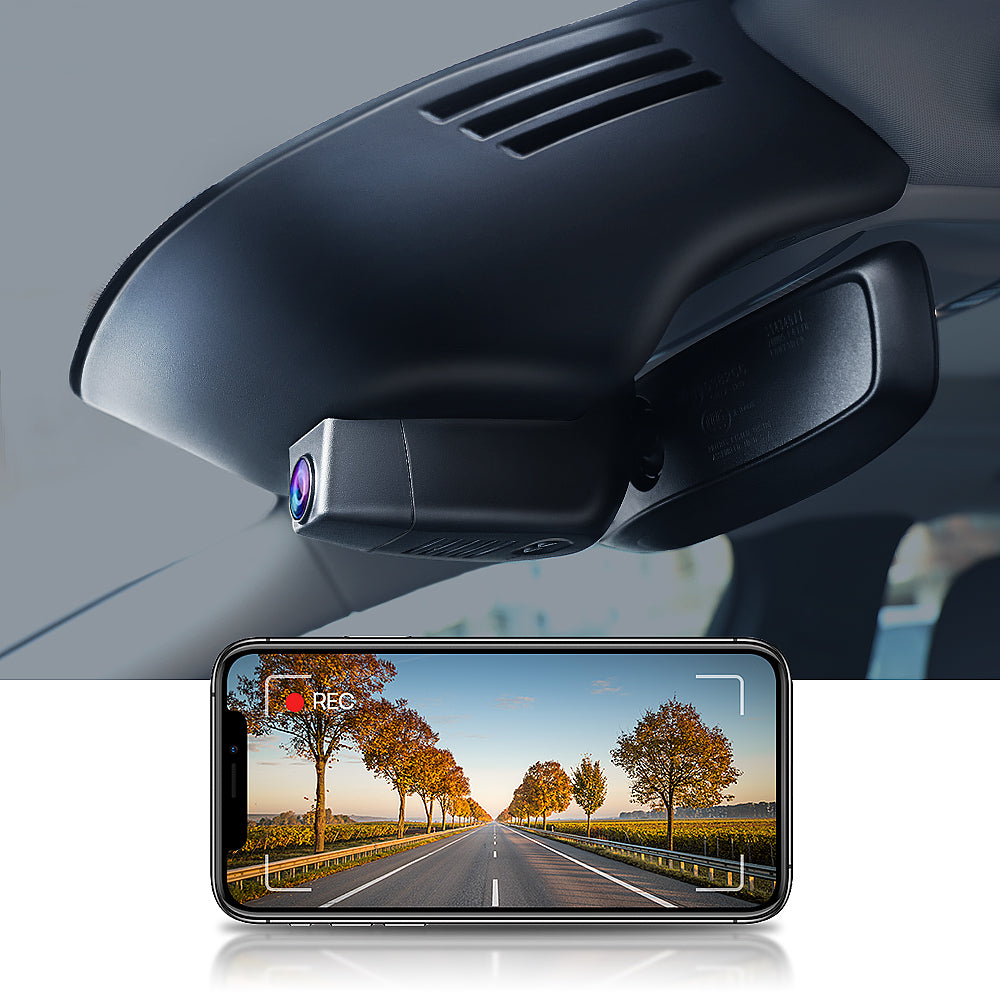
What Fitcamx Actually Does
Fitcamx creates custom camera housings for thousands of car models (Toyota, Honda, BMW, Audi, etc.).
Instead of sticking a camera to your glass, you pop off the plastic cover behind your rear-view mirror and snap the Fitcamx housing in its place. It uses a "Y-Adapter" cable to steal power from your rain sensor or reading light, so you don't have to run a long cable to your cigarette lighter.
Core Features
How to Use Fitcamx — The Installation
We installed the Fitcamx on a Toyota RAV4 to test the "Plug and Play" claim.
- Remove Cover: We used the included pry tool to pop off the original plastic mirror cover. It took some force but came off cleanly.
- The Tap: We unplugged the small connector powering the "Rain Sensor" (wipers).
- The Bridge: We plugged the Fitcamx "Y-Cable" into the car's plug, and then plugged the sensor back into the Y-Cable. This splits the power safely.
- Snap On: We clipped the Fitcamx housing in place. It looked 100% factory. Total time: 12 minutes.
Example Use Cases
Who Fitcamx Is Best For
- Aesthetics First: Drivers who hate visible wires.
- DIY Beginners: People scared of "hardwiring" into a fuse box.
- Factory Spec Lovers: People who want their car to look unmodified.
Who Should Avoid Fitcamx
- Tech Nerds: The app is basic. If you want Cloud upload, LTE, or Alexa integration, get a Nextbase or Garmin.
- Screen Lovers: Fitcamx has no screen. You must use your phone to view footage.
Pricing & Models
- 4K Front Camera
- 64GB SD Card Included
- Installation Tools
- Dual Cameras (Front + Back)
- Requires running cable to back window
- 128GB SD Card Support
How Fitcamx Compares
| Feature | Fitcamx | Garmin Mini 2 | Viofo A129 |
|---|---|---|---|
| Installation | Easy (Plug & Play) | Hard (Long Wires) | Hard (Long Wires) |
| Aesthetics | Invisible (OEM) | Small but visible | Bulky |
| Video Quality | 4K Sony | 1080p | 4K |
| App Quality | Basic | Excellent | Basic |
Limitations & Reality Check
- Parking Mode requires Fuse Box: The "Rain Sensor" installation only works when the car is ON. If you want the camera to record while parked (24/7 security), you MUST buy the separate Fuse Box cable and hardwire it.
- No Screen: You cannot instantly replay footage on the device. You have to connect via WiFi to your phone, which takes about 30 seconds.
Best Practices: "The Trim Tool"
Don't use a screwdriver to remove your car's plastic cover. You will scratch it.
Pros & Cons
- Looks completely factory (OEM). No clutter.
- Installs in <15 minutes with no wire routing.
- 4K video quality is excellent for license plates.
- Includes a free SD card in the box.
- App is a bit clunky compared to Garmin.
- Parking mode is not available with the easy install method.
- Slightly more expensive than generic cams.
Frequently Asked Questions
Does Fitcamx void warranty?
Generally, no. It uses a "Plug and Play" harness that does not cut or splice any factory wires. It can be removed in 5 minutes, returning the car to stock condition.
Does it record when parked?
Not out of the box. The standard "Rain Sensor" installation only powers the camera when the engine is on. For 24/7 Parking Mode, you must buy the "Fuse Box Cable" kit.
Does it fit my specific car?
Fitcamx makes dozens of specific models. You must check their website carefully to match your car's Model, Year, and "Trim Level" (e.g., does it have a sunroof/rain sensor?).
Is the audio recording good?
Yes, it has a built-in microphone to record cabin audio, which is useful for police interactions. You can turn this off in the app settings.
Does it have GPS?
No. Fitcamx keeps it simple to reduce size and heat. It does not log your speed or GPS location on the video file.
Final Verdict
If you drive a nice car, do not ruin it with a $50 dash cam that has ugly wires hanging everywhere.
Fitcamx is the only dash cam that respects your car's interior. The video quality is top-tier (4K), and the installation is so easy a non-mechanic can do it. It is the best upgrade you can make for peace of mind.
Shop Fitcamx for Your Car →