

If you are trading futures manually across multiple prop firm accounts, you are playing a losing game. Trying to switch between different NinjaTrader or Tradovate windows to execute the same NQ short across 10 accounts is a logistical nightmare. By the time you click "Sell" on the final account, slippage has completely destroyed your entry price.
TradeSyncer was built to solve this exact problem. It is a fully cloud-based trade copier designed to synchronize a single leader account to unlimited follower accounts instantly. But does it actually replicate trades with zero latency, or will connection dropouts cost you a funded account? In this TradeSyncer review, we dive deep into its infrastructure to find out.
1. Quick Summary
The Ultimate Payout Multiplier
TradeSyncer eliminates the need for clunky local software and expensive Virtual Private Servers (VPS). Because it runs entirely in the cloud, you can place a trade directly from TradingView on your laptop, and the software instantly replicates the bracket orders and position sizing across all your connected prop firm accounts with sub-100ms latency.
Start Your Free Trial Today →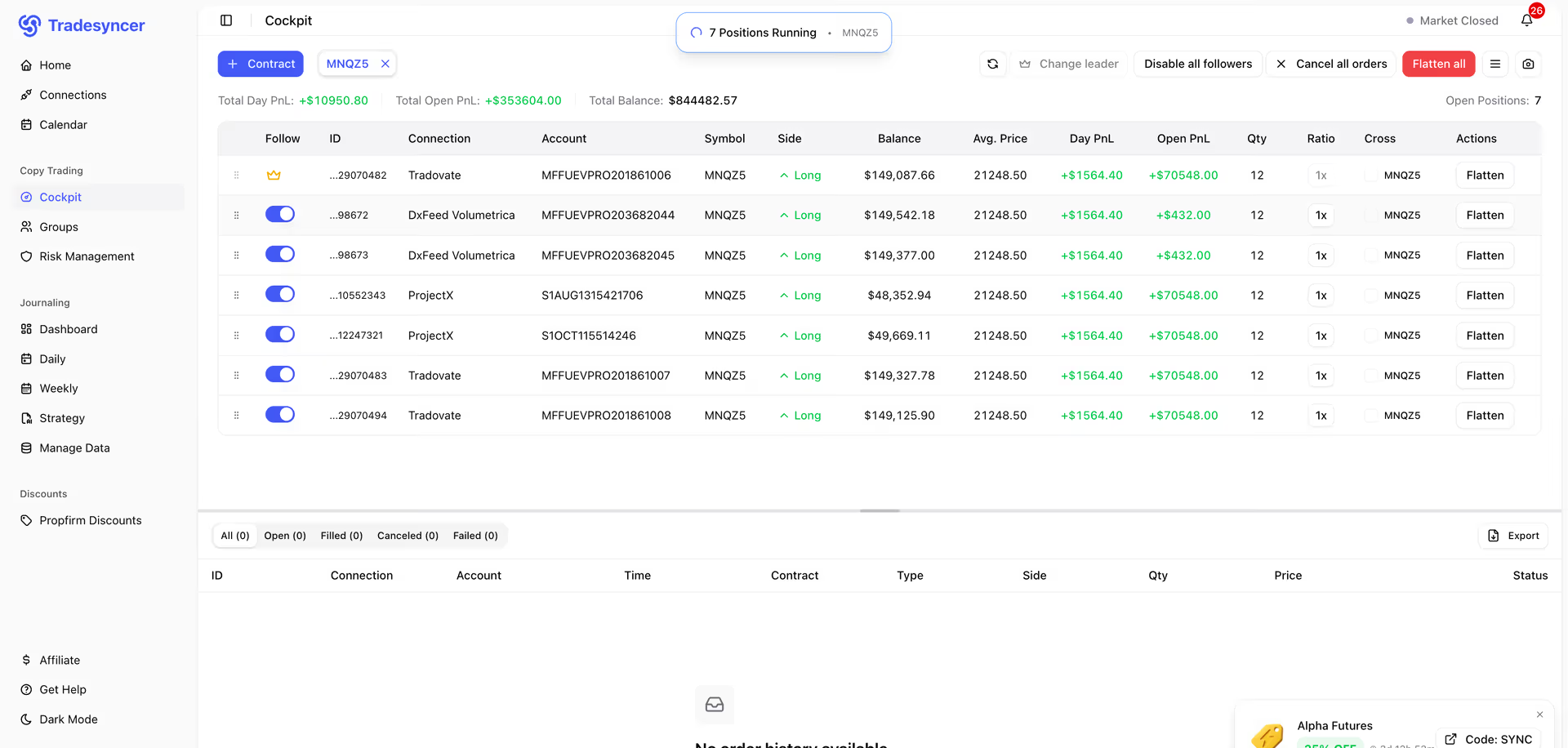
2. What TradeSyncer Actually Does
TradeSyncer is the central nervous system for your trading accounts.
Instead of downloading a local software program that must stay running on your PC 24/7, TradeSyncer connects your brokers directly via the cloud. You designate one account as the "Leader" and multiple other accounts as "Followers." When you execute a trade on the Leader account (via Tradovate, Rithmic, or directly through a TradingView webhook), the platform instantly duplicates that exact trade to all Follower accounts, automatically adjusting for your specific risk and position-sizing rules.
3. Core Features
4. The Data: The Cost of Slippage
When trading volatile assets like NQ (Nasdaq 100), a one-second delay between your first and last account can result in hundreds of dollars in slippage. Here is how cloud-syncing mitigates this.
5. The Technical Setup (Brokers & Bracket Orders)
TradeSyncer is incredibly versatile because it bridges multiple data feeds natively. It supports seamless integration with NinjaTrader, Tradovate, Rithmic, dxFeed, Volumetrica, and ProjectX.
More importantly, it fully supports advanced Bracket Orders (OCO). If you place a trade with an automatic 15-tick Stop Loss and a 30-tick Take Profit on your Leader account, TradeSyncer replicates the entire bracket to the Follower accounts. If your Take Profit gets hit, the platform automatically cancels the Stop Loss across all accounts simultaneously, leaving no orphaned orders behind.
6. Practical Workflow & Setup
Here is what the onboarding process looks like for a trader managing multiple prop firm evaluations:
Step 1: Broker Authentication
Log into the web dashboard. Input your Tradovate or Rithmic API credentials to securely connect your trading accounts.
Step 2: Assign Roles
Select your primary account to act as the "Leader." Highlight the remaining 10 evaluation accounts and assign them as "Followers."
Step 3: Risk Configuration
Set max daily loss limits on the Follower accounts. Configure your position sizing ratios (e.g., setting a specific account to trade at 50% volume).
Step 4: Execute
Open TradingView or your preferred execution platform. Take a trade on the Leader account, and watch it populate across all Followers instantly.
7. Example Use Cases
8. The Real ROI (Leverage vs. Protection)
Hover over the metrics below to see the baseline operational advantages of using a cloud-based copier.
Turn a single $500 winning trade into a $10,000 payout by effortlessly mirroring it across 20 funded accounts.
The built-in risk manager automatically locks out follower accounts before they breach their trailing drawdown limits.
9. Who TradeSyncer Is Best For
- Prop Firm Traders: If your entire business model is based on securing and maintaining multiple funded accounts, a reliable trade copier is the single most important piece of software you will buy.
- Mac and Mobile Users: Because it is fully cloud-based, you don't need a heavy Windows PC to run it. You can manage your connections entirely through a web browser.
- TradingView Purists: If you despise standard broker execution interfaces and just want to trade directly from your TradingView charts, the webhook integration is flawless.
10. Who Should Avoid TradeSyncer
- Single Account Traders: If you only trade one personal live account, you do not need a trade copier. You are just adding unnecessary latency to your execution.
- Algorithmic HFT Traders: If you are running ultra-high-frequency trading bots looking for micro-second arbitrage, any middleman software—even one as fast as TradeSyncer—will add a few milliseconds of delay.
11. Pricing & Account Limits
TradeSyncer avoids complex, confusing tier structures. Pricing is typically tiered smoothly based entirely on the number of accounts you need to connect to the platform.
Flexible Monthly
- Unlimited trade volume
- 100% Cloud-based hosting
- TradingView Integration
- Full Risk Management Suite
Annual Plan
- Significant yearly savings
- Cross-broker synchronization
- Advanced Bracket/OCO Support
- Built-in Trading Journal Analytics
12. Best Practices: "The Alpha Plan"
If you want to scale your trading income efficiently without increasing your daily stress or screen time, you must execute the Alpha Plan for multi-account operations.
13. How TradeSyncer Compares
| Feature | TradeSyncer | Replikanto | Quantower Native |
|---|---|---|---|
| Architecture | Cloud-Based (Web) | Local Software (Requires PC/VPS) | Local Platform Feature |
| Mac Compatibility | Yes (Native Web) | No (Requires Parallels/VPS) | No |
| Cross-Broker Sync | Yes | Limited (NinjaTrader focus) | Limited to active connections |
| Risk Management | Advanced (Built-in) | Basic | Basic |
14. Limitations & Reality Check
- Internet Dependency: Because TradeSyncer relies on cloud webhooks and APIs, if the underlying broker's API (like Tradovate or Rithmic) experiences an outage, your trades cannot sync. You are at the mercy of the broker's server stability.
- Account Disconnections: API tokens periodically expire for security reasons. You must actively monitor the TradeSyncer dashboard to ensure all 20 of your follower accounts remain authenticated before the trading session begins.
15. PROS & CONS
- 100% Cloud-based; totally eliminates the need for an expensive Windows VPS.
- Allows Mac and mobile users to manage multiple prop accounts flawlessly.
- Advanced risk controls protect funded accounts from blowing up.
- Direct integration with TradingView allows for beautiful chart execution.
- Execution relies entirely on the stability of the broker's API.
- Requires diligent monitoring to ensure API connection tokens do not expire.
16. Frequently Asked Questions
1. Is TradeSyncer cloud-based or do I need a VPS? +
TradeSyncer is 100% cloud-based. You do not need to download local software, leave your computer running 24/7, or pay for a Windows VPS to keep the trade copier active.
2. Does it work with TradingView? +
Yes! You can connect your TradingView account and execute trades directly from your charts. TradeSyncer will instantly push those trades to your connected backend brokers like Tradovate or Rithmic.
3. Which prop firms and brokers are supported? +
It supports major platforms including Tradovate, Rithmic, NinjaTrader, dxFeed, Volumetrica, and ProjectX, making it compliant with almost all major futures prop firms.
4. How fast is the execution speed? +
Due to its global server infrastructure, TradeSyncer typically executes cross-account trades with latency under 100 milliseconds, minimizing the risk of slippage on follower accounts.
5. Does it copy Bracket Orders and Stop Losses? +
Yes. It features full support for advanced OCO (One Cancels Other) bracket orders. If your Stop Loss is hit on the leader account, it is instantly cancelled and executed across all followers.
6. Can I scale position sizes differently for follower accounts? +
Absolutely. You can set custom position sizing per account using fixed sizing, or a custom multiplier ratio (e.g., Follower A trades at 100% volume, Follower B trades at 50% volume).
7. Is copy trading allowed by prop firms? +
Yes, almost all major prop firms allow you to copy trades across your own personal evaluation or funded accounts. However, you should always verify the specific rules of your individual firm.
8. Does it work on Mac and mobile? +
Yes. Because it is accessed via a web browser, TradeSyncer works flawlessly on macOS, Windows, iPads, and mobile phones without any software installation restrictions.
17. Final Verdict
If you are trying to manage multiple prop firm evaluations by clicking through different browser windows or running clunky, outdated software on a lagging Windows VPS, you are putting your trading capital at massive risk.
TradeSyncer brings futures trade copying into the modern era. By utilizing a completely cloud-based architecture, it allows traders to seamlessly multiply their edges across dozens of accounts simultaneously with sub-100ms precision. For any serious prop firm trader looking to scale their payouts, this platform is an absolute necessity.
Start Syncing Your Trades Today →