
Cloud storage has become an assumed utility for modern businesses. But if your agency handles proprietary source code, legal documents, or sensitive client financial records, using Google Drive or Dropbox is a massive liability. Standard cloud providers hold the decryption keys to your data, meaning they can (and do) scan your files, and a central breach leaves your IP completely exposed.
Tresorit is the anti-Google Drive. It is a Swiss-based, end-to-end encrypted (E2EE) cloud storage platform designed for absolute zero-knowledge privacy. If you lose your password, they cannot recover your files, because they physically cannot read them. But does this military-grade security ruin the convenience of quick file sharing? In this Tresorit review, we dive deep into the vault to find out.
1. Quick Summary
The Swiss Data Vault
Tresorit bridges the gap between paranoid security and modern convenience. It encrypts every file before it leaves your local machine, meaning the servers only store illegible cipher text. Yet, you can still right-click a file on your desktop and instantly generate a secure, password-protected download link to share with clients who don't even have a Tresorit account.
Secure Your Client Data Today →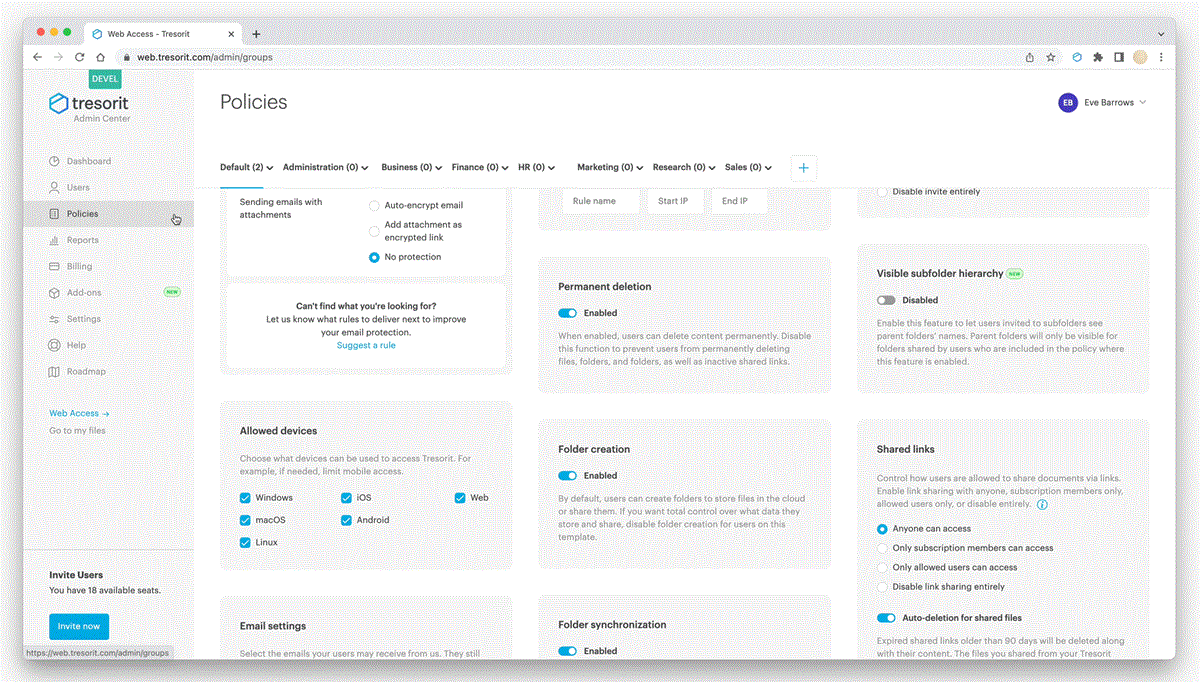
2. What Tresorit Actually Does
Tresorit looks and feels exactly like Dropbox, but under the hood, the architecture is fundamentally different.
When you drag a file into a "Tresor" (their term for a folder), the Tresorit desktop or mobile app encrypts the file locally using AES-256 before uploading it. Because it uses Zero-Knowledge Encryption, Tresorit’s servers never possess the keys needed to decrypt the data. You are the sole keyholder. This means neither hackers, rogue employees, nor government subpoenas can force Tresorit to hand over your readable files.
3. Core Features
4. The Data: Privacy Without the Friction
Historically, achieving true E2E encryption required manually zipping files, encrypting them with PGP keys, and emailing passwords separately. Tresorit automates this entirely.
5. The Technical Setup (Data Residency)
Security is only as good as the legal jurisdiction governing the servers. Tresorit is headquartered in Switzerland, arguably the most privacy-friendly jurisdiction on Earth.
However, for enterprise businesses with strict compliance rules, Tresorit offers Data Residency Options. You can choose exactly where your encrypted data physically lives (e.g., forcing all files to remain in Germany, the US, or the UK) to instantly satisfy local GDPR, HIPAA, or CCPA regulatory audits.
6. Practical Workflow & Timeline
Migrating to Tresorit requires almost zero behavioral changes for your team. Here is how you use it daily:
Step 1: The Local Sync
Install the Tresorit desktop app. It integrates directly into Windows File Explorer or Mac Finder, just like a standard Dropbox folder.
Step 2: Client "Tresors"
Create a dedicated, encrypted "Tresor" for a new client. Drag and drop their proprietary assets into the folder. They encrypt instantly in the background.
Step 3: Secure Delivery
Right-click the file to generate a Secure Link. Add a password, require email verification to open, and set the link to self-destruct after 48 hours.
Step 4: The Audit Trail
Check your dashboard to see exactly when the client downloaded the asset, providing cryptographic proof of delivery.
7. Example Use Cases
8. The Real ROI (Risk Mitigation)
Hover over the metrics below to see the baseline advantages of utilizing zero-knowledge architecture.
Tresorit's architecture makes passing strict GDPR or HIPAA data-handling audits effortless.
Telling an enterprise client that you use Swiss E2EE storage instead of free Google Drive wins contracts.
9. Who Tresorit Is Best For
- B2B Service Providers: If your agency handles high-value client intellectual property, utilizing Tresorit is a massive unique selling point (USP) in your sales pitches.
- Privacy Advocates: Anyone who simply does not want Google or Microsoft feeding their personal files into an AI training model.
- Remote Teams: Granular access controls let you dictate exactly which contractors can view, edit, or download specific folders.
10. Who Should Avoid Tresorit
- Live Collaboration Addicts: Because files are heavily encrypted, you cannot simultaneously live-edit a spreadsheet with 5 other people exactly like you do in Google Sheets. You must download, edit, and re-sync.
- Casual Users: If you are just storing vacation photos and old college essays, the premium price tag for military-grade encryption is unnecessary overkill.
11. Pricing & Storage Limits
Tresorit is a premium product. You are paying a premium over Dropbox for the complex cryptographic architecture running in the background.
Personal Plan
- 1TB Encrypted Storage
- 1 User Account
- Secure Link Sharing
- Outlook / Gmail Integrations
Business Standard
- 1TB Storage per user
- Advanced Access Controls
- Admin Control Panel & Auditing
- eSignature Integrations
12. Best Practices: "The Alpha Plan"
If you want to absolutely dominate the cybersecurity affiliate space and intercept high-value enterprise buyers, you must execute the Alpha Plan for your traffic routing. Do not build leaky bridge pages.
13. How Tresorit Compares
| Feature | Tresorit | Google Drive | Sync.com |
|---|---|---|---|
| Encryption Type | Zero-Knowledge (E2EE) | Standard (Provider holds keys) | Zero-Knowledge |
| Data Scanning | Impossible | Active (For ads & AI) | Impossible |
| File Sharing Security | Very High (Timers/Passwords) | Low (Public links) | High |
| Live Collaboration | No (Due to E2EE) | Yes (Google Docs) | No |
14. Limitations & Reality Check
- The Lost Password Catastrophe: With true Zero-Knowledge architecture, there is no "Forgot Password" backdoor. If you lose your master password and your recovery codes, your data is mathematically locked forever. Tresorit support cannot recover it for you.
- Search Limitations: Because the files are encrypted, you cannot use a web search bar to search for a specific word inside a document like you can on Google Drive. You can only search file names.
15. PROS & CONS
- Absolute, cryptographically proven data privacy.
- Swiss jurisdiction protects data from unwarranted government snooping.
- Secure links allow you to share encrypted files with non-users safely.
- Maintains the seamless desktop "drag and drop" feel of Dropbox.
- More expensive than standard consumer cloud storage.
- Losing your master key means permanent data loss.
16. Frequently Asked Questions
1. What does Zero-Knowledge Encryption actually mean? +
It means the encryption keys are generated and held exclusively on your device. Tresorit's servers only receive scrambled data. Because they have "zero knowledge" of your key, they physically cannot read, scan, or hand over your files to third parties.
2. Do my clients need a Tresorit account to download files? +
No. You can generate secure web links. When your client clicks the link, the file is decrypted securely in their browser using the password you provided them, requiring zero software installation on their end.
3. Is Tresorit HIPAA compliant? +
Yes. Tresorit's architecture naturally supports HIPAA, GDPR, and CCPA compliance. They provide Business Associate Agreements (BAAs) for healthcare organizations on their enterprise plans.
4. Does it work on mobile devices? +
Yes. Tresorit offers fully encrypted iOS and Android apps. You can securely access your files on the go, scan physical documents directly into the encrypted vault, and auto-upload photos securely.
5. What happens if I forget my password? +
Unlike Google, Tresorit cannot email you a password reset link to unlock your data. However, on Business plans, Admins can utilize "Advanced Control" features to reset user passwords and recover company data using a master admin key.
6. Is there a free version of Tresorit? +
Tresorit offers a free "Basic" plan with very limited storage (usually around 3GB) primarily designed for receiving files and basic secure sharing, but professional use requires a paid subscription.
17. Final Verdict
In an era where massive tech companies are scraping every piece of available data to train AI models, treating your client's proprietary files with absolute secrecy is no longer optional. It is a mandatory business practice.
Tresorit is the undisputed leader in usable security. It takes the highly complex, mathematically bulletproof concept of Zero-Knowledge encryption and wraps it in a beautiful, simple interface that anyone who has used Dropbox can understand in 5 minutes. If you value your intellectual property, it is worth every penny.
Secure Your Cloud Storage Today →