

User Generated Content (UGC) is the highest-converting ad format on the internet. But sourcing it is a nightmare. Paying a creator on Fiverr costs $150 per video, takes a week to deliver, and if the script flops, your money is gone.
MakeUGC.ai bypasses the human bottleneck entirely. It uses AI to generate hyper-realistic, talking avatars that look like regular people filming on their iPhones in a bedroom or car. But can an AI avatar actually fool a doom-scrolling audience? In this MakeUGC review, we put its lip-sync engine and template library to the test to see if it can produce profitable Google and TikTok ads.
Quick Summary
The Ultimate Arbitrage Tool
While tools like HeyGen focus on stiff, corporate presentations, MakeUGC is built exclusively for direct-response marketing. The avatars are casually dressed, the lighting looks like natural window light, and the pacing is aggressive. If you are churning out creatives to find a winning hook, this software turns a two-week production cycle into a five-minute export.
Start Generating Video Ads →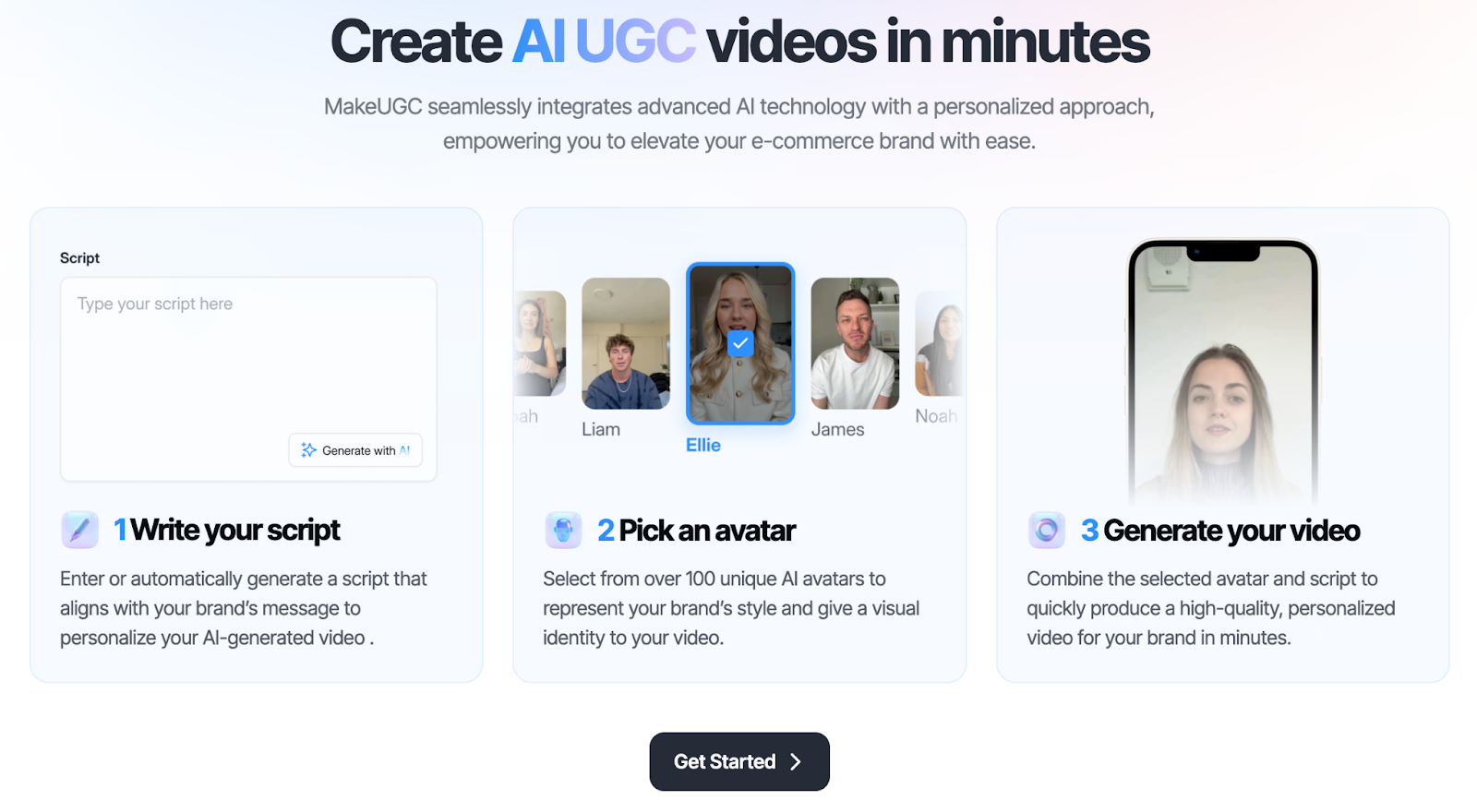
What MakeUGC Actually Does
MakeUGC functions as an on-demand video production studio for short-form ads.
You select an avatar from their library of diverse, "everyday" people. You paste your ad script into the text box. The AI immediately generates a video of that person speaking your script with natural hand gestures, head tilts, and accurate lip-syncing. It allows you to overlay bold, TikTok-style auto-captions and insert B-roll clips over the video to maintain viewer retention.
Core Features
How to Use MakeUGC — Workflow
We tested the platform by generating a fast-paced ad for a software tool designed to run on YouTube Shorts and Google Demand Gen campaigns.
- The Avatar: We selected "Casual Tech Guy" sitting in a home office setting.
- The Script: We pasted a high-energy, 15-second hook. We selected an enthusiastic, slightly fast-paced AI voice from the library.
- The Edit: We used the timeline editor to insert 3 seconds of screen-recorded B-roll right in the middle of the hook to break the visual pattern.
- The Export: We hit render. In about 4 minutes, we had a platform-ready, captioned MP4 file ready to upload directly into Google Ads.
Example Use Cases
Who MakeUGC Is Best For
- Media Buyers: If your job requires feeding the algorithm 5 fresh creatives every single week to avoid ad fatigue.
- Introverted Marketers: You know how to write a killer sales script, but you hate being on camera yourself.
- High-Volume Affiliates: Testing dozens of different angles (e.g., "The Mom Angle," "The Tech Bro Angle") simultaneously using different demographic avatars.
Who Should Avoid MakeUGC
- Brand Storytellers: If you are building a deep, personal connection with an audience (like a vlog), an AI avatar will destroy your authenticity. This is strictly for top-of-funnel direct-response ads.
- Complex Physical Product Demos: The AI avatars cannot physically hold or manipulate your custom physical product in their hands yet. You must use B-roll for that.
Best Practices: "The Alpha Plan"
If you want to absolutely dominate your ad campaigns and out-convert competing affiliates, you must execute the Alpha Plan for creative testing and traffic routing. Do not waste time building elaborate, leaky funnels.
How MakeUGC Compares
| Feature | MakeUGC | HeyGen | Fiverr (Human) |
|---|---|---|---|
| Primary Focus | Direct Response Ads | Corporate Presentations | Custom Acting |
| Avatar Style | Casual / Amateur | Stiff / Studio | Authentic Human |
| Time to Deliver | Minutes | Minutes | 5 - 10 Days |
| Cost per Video | Cents (Credits) | Higher (Credits) | $50 - $200+ |
Limitations & Reality Check
- The "Uncanny Valley": While the technology is excellent, it is not 100% perfect. Highly complex, fast-spoken words or extreme emotional inflections can sometimes cause minor lip-sync glitches. It is crucial to use the B-roll feature to cut away from the face during long monologues to maintain the illusion.
- Hand Gestures: Currently, AI avatars have limited natural body movement. They cannot seamlessly interact with their environment or hold up a physical prop to the camera naturally.
Pros & Cons
- Avatars are specifically styled for social media (casual lighting, realistic settings).
- Eliminates the cost and delay of managing human freelance creators.
- Built-in editor handles captions, voices, and B-roll in one interface.
- Allows for rapid, multi-language ad testing from a single base script.
- Avatars cannot physically hold your product.
- Requires careful script pacing to ensure the AI voice sounds natural.
- Video rendering consumes subscription credits.
Frequently Asked Questions
Will ad platforms ban AI-generated UGC?
Currently, platforms like Google, Meta, and TikTok allow AI-generated video ads. However, you must ensure your claims comply with standard advertising policies, and some platforms may eventually require a label indicating the use of AI.
Do I have to use their voices?
MakeUGC includes a wide library of high-quality, emotive AI voices. Many of these tools also allow you to upload your own pre-recorded voiceover and the AI will sync the avatar's lips to your audio.
Is MakeUGC better than HeyGen?
For marketing purposes, yes. HeyGen is fantastic for corporate training videos and onboarding presentations, but MakeUGC's avatars and templates are specifically engineered for the fast-paced, native look required for TikTok and Instagram ads.
Final Verdict
If you are waiting a week for a Fiverr actor to deliver an ad that might not even convert, you are burning valuable time and budget.
MakeUGC.ai solves the creative testing bottleneck. By combining casual, native-looking avatars with instant script-to-video generation, it allows solo marketers to operate with the output volume of a massive agency. When paired with a direct-linking strategy, it is an essential arbitrage tool for scaling ad spend profitably.
Generate High-Converting Video Ads →