
When you hire a remote team—especially outsourced freelancers paid by the hour—trust becomes an expensive liability. Are they actually working, or are they watching Netflix while the clock ticks?
Time Doctor is an employee monitoring tool designed specifically to answer that question. Unlike basic stopwatches, it actively records screen activity, website usage, and keyboard strokes. It is highly controversial, often labeled as "micromanagement software." But for businesses managing strict budgets and remote data-entry teams, is it a necessary evil? In this Time Doctor review, we deployed it to a remote workflow to test the monitoring features and payroll integration.
Quick Summary
The End of "Time Theft"
Time Doctor is not for creative teams who need autonomy. It is a strict accountability engine for hourly workers. The ability to automatically generate payroll based on mathematically verified work hours—backed by random screenshots and activity meters—completely eliminates billing disputes and time theft.
Start Your 14-Day Free Trial →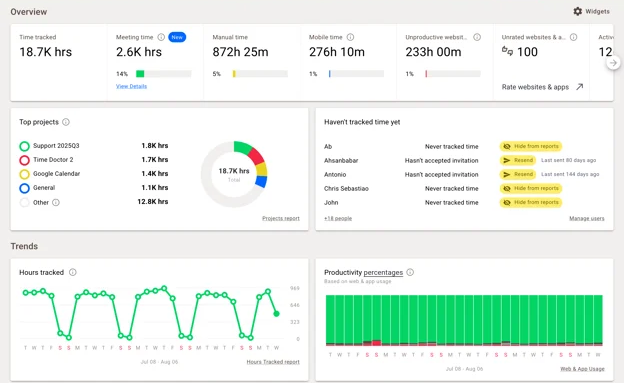
What Time Doctor Actually Does
At its core, Time Doctor is a desktop application that employees run while they work.
When the timer starts, the software begins logging data. It records the exact websites visited, the applications used, and takes randomized screenshots of the monitor (if enabled by the admin). If an employee visits Facebook for 20 minutes, the software flags it as "Unproductive Time." If they walk away from the computer without pausing, it issues an "Idle Alert" asking if they are still working.
Core Features
How to Use Time Doctor — Workflow
We tested Time Doctor by managing a remote Virtual Assistant tasked with CRM data entry.
- The Setup: The VA installed the desktop app and selected the "Data Entry" project.
- The Tracking: As they worked, Time Doctor took a screenshot every 9 minutes. At one point, the VA went to make coffee without pausing. After 3 minutes of zero mouse/keyboard movement, an alert popped up. Because it wasn't answered, it paused the timer automatically.
- The Audit: At the end of the week, we opened the "Web & App Usage" report. We saw 85% of time was spent in Google Sheets, and 15% in Slack. Perfect.
- The Payout: We used the built-in payroll feature to generate an invoice based exactly on the 32 hours tracked.
Example Use Cases
Who Time Doctor Is Best For
- Managers of Outsourced Talent: When you pay hourly for highly repetitive tasks (data entry, basic coding), this is the safest way to ensure ROI.
- Agencies Billing by the Hour: The granular reporting makes it impossible for clients to dispute your invoices.
- Compliance-Heavy Teams: Features like blurring screenshots ensure sensitive data (like credit card numbers) isn't captured during monitoring.
Who Should Avoid Time Doctor
- Creative & Executive Teams: High-level workers (designers, strategists) often "think" away from the keyboard. The idle alerts will infuriate them and destroy company culture.
- Trust-Based Cultures: If your company measures success purely by output/deliverables rather than hours logged, this tool is massive overkill.
Pricing & Monitoring Tiers
Time Doctor charges per user, per month. The deeper the monitoring, the higher the tier.
| Plan | Price (Approx) | Key Features |
|---|---|---|
| Basic | ~$7 /mo per user | Time tracking, tasks, unlimited screenshots. (1 month data storage) |
| Standard | ~$10 /mo per user | Web/App tracking, payroll, 60+ integrations. |
| Premium | ~$20 /mo per user | Video screen capture, client login portal, VIP support. |
How Time Doctor Compares
| Feature | Time Doctor | Hubstaff | Toggl Track |
|---|---|---|---|
| Primary Focus | Monitoring | Monitoring + GPS | Lightweight Tracking |
| Screen Capture | Yes (+ Video) | Yes | No |
| Idle Alerts | Aggressive | Moderate | Passive |
| Vibe | Strict Boss | Field Manager | Freelancer Friendly |
Limitations & Reality Check
- The Morale Cost: Rolling this out to an existing team will cause friction. Employees generally hate being monitored. You must be prepared to handle the cultural pushback.
- "Fake" Productivity: Savvy employees know how to "game" time trackers using mouse jigglers or keeping a Word document active. The software requires a human manager to occasionally audit the screenshots.
Best Practices: "Total Transparency"
Do not spy in secret.
Pros & Cons
- Provides undeniable proof of work for hourly billing.
- Auto-pauses when employees walk away, saving you money.
- Integrates flawlessly with Asana, Jira, and GitHub.
- Payroll feature makes paying international freelancers effortless.
- Can severely damage morale if implemented poorly.
- UI is slightly clunkier than modern tools like Toggl.
- Web/App tracking is excluded from the lowest tier.
Frequently Asked Questions
Does it track keystrokes?
No, Time Doctor does not operate as a keylogger. It tracks keyboard and mouse activity levels (e.g., clicking vs idle), but it does not record what is actually typed to protect sensitive data like passwords.
Does it run in the background secretly?
While there is a "silent" version for company-owned devices, the standard version requires the employee to manually click "Start" and "Stop." They know exactly when they are being tracked.
Is Time Doctor better than Hubstaff?
If your team is entirely desk-based, Time Doctor's distraction alerts and web tracking are slightly superior. If your team is out in the field (e.g., construction, delivery), Hubstaff is better due to its strong GPS tracking.
Can it track mobile phones?
Yes, there is a mobile app available for tracking time on the go, but screen capturing and deep app monitoring are primarily designed for desktop (Windows/Mac/Linux).
Final Verdict
If you are running a creative agency with highly autonomous senior staff, do not use this software.
However, if you are managing an outsourced team of hourly workers doing data entry, customer support, or basic development, Time Doctor is the gold standard. It changes the conversation from "I think you're wasting time" to "Here is the exact data." When used transparently, it protects your payroll budget and ensures you only pay for verified work.
Test Time Doctor with Your Team (Free Trial) →