

Building a local business directory is one of the oldest, most reliable SEO business models on the internet. You rank for "Best Plumbers in [City]," capture the traffic, and charge the plumbers for visibility.
Historically, doing this required hiring a developer or wrestling with rigid, bloated WordPress themes that break every time you update them. Directorist takes a different approach. It is a standalone plugin that turns any WordPress site into a fully monetized directory engine. But is the backend flexible enough to handle thousands of listings without crashing? In this Directorist review, we built a niche directory to test its database imports and monetization features.
Quick Summary
Turn Traffic Into Passive Income
Directorist excels because it gives you the exact infrastructure to charge businesses for premium listings, lead generation, and featured rankings, all entirely within WordPress. You own the data, you control the layout via a drag-and-drop builder, and you keep 100% of the revenue.
Download Directorist for Free →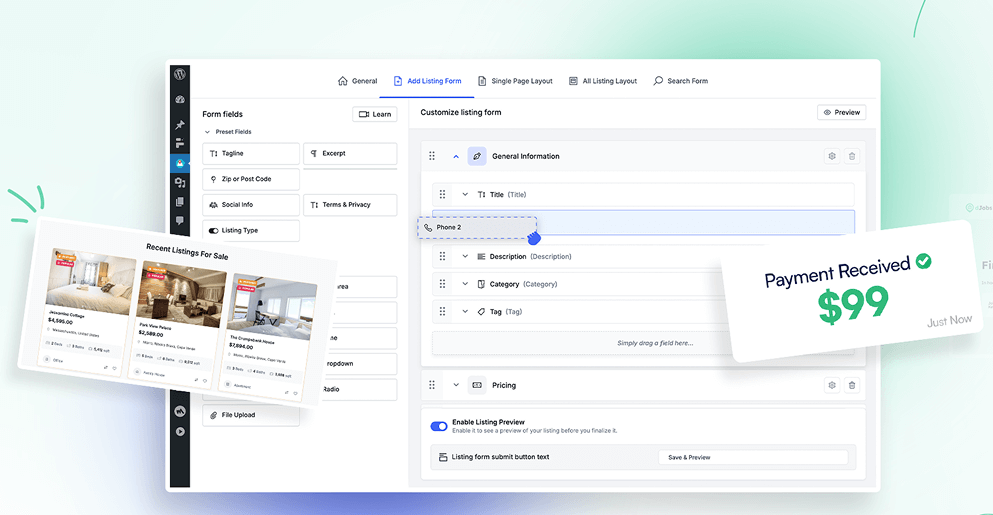
What Directorist Actually Does
Directorist transforms a standard WordPress installation into a complex classifieds or directory platform (like Yelp, Zillow, or TripAdvisor).
It generates the underlying architecture: advanced search filters, map integrations, user registration dashboards, and listing submission forms. Unlike "Directory Themes" that lock you into a specific design, Directorist is a plugin. This means it works with almost any modern theme (like Astra or GeneratePress) and integrates smoothly with page builders like Elementor or Gutenberg.
Core Features
How to Use Directorist — Workflow
We built a "SaaS Tool Directory" to test the database management and import limits.
- The Setup: We installed the core plugin and the premium extensions (to unlock Stripe payments).
- The Structure: We used the builder to create custom fields relevant to software: "Pricing Model," "Free Trial," and "API Access."
- The Import: We uploaded a CSV file containing 500 different software tools. The mapping tool correctly assigned our custom fields to the database.
- The Hook: We enabled the "Claim Listing" feature. When the founders of those 500 tools discover their page, they must pay $49/year to "Claim" it, add their logo, and reply to user reviews.
Example Use Cases
Who Directorist Is Best For
- Niche Site Builders: If you want to build an asset that generates passive subscription revenue, directories are incredibly lucrative.
- Community Managers: Giving your existing audience a place to list their services and interact.
- WordPress Power Users: You need to be comfortable managing plugins, APIs (like Google Maps), and basic WordPress settings.
Who Should Avoid Directorist
- Non-WordPress Users: If you hate managing hosting and plugin updates, look for a hosted SaaS solution (though you will sacrifice data ownership and customization).
- Bloggers: If you just want a simple list of "Top 10 Tools" on a post, a full directory plugin is unnecessary database bloat.
Pricing & Premium Extensions
Directorist offers a generous free version on the WordPress repo, but to make actual money, you need the Premium extensions (sold as a bundle).
| Plan | Price | Includes |
|---|---|---|
| Core Plugin | $0 | Basic listings, search, and frontend submission. |
| 1-Site Premium | ~$119 /yr | Unlocks all 29+ extensions (Stripe, Claim Listing, Live Chat). |
| Lifetime Deal | ~$349 - $799 | Pay once, get updates forever. (Highly recommended if available). |
How Directorist Compares
| Feature | Directorist | GeoDirectory | MyListing (Theme) |
|---|---|---|---|
| Architecture | Plugin (Theme Agnostic) | Plugin | Theme-Bound |
| Ease of Use | High (Drag & Drop) | Low (Complex) | Medium |
| Monetization | Excellent (Built-in) | Requires Add-ons | Requires WooCommerce |
| Mobile App Sync | Yes (Native App) | No | No |
Limitations & Reality Check
- The Setup Time: Do not expect to launch a fully functioning, paid directory in an hour. Configuring payment gateways, setting up Google Maps API keys, and designing the custom submission forms will take a dedicated weekend.
- Theme Styling: Because it is a plugin, it adopts the styling of your active WordPress theme. If your theme is poorly coded, the directory pages might require custom CSS to look perfect. (They offer their own free "OneListing" theme to bypass this).
Best Practices: "The Seed Strategy"
Nobody pays to list their business in an empty mall.
Pros & Cons
- Plugin architecture means you aren't locked into a specific WordPress theme forever.
- Incredible monetization features (Subscriptions, Pay-per-Listing, Claiming).
- Drag-and-drop form builder makes creating custom data fields easy.
- Option to deploy a native iOS/Android app mapped to your directory.
- Initial configuration (APIs, Maps, User Roles) involves a learning curve.
- Heavy directories require strong WordPress hosting to remain fast.
- Support response times can occasionally lag during major updates.
Frequently Asked Questions
Do I need to buy a specific theme?
No, Directorist is a plugin and works with most popular themes (like Astra, OceanWP, Divi). However, using their native themes ensures the absolute best visual compatibility without CSS tweaking.
Does it support Elementor?
Yes, Directorist provides dedicated Elementor widgets so you can design your directory archive and search pages using a visual builder.
How do users pay me?
With the premium extensions, you can connect Stripe or PayPal directly, or integrate with WooCommerce to handle subscriptions and checkout routing.
Can users leave reviews?
Yes, a multi-criteria review system is built-in. Users can rate listings, and business owners (if they pay to claim the listing) can reply to those reviews.
Final Verdict
Building a directory is a proven, scalable business model. The barrier to entry used to be the high cost of custom web development.
Directorist completely removes that barrier. By combining a flexible database builder with out-of-the-box monetization tools, it allows anyone with basic WordPress skills to launch a revenue-generating platform in a matter of days. If you are willing to put in the initial setup work, it is the most powerful directory engine on the market.
Start Building Your Directory →