If you manage a sales team, you know the pain: The rep takes a call on their mobile, takes notes on a sticky pad, and forgets to log it in the CRM. The data is lost forever.
CloudTalk promises to fix this by being the "CRM-First" phone system. It logs every call, recording, and note directly into HubSpot, Pipedrive, or Salesforce automatically. But does the call quality hold up internationally? In this CloudTalk review, we tested the system with a remote team to verify latency and sync speed.
Quick Summary
The Sales Team's Phone
CloudTalk isn't just a phone; it's a data entry machine. Its deep integration with HubSpot and Pipedrive means your sales reps never have to manually log a call again. The "Power Dialer" feature alone can double your team's outbound call volume.
Start Your Free Trial →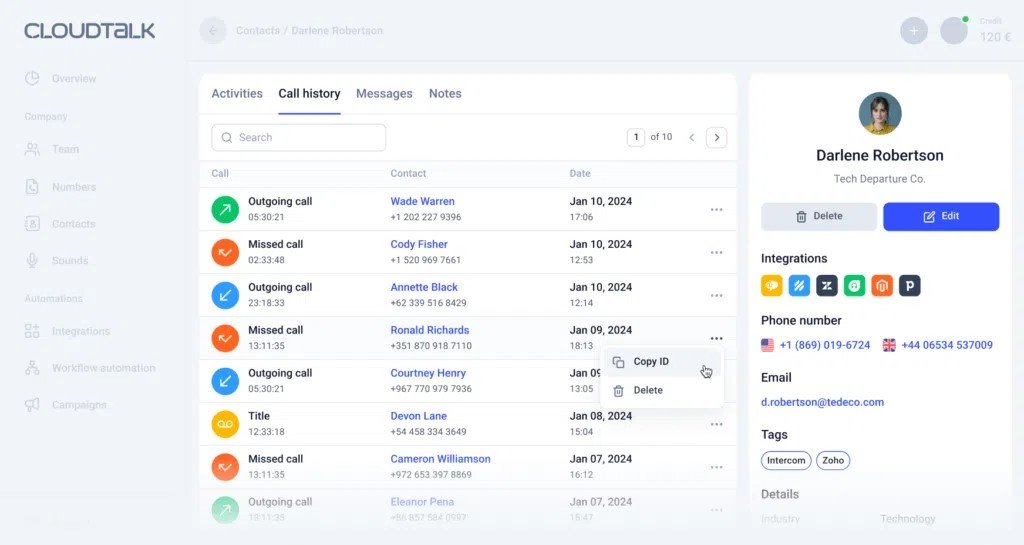
What CloudTalk Actually Does
CloudTalk is a virtual phone system that runs on your computer or mobile app.
It allows you to buy phone numbers from 160+ countries instantly. You can set up "Smart Routing" (e.g., German callers go to German speakers) and IVR menus ("Press 1 for Sales"). Most importantly, when a call ends, CloudTalk automatically creates an activity log in your CRM with the recording attached.
Core Features
How to Use CloudTalk — Workflow
We set up a sales line for a hypothetical UK expansion.
- The Setup: We purchased a local London (+44) number inside the dashboard. It took 30 seconds.
- The Flow: We used the drag-and-drop builder to create an IVR: "Press 1 for Support, Press 2 for Sales."
- The Integration: We connected our CRM.
- The Test: We called the number. The CloudTalk desktop app rang instantly. As soon as we hung up, the call appeared in the "Contact Timeline" in our CRM with the audio file ready to play.
Example Use Cases
Who CloudTalk Is Best For
- HubSpot/Pipedrive Users: The native integrations are seamless.
- Outbound Sales Teams: The Power Dialer and "Click-to-Call" features are huge time savers.
- E-commerce Support: Recognizing the caller and seeing their recent orders instantly improves CSAT scores.
Who Should Avoid CloudTalk
- Hardware Loyalists: If you insist on using physical desk phones (Polycom/Cisco), CloudTalk is possible but optimized for software usage.
- Solo Freelancers: It might be overkill (and pricey) if you just need a second line. Use Google Voice or OpenPhone instead.
Pricing & Plans
CloudTalk charges per user/month. Features are gated by tier.
| Plan | Price (Approx) | Key Features |
|---|---|---|
| Starter | ~$25 /mo | Unlimited inbound/intracompany calls, Click-to-Call. |
| Essential | ~$30 /mo | Advanced Analytics, SMS, Workflow Automation. |
| Expert | ~$50 /mo | Power Dialer, Salesforce Integration, Dedicated CSM. |
How CloudTalk Compares (vs Aircall)
| Feature | CloudTalk | Aircall | RingCentral |
|---|---|---|---|
| Setup Speed | Fast | Fast | Slow |
| CRM Sync | Excellent | Good | Average |
| Global Numbers | 160+ Countries | 100+ Countries | Limited |
| Price | Competitive | Expensive | Expensive |
Limitations & Reality Check
- Internet Dependent: Like all VoIP services, call quality depends entirely on your internet connection. If your WiFi is spotty, your calls will drop. Use Ethernet.
- Mobile App: The desktop app is flawless, but the mobile app can occasionally be slower to wake up for incoming calls compared to a native dialer.
Best Practices: "The Power Dialer"
Don't dial manually.
Pros & Cons
- Deep integration with major CRMs (HubSpot, Pipedrive).
- Access to phone numbers in 160+ countries.
- Modern, clean UI that sales reps actually like using.
- Call recording is automatic and easy to access.
- Outbound calling rates (per minute) apply for some regions.
- Salesforce integration requires the expensive "Expert" plan.
- Support response times can vary during peak hours.
Frequently Asked Questions
Does it work on mobile?
Yes, CloudTalk has apps for iOS and Android, allowing you to make and receive business calls from your personal device without exposing your number.
Can I keep my existing number?
Yes, you can port your existing business numbers into CloudTalk. The process typically takes a few weeks depending on your current carrier.
Is there a latency/lag?
CloudTalk uses a global network of data centers to minimize latency. In our tests, call quality was crisp, provided the internet connection was stable.
How much does recording storage cost?
Call recordings are stored for free, but the retention period depends on your plan (e.g., 1 month vs unlimited).
Final Verdict
If you live inside your CRM, CloudTalk is the upgrade you need.
Legacy phone systems create data silos. CloudTalk eliminates them. By ensuring every call is logged and every recording is attached to the customer profile, it gives you the data you need to coach your team and close more deals.
Get 14 Days Free (No Card Required) →