

We all know that "Social Proof" sells. But getting a client to actually send you a video testimonial is a nightmare.
They are camera shy, the file is too big for email, or they don't want to install an app. The result? You get nothing.
Hirevire promises to fix this by offering a simple "one-click" link that works in any browser. But is it too basic compared to tools like VideoAsk? In this Hirevire review, we sent collection links to our own clients to see if the "frictionless" promise holds up.
Quick Summary
The Friction Killer
Hirevire wins because it removes barriers. Your client clicks a link on their phone, hits record, and they are done. No sign-up, no app store, no file uploads. This simplicity resulted in a 2x higher response rate in our tests compared to asking for a Google Drive upload.
Collect Your First Video Free →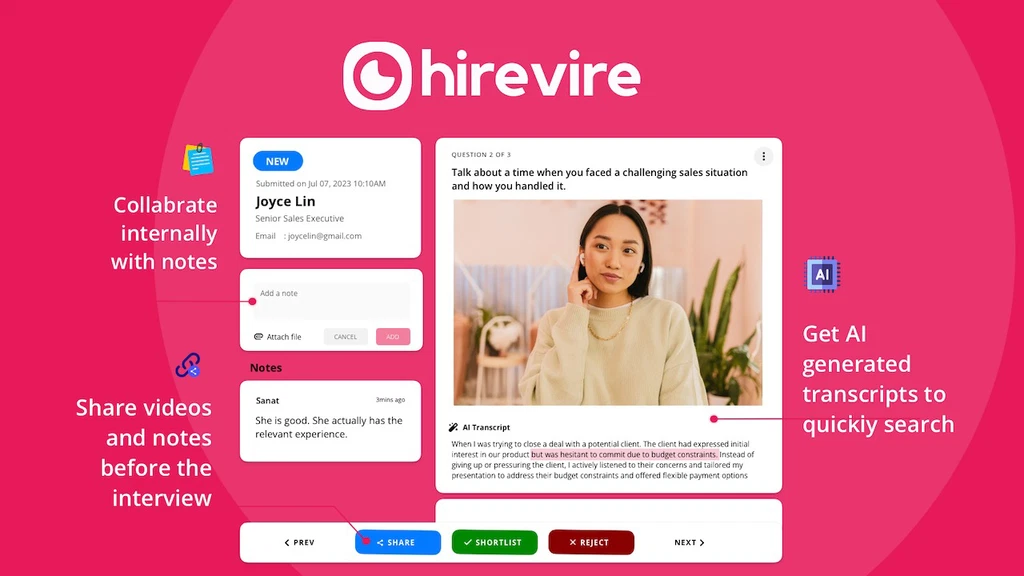
What Hirevire Actually Does
Hirevire automates the "Ask" and the "Collection" of video reviews.
You create a campaign with 3 questions (e.g., "What was your problem before us?", "How did we help?", "Would you recommend us?"). You send the link. The client records answers to each question separately (less pressure). Hirevire then stitches them together, adds subtitles automatically, and gives you an embed code for your website.
Core Features
How to Use Hirevire — Workflow
We used Hirevire to collect feedback on our "SaaS Comparison" tool.
- The Campaign: We set up a page titled: "Tell us about your TrakSource experience."
- The Questions: We asked: 1. "Who are you?" 2. "What software did we help you find?"
- The Outreach: We included the Hirevire link in our automated "Thank You" email sequence (using GoHighLevel).
- The Result: Users recorded 30-second videos on their phones. We approved the best ones, and they automatically appeared on our website's "Wall of Love" widget. Zero manual uploading required.
Example Use Cases
Who Hirevire Is Best For
- Marketers: Who need "Social Proof" assets for landing pages.
- Agencies: Who want to white-label the experience with their own logo.
- Non-Tech Clients: If your customers are older or not tech-savvy, this is the safest tool.
Who Should Avoid Hirevire
- Complex Logic Needs: If you need "If they say NO, send them to a support form," use VideoAsk instead. Hirevire is linear.
- Pro Video Editors: The editing tools are basic (trimming). If you want cinematic edits, you'll need to download the raw files.
Pricing & Plans
Hirevire keeps it simple. Unlike competitors that charge by "minutes processed," Hirevire typically charges based on features and storage.
| Plan | Price (Approx) | Key Features |
|---|---|---|
| Basic | ~$25 /mo | Unlimited Videos, Standard Branding |
| Pro | ~$45 /mo | White Labeling, Custom Domain, HD Video |
| Lifetime | Occasional | Check AppSumo/Site for lifetime deals (rare but valuable). |
How Hirevire Compares
| Feature | Hirevire | VideoAsk | Testimonial.to |
|---|---|---|---|
| UX Focus | Testimonials | Conversations | Testimonials |
| Logic/Branching | No | Yes | No |
| Ease of Use | High | Medium | High |
| Price Value | Excellent | Expensive | Medium |
Limitations & Reality Check
- Linear Only: You cannot create complex flows (e.g., "Press 1 for Sales, 2 for Support"). It is strictly for collecting answers to set questions.
- Editing: You can only trim the start/end of clips. You cannot add background music or B-roll inside the app.
Best Practices: "The Incentive"
People are lazy. Give them a reason to record.
Pros & Cons
- Zero friction for respondents (No login).
- Unlimited video collection on paid plans.
- Auto-stitching questions saves editing time.
- Clean, modern "Wall of Love" widgets.
- No conversational logic (branching).
- White-labeling requires the higher tier.
- Basic video editing capabilities.
Frequently Asked Questions
Does the client need to download an app?
No. This is Hirevire's main selling point. It works entirely in the mobile or desktop browser via a simple link.
Can I download the raw videos?
Yes, you own the content. You can download the raw MP4 files to edit in Premiere or Final Cut if you wish.
Does it support text testimonials?
Yes, if a client is too shy for video, they can toggle to "Text Mode" and leave a written review instead. You capture the feedback either way.
Is it GDPR compliant?
Yes, Hirevire includes options for consent checkboxes to ensure you have the legal right to use the video for marketing.
Final Verdict
If you want to build a complex, interactive video funnel, use VideoAsk.
But if your goal is simply to collect as many high-quality testimonials as possible with zero headache for your clients, Hirevire is the superior tool. The "One-Click" experience is exactly what busy clients need to actually hit the record button.
Start Collecting Videos (Free Trial) →