
The biggest friction point in any webinar is the download. "Please install Zoom to join this meeting" is the sentence that kills your attendance rate.
Livestorm fixes this by running entirely in the browser. It is built for marketers, not IT departments. But with a complex "Active Contact" pricing model and a restrictive free plan, is it worth the premium over Zoom? In this Livestorm review, we ran a "SaaS Demo Day" to test the registration funnel and automation features.
Quick Summary
The "Frictionless" Webinar
Livestorm's strength is simplicity. Your attendees click a link, and they are in. No apps, no plugins. This boosts attendance rates by 15-20% compared to Zoom. The built-in email automation (reminders + replays) means you don't need Zapier to run a basic funnel.
Create Your Free Account →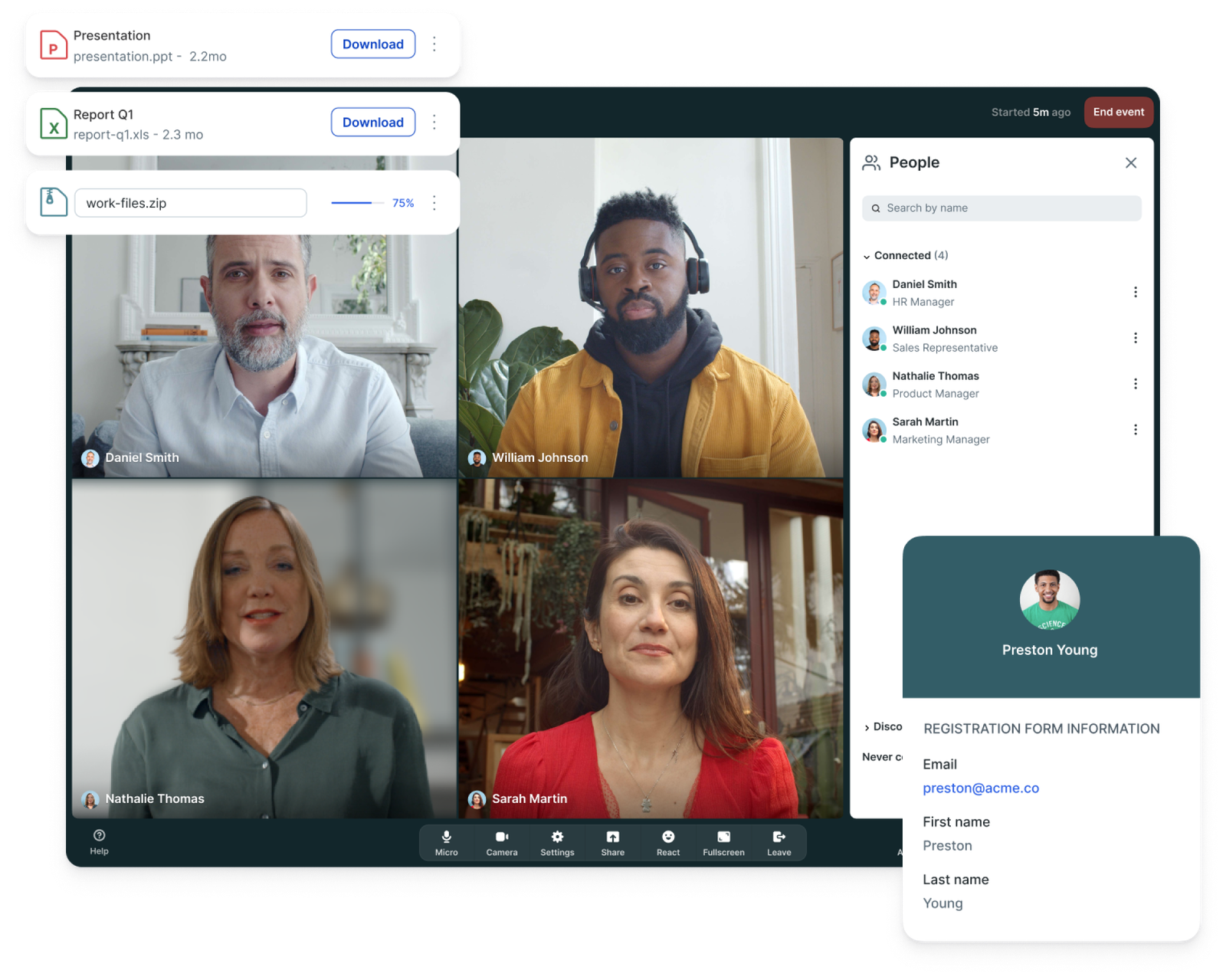
What Livestorm Actually Does
Livestorm is an "Video Engagement Platform." It handles the entire lifecycle of an event:
1. Registration: Custom landing pages with your branding.
2. Emails: Automated reminders (1 hour before) and follow-ups (replay link).
3. The Event: HD video, polls, Q&A, and screen sharing in the browser.
4. Analytics: Detailed reports on who attended and how long they stayed.
Core Features
How to Use Livestorm — Workflow
We set up a "Weekly SaaS Demo" to automate our sales calls.
- The Setup: We created a "Recurring Event" set to run every Tuesday at 2 PM.
- The Automation: We configured the email sequence:
- Immediate: "You are registered!"
- 1 Hour Before: "Join us live."
- Post-Event: "Here is the replay (and a discount code)."
- The Result: We invited 50 leads. 35 showed up (70% attendance, higher than our Zoom average). The replay email had a 60% open rate.
Example Use Cases
Who Livestorm Is Best For
- Marketers: Who need registration data synced to their CRM instantly.
- SaaS Companies: Who want a polished, branded experience for demos.
- Educators: Who need detailed analytics on student attendance.
Who Should Avoid Livestorm
- Budget Users: The Pro plan is expensive (~$99/mo) compared to Zoom ($15/mo).
- Massive Events: If you need 10,000+ attendees, enterprise tools like ON24 might be better suited.
Pricing & The "Active Contact" Trap
Livestorm's pricing is tricky. You don't pay per "Host"; you pay per Active Contact. An active contact is anyone who registers for or attends an event in a given month.
| Plan | Price | Limits |
|---|---|---|
| Free | $0 /mo | 20 min duration / 30 contacts |
| Pro | ~$99 /mo | 4 hours / 100 contacts |
| Business | Custom | Unlimited contacts / 3,000 attendees |
How Livestorm Compares (vs Zoom)
| Feature | Livestorm | Zoom Webinar | Demio |
|---|---|---|---|
| Access | Browser (Instant) | App Download | Browser |
| Marketing Features | Excellent | Basic | Good |
| Free Plan | Unlimited (20 mins) | 40 mins | 14-day Trial |
| Price | High ($99+) | Low ($79+) | Medium ($59+) |
Limitations & Reality Check
- The 20-Minute Limit: The Free plan is strictly for testing. You cannot run a real webinar in 20 minutes. It cuts off abruptly.
- Video Quality: Because it is browser-based (WebRTC), video quality depends heavily on your internet connection. It is slightly less stable than a native app like Zoom on slow networks.
Best Practices: "The Green Room"
Don't go live cold.
Pros & Cons
- Zero-friction entry for attendees (No install).
- Beautiful UI/UX that looks modern.
- Automated email sequences included.
- Evergreen/On-Demand features are powerful.
- Free plan is too short (20 mins).
- Pricing scales up fast with "Active Contacts."
- No virtual backgrounds (requires 3rd party tools).
Frequently Asked Questions
Does Livestorm require a download?
No. This is its main feature. Hosts and attendees join directly via Chrome, Firefox, or Safari on desktop or mobile.
Is the Free plan really free?
Yes, it is free forever, but limited to 20 minutes per event and 30 active contacts per month. It is designed for testing, not production.
Can I record sessions?
Yes, all sessions are automatically recorded in HD. You can send the replay link to attendees automatically or download the MP4 file.
What is an "Active Contact"?
An active contact is a unique person who registers for or joins an event. If the same person joins 3 events in a month, they count as 1 active contact.
Final Verdict
If you are running Marketing Webinars where the goal is leads and sales, Livestorm is the best tool. The friction-free entry will get you more attendees, and the CRM integrations will help you close them.
If you just need to host internal team meetings, stick with Zoom or Google Meet. Livestorm is a sales engine, not just a video chat.
Start Your Webinar Journey →